Dealer CRM Pipeline Blueprint for Sales Managers
By MDMS Team · 13 August 2026

Dealer CRM Pipeline Blueprint for Sales Managers
A practical dealer CRM pipeline is a 7-stage, event-driven workflow that advances based on customer actions, not salesperson opinion. The stages are: New Lead → Contacted/Qualified → Appointment Set → Showed → Test Drive/Demo → Negotiation/Desking → Closed Won or Closed Lost. Each stage moves forward only when a verifiable event occurs, such as a confirmed appointment, a logged test drive, or a submitted credit application.
Three actions to take in your CRM today:
- Define entry and exit criteria for every stage. Write the objective trigger that moves a record in and the evidence required to move it out. No trigger, no movement.
- Assign a named owner to each stage. BDC owns New Lead through Appointment Set; floor sales own Showed through Negotiation; F&I owns the Closed transition. Ambiguity is where deals go to die.
- Set a speed-to-lead SLA. Ensure the first contact attempt occurs within five minutes of lead submission. Log it in the CRM. Every minute beyond that costs you conversion probability.
Quick-start pipeline card (copy into your CRM):
| Stage | Entry trigger | Exit criteria | Max dwell | Owner |
|---|---|---|---|---|
| New Lead | Lead record created | First contact attempted | 5 min | BDC |
| Contacted/Qualified | Contact logged | Needs, budget, timeline confirmed | 24 hrs | BDC |
| Appointment Set | Appointment confirmed in CRM | Customer arrives at dealership | 48 hrs | BDC |
| Showed | Check-in logged | Demo or test drive initiated | Same day | Sales consultant |
| Test Drive/Demo | Drive logged | Negotiation initiated | Same day | Sales consultant |
| Negotiation/Desking | Deal sheet opened | Signed or declined | 72 hrs | Sales manager |
| Closed Won/Lost | Outcome recorded | Finance funded or lost reason logged | 24 hrs | F&I / Sales manager |
Key Takeaways
A structured, event-driven dealer CRM pipeline with defined stage ownership and automated follow-up is the single most reliable lever for improving lead-to-sale conversion and forecast accuracy in a dealership.
| Point | Details |
|---|---|
| Use 7 event-driven stages | Pipeline stages must advance on customer actions, not salesperson self-reports, to stay accurate. |
| Set speed-to-lead under 5 minutes | Automated first contact within five minutes is the highest-impact single change most dealerships can make. |
| Assign named role owners | Every stage needs a role owner with a measurable SLA; ambiguity is where deals stall. |
| Sync CRM and DMS in real time | Webhooks and API-based integration keep stage triggers, deal data, and inventory aligned without lag. |
| Moderndms for equipment dealers | Moderndms provides a native CRM-DMS integration built for equipment dealerships, with modular rollout and no lock-in. |
Table of Contents
- Why a structured dealer CRM pipeline changes your numbers
- The recommended 7-stage pipeline: definitions and qualification rules
- How customer actions should move records between stages
- What your CRM and DMS must sync to keep the pipeline accurate
- Automation recipes that keep the pipeline moving
- Reports, KPIs, and dashboards that make pipeline health visible
- Who owns the pipeline and how to build adoption that sticks
- Data migration and hygiene checklist before go-live
- Common pitfalls and how to fix a stalled or inaccurate pipeline
- Compliance and data privacy in your CRM pipeline
- Aligning your CRM pipeline with marketing for better lead nurturing
- What most pipeline guides get wrong
- Moderndms supports an integrated, event-driven pipeline from day one
- Sources
- FAQ
Why a structured dealer CRM pipeline changes your numbers
Most dealerships treat their CRM as a contact database. That is the wrong mental model. A structured pipeline is a live forecast tool, a coaching instrument, and a compliance record, all at once.
Dealerships with effective CRM see a 15–25% improvement in lead-to-sale conversion rates when follow-up is consistent and automated. That range is not theoretical. It comes from implementation data across dealerships that moved from ad-hoc follow-up to defined, stage-gated workflows. The difference is almost always process discipline, not a better CRM product.
Companies with defined sales pipelines also report roughly 18% higher revenue growth and 28% higher win rates compared to those without them.
The failure modes that kill pipeline accuracy:
- Stages defined by salesperson activity (“I called them”) rather than by customer action (“they confirmed the appointment”)
- No maximum dwell time, so stale leads inflate the active pipeline and distort forecasts
- Missing lead source attribution, making it impossible to calculate cost-per-sale by channel
- No logged-response requirement, so speed-to-lead data is invisible to management
One documented case saw speed-to-first-response drop from roughly 192 minutes to under two minutes, with logged-response rate climbing from 38% to 91%, after automated lead routing replaced manual assignment. Those numbers represent recoverable revenue that most dealerships are currently leaving on the table.
The recommended 7-stage pipeline: definitions and qualification rules
A well-built pipeline stage has four components: an objective entry trigger, required evidence to advance, a maximum dwell time, and a named owner. Here is each stage in full.
Entry/exit checklist for each stage review:
- Is the entry trigger a customer action or a system event? If it is a salesperson’s self-report, rewrite it.
- Is the exit criterion something a manager can verify in the CRM without asking the salesperson?
- Does every record older than the max dwell time trigger an alert or escalation?
- Is the stage owner a role, not a person? (People leave; roles persist.)
Pro Tip: Tie every stage movement to an observable event logged in the system, not a field the salesperson manually updates. When a test drive is logged against a VIN, the CRM advances the stage automatically. When it depends on a checkbox, it gets skipped.
If your numbers sit below these ranges, the gap is usually in the Contacted-to-Appointment or Showed-to-Negotiation transitions, which are the two stages most sensitive to follow-up speed and salesperson skill.
How customer actions should move records between stages
The core rule is simple: a stage advances when the customer does something, not when the salesperson reports something. This distinction prevents “stage rot,” where records sit in Appointment Set for two weeks because no one confirmed whether the customer actually showed.
Observable triggers that should drive automatic stage advancement:
- Form submitted on website or third-party lead aggregator → New Lead created
- Appointment confirmation SMS/email reply received → Appointment Set confirmed
- Customer check-in scanned or logged at reception → Showed
- Test drive waiver signed or VIN logged against customer record → Test Drive/Demo
- Credit application submitted → advance to Negotiation/Desking
- Finance contract funded in DMS → Closed Won
Rules for automated advancement vs. manual verification:
- Automate advancement when the trigger is a system event with a timestamp (form submission, check-in scan, signed document).
- Require manual verification when the trigger depends on a conversation outcome (qualification confirmed, negotiation declined). In these cases, the automation creates a task for the owner; the owner logs the outcome.
- Exception: if a customer no-shows, the system should NOT automatically move the record to Closed Lost. It should create a no-show task and start a re-engagement sequence. The record stays in Appointment Set until a human makes a disposition decision.
Pipeline audit checklist: are your stages reflecting customer reality?
- Pull all records in Appointment Set older than 48 hours. How many have a check-in event? If fewer than 70%, your showed-tracking is broken.
- Pull all records in Test Drive/Demo older than 24 hours. Is a VIN logged against each? If not, that stage is being manually advanced.
- Pull Closed Lost records from the last 30 days. Do all have a lost-reason category? Blank lost reasons make source ROI analysis impossible.
Pro Tip: Run this audit in your first week. The gaps you find will tell you exactly which stage definitions need tightening before you touch automation.
What your CRM and DMS must sync to keep the pipeline accurate
A CRM that does not talk to your dealer management system is a partial record. It can track leads and appointments, but it cannot confirm whether a deal funded, a unit delivered, or a VIN matched. That gap breaks your Closed Won data and makes pipeline-to-revenue reconciliation impossible.
Required sync points between CRM and DMS:
- Lead source attribution: every lead record must carry its source (website, third-party aggregator, walk-in, referral) so cost-per-sale by channel is calculable.
- Inventory data: available stock, VINs, and pricing must be visible inside the CRM so salespeople can match leads to units without switching systems.
- Deal transactions: deal sheet creation, deal status, and finance funding events must push from DMS to CRM to trigger stage advancement and close the loop.
- VIN and delivery dates: delivery confirmation closes the post-sale workflow and triggers customer satisfaction follow-up.
- Finance status: funded, pending, or declined status from F&I must sync in near-real-time to prevent records from sitting in Negotiation/Desking after a deal is done.
- Customer master record: name, contact details, and purchase history must be a single shared record, not two separate entries that diverge over time.
Gartner’s research on CRM automation highlights that event-driven integrations using webhooks and APIs are what make automation reliable at scale. Polling-based syncs (where the CRM checks the DMS every hour) introduce lag that breaks speed-to-lead SLAs and creates race conditions in stage advancement.
Integration go-live checklist:
- All lead sources mapped to a source code in both CRM and DMS
- Inventory feed tested with at least 20 live VINs, including price and availability statuses
- Deal transaction webhook tested end-to-end from deal creation to CRM stage update
- Customer deduplication rules defined and tested (match on email + phone; flag, do not auto-merge)
- Finance status field mapped and tested with a funded deal scenario
Warning: mismatched field names between CRM and DMS are the most common cause of duplicate records and broken stage triggers. Map every field explicitly before go-live. “Customer name” in one system and “contact full name” in another will create two records for the same person if the deduplication logic does not account for it.
Automation recipes that keep the pipeline moving
Sales automation improves qualification rates and lowers cost-to-serve when it is built on clear processes. The recipes below follow a simple structure: event → system action → assigned task.
Speed-to-lead sequence (first 60 minutes):
- Lead created → CRM assigns to BDC rep → automated SMS sent to customer within 60 seconds → task created: “Call within 5 minutes”
- No answer at 5 minutes → automated voicemail drop → task created: “Second call attempt in 55 minutes”
- No answer at 60 minutes → automated email sent → task created: “Third attempt tomorrow at 9 AM”
- Contact made at any point → automation pauses → human conversation takes over → BDC logs outcome and advances stage manually
Appointment confirmation sequence:
- Appointment set in CRM → automated confirmation SMS sent immediately
- 24 hours before appointment → reminder SMS with dealership address and contact number
- 2 hours before appointment → final reminder SMS
- Appointment time passes with no check-in → no-show task created for BDC → re-engagement sequence starts
No-show re-engagement (14-day nurture):
- Day 1: BDC call attempt + SMS (“We missed you today — happy to reschedule”)
- Day 3: Email with relevant inventory or offer
- Day 7: BDC second call attempt
- Day 14: Final re-engagement email; if no response, move to long-term nurture list
Stale-deal escalation:
- Record in any active stage beyond max dwell time → alert sent to sales manager. Task created for stage owner to update or disposition.
Key rules for pausing automation:
- Any logged human interaction (call, email reply, in-person visit) pauses the automated sequence for that record immediately.
- Automation resumes only if the record returns to an uncontacted state (e.g., appointment no-show with no subsequent contact).
- Never run automated messages and active human follow-up simultaneously. Customers notice and it damages trust.
To reduce the administrative load that automation alone cannot eliminate, the guide on reducing admin tasks in your dealership covers complementary process changes worth reviewing alongside these recipes.
Reports, KPIs, and dashboards that make pipeline health visible
A pipeline you cannot measure is a pipeline you cannot manage. The table below covers the metrics that matter, with formulas and target benchmarks.
| KPI | Formula | Target benchmark | Why it matters |
|---|---|---|---|
| Speed-to-first-response | Time from lead created to first logged contact | Under 5 minutes | Conversion probability drops sharply after 5 minutes |
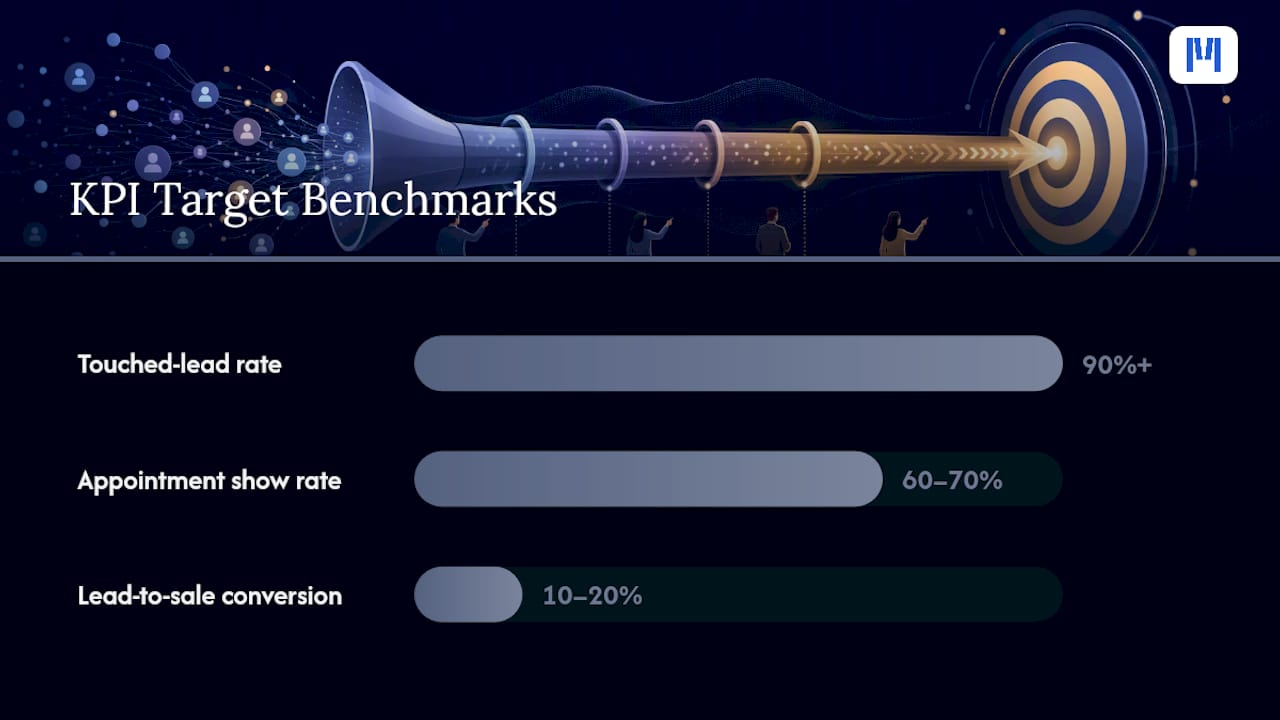
| Touched-lead rate | Leads with at least one logged contact ÷ total leads | Above 90% | Untouched leads are invisible lost sales |
| Stage conversion rate | Records advancing to next stage ÷ records entering current stage | Varies by stage (see benchmarks above) | Identifies where the pipeline leaks |
| Average time-in-stage | Sum of days in stage ÷ records in stage | Below max dwell per stage | Flags stalled deals before they go cold |
| Pipeline value by stage | Sum of deal values for all active records per stage | Track trend, not absolute | Forecasting and capacity planning |
| Appointment show rate | Showed ÷ Appointment Set | 60–70% | Low rate signals confirmation or routing problems |
| Lead-to-sale conversion | Closed Won ÷ total leads | 10–20% depending on source | Overall pipeline efficiency |
| Source ROI | Revenue from source ÷ cost of source | Positive and ranked | Guides marketing spend allocation |
Review cadence:
- Daily: speed-to-first-response, touched-lead rate, appointments set vs. showed (BDC manager view)
- Weekly: stage conversion rates, time-in-stage, stale deals by owner (sales manager pipeline review — run as a coaching session, not a status report)
- Monthly: source ROI, lead-to-sale conversion by source and rep, pipeline value trend
Role-based dashboard checklist:
- Sales consultant: my active leads, today’s tasks, my appointments this week, my stage conversion rates
- BDC rep: response time on my leads, appointment set rate, no-show rate, open tasks
- Sales manager: team pipeline by stage, stale deals, daily touched-lead rate, weekly conversion trend
- GM/principal: pipeline value by stage, source ROI, monthly lead-to-sale conversion, forecast vs. target
Set threshold alerts for: any lead untouched for more than 30 minutes, any record in Appointment Set for more than 48 hours without a check-in, and any Negotiation/Desking record open for more than 72 hours.
Who owns the pipeline and how to build adoption that sticks
Ownership without accountability is decoration. Every stage needs a named role, a measurable SLA, and a consequence for missing it.
Stage ownership by role:
- BDC: New Lead, Contacted/Qualified, Appointment Set. Owns speed-to-lead and appointment show rate.
- Sales consultant: Showed, Test Drive/Demo. Owns demo-to-negotiation conversion.
- Sales manager: Negotiation/Desking. Owns deal structure and close rate.
- F&I manager: Closed Won transition. Owns finance funding confirmation and delivery date logging.
- Delivery coordinator: Post-sale workflow. Owns VIN delivery confirmation and customer satisfaction trigger.
Two-week onboarding plan for new CRM users:
- Days 1–3: System orientation, stage definitions, task management, logging calls and appointments
- Days 4–7: Supervised live use with shadowing; manager reviews CRM entries daily and corrects in real time
- Days 8–10: Independent use with daily check-in; manager reviews pipeline entries each morning
- Days 11–14: KPI targets introduced; rep reviews their own dashboard with manager weekly
Adoption enforcement mechanisms:
- Weekly pipeline audit: any record with no activity in 48 hours is flagged and reviewed in the Monday coaching session
- Deal log requirement: no deal goes to F&I without a complete CRM record (all stages logged, lost reason or won outcome recorded)
- Compensation tie-in: where permissible, tie a portion of performance review to CRM compliance metrics, not just sales volume
Roughly 60% of dealership sales teams do not use their CRM consistently, despite dealerships spending $30,000–50,000 annually on the platform. The problem is almost never the software. It is the absence of a defined process, a named owner, and a consequence for non-compliance.
Data migration and hygiene checklist before go-live
A bad data migration creates a pipeline that looks populated but is actually full of duplicates, missing fields, and misrouted records. Do this in order.
Step-by-step migration tasks:
- Export all active leads and customer records from the legacy system in a standard format (CSV or XML).
- Run a deduplication pass: match on email address first, then phone number, then name plus postcode. Flag matches for human review; do not auto-merge.
- Map every legacy field to its CRM equivalent. Document fields with no direct match and decide: drop, transform, or create a custom field.
- Clean required fields: remove records with no contact information, no lead source, or no creation date.
- Import in batches of 200–500 records. Validate each batch before importing the next.
- Run end-to-end test cases: create a new lead, advance it through all seven stages, confirm each stage trigger fires, and verify the record appears correctly in all dashboards.
- Validate DMS sync: create a test deal in the DMS and confirm it updates the corresponding CRM record within the expected time window.
- Confirm automation triggers: submit a test lead and verify the speed-to-lead sequence fires within 60 seconds.
Testing timeline:
- Week 1: field mapping, deduplication, and batch import of historical records
- Week 2: integration testing, automation testing, and end-to-end scenario validation
- Go-live: cutover with legacy system in read-only mode for 30 days as a rollback option
Rollback consideration: keep the legacy system accessible in read-only mode for 30 days post-cutover. If a critical data gap is discovered, you need the ability to retrieve the original record without a full re-migration.
For more on managing inventory data and DMS integration before go-live, the MDMS inventory guide covers field mapping and validation approaches specific to equipment dealerships.
Common pitfalls and how to fix a stalled or inaccurate pipeline
Most pipeline problems fall into four categories. Here is how to diagnose and fix each one within 24–72 hours.
Diagnostic checklist:
- Data rot: records with no activity in 30+ days sitting in active stages. Pull a report filtered by last-activity date. Any record with no logged activity in 14 days needs a disposition decision today.
- Subjective stages: salespeople advancing records based on their own assessment (“I think they’re interested”) rather than a logged event. Pull stage-movement logs and check whether advances correlate with system events or manual edits.
- Slow response: touched-lead rate below 80% or average first-response time above 30 minutes. Check whether automation is configured and firing. If it is, check whether BDC reps are logging calls.
- Misrouting: leads assigned to the wrong rep or sitting in a queue with no owner. Check the lead routing rules and confirm every source has an assigned routing path.
Quick fixes (24–72 hours):
- Enforce SLAs by adding an automated alert to the sales manager for any lead untouched after 30 minutes.
- Clean duplicates by running a deduplication report filtered to the last 90 days and merging or deleting confirmed duplicates.
- Tighten stage criteria by editing the stage definition in the CRM to require a specific field value before advancement is permitted.
- Add automated re-engagement for all records in Appointment Set with no check-in after 48 hours.
After a 48-hour audit and cleanup, the active pipeline dropped to 120 records, but forecast accuracy improved because the remaining records were real, active opportunities. The sales manager’s weekly coaching session became productive because every record on the list was genuinely in play.
Compliance and data privacy in your CRM pipeline
Customer data flowing through a CRM pipeline is subject to privacy obligations that vary by jurisdiction. In Australia, the Privacy Act 1988 and the Australian Privacy Principles (APPs) govern how personal information is collected, stored, used, and disclosed. Any dealership collecting customer contact details, financial information, or credit application data through its CRM must comply.
Practical compliance requirements for CRM pipeline management:
- Collect only the data fields you need for the pipeline stage. A New Lead record needs name, contact, and lead source. It does not need financial history at that point.
- Obtain explicit consent before sending automated marketing messages. Opt-in records must be logged in the CRM with a timestamp and source.
- Restrict access to sensitive fields (credit application data, finance status) to roles that need them. F&I data should not be visible to every sales consultant.
- Define a data retention policy: how long do Closed Lost records stay in the active CRM before archiving? A common approach is 24 months for active records, then archive with restricted access.
- Log all data access and changes for audit purposes. Most modern CRM platforms provide an audit trail; confirm yours is enabled and retained for at least 12 months.
- If your CRM vendor stores data offshore, confirm the arrangement complies with APP 8 (cross-border disclosure of personal information).
Data breaches involving customer financial or contact information carry notification obligations under the Notifiable Data Breaches scheme. Your CRM vendor’s data processing agreement should specify their obligations in the event of a breach affecting your customer records.
Aligning your CRM pipeline with marketing for better lead nurturing
A CRM pipeline that does not connect to your marketing platform is a one-way street. Leads come in, get worked, and either close or disappear. Without a marketing connection, they are gone.
How to align pipeline stages with marketing actions:
- New Lead: trigger a welcome email sequence from your marketing platform the moment a record is created. This runs in parallel with BDC outreach and ensures the customer receives a consistent brand message regardless of response time.
- Contacted/Qualified: tag the record with the vehicle type or category of interest. Use this tag to segment marketing emails and retargeting ads so the customer sees relevant inventory, not generic promotions.
- Appointment Set: pause broad marketing sequences. The customer is in an active sales conversation. Sending a promotional email the day before their appointment creates noise, not value.
- Closed Lost: move the record to a long-term nurture sequence based on the lost reason. “Price” lost reasons get a different nurture track than “timing” lost reasons. A customer who lost interest because of price in March may be ready in September when a promotion runs.
- Closed Won: trigger a post-sale sequence: delivery confirmation, satisfaction check-in at 30 days, service reminder at 90 days, and a referral request at 6 months.
Segmentation for nurture campaigns:
Segment your pipeline by vehicle type, customer segment (new vs. returning), and lead source. A customer who came in from a trade-in inquiry has different intent than one who submitted a finance pre-approval form. Your nurture content should reflect that difference. For dealerships managing agricultural machinery alongside construction or industrial equipment, segmentation by asset category is particularly important because purchase cycles and financing structures differ significantly across those segments.

The practical rule: marketing automation handles the long-game nurture; CRM automation handles the short-game follow-up. They should share data but operate on different timelines and triggers.
What most pipeline guides get wrong
The conventional wisdom on dealer CRM pipelines focuses on the number of stages and the choice of software. Both are secondary concerns.
The real problem in most dealerships is that the pipeline reflects what salespeople believe is happening, not what customers are actually doing. A salesperson who moves a record to Appointment Set because “they said they’d come in” is not logging a customer action. They are logging an intention. Intentions do not fund deals.
The fix is not more training on the CRM. It is redesigning the pipeline so that stage advancement is physically impossible without a system event. When a check-in scan is required to move a record to Showed, the data becomes reliable. When a VIN log is required to move to Test Drive, the data becomes reliable. The CRM stops being a self-reported activity log and starts being an accurate operational record.
The second thing most guides underestimate is the cost of a slow first response. The case data showing response time dropping from 192 minutes to under two minutes is not an outlier. It is what happens when automation handles the first touch instead of a human queue. The leads were always there. The process was just too slow to catch them.
Build the process first. Automate the process second. In that order, every time.
Moderndms supports an integrated, event-driven pipeline from day one
Running a pipeline like the one described above requires a platform where CRM, DMS, inventory, and finance data share a single record, not a patchwork of integrations you maintain yourself.

Moderndms is built specifically for equipment dealerships that need exactly this: a CRM module connected natively to deal management, inventory, rental fleet, service, and finance, so stage triggers fire on real events rather than manual updates. Setup takes under an hour, there is no long-term lock-in, and your data stays yours. Dealerships using Moderndms report saving up to 10 hours per week in administrative tasks, which is time that goes back into follow-up and customer contact.
If you manage industrial capital equipment or a mixed fleet, the modular rollout means you can start with CRM and pipeline management and add service, rental, or parts workflows as your team is ready. No forced full-platform adoption on day one.
Book a demo or start a free trial at Moderndms and see the pipeline in a live dealership context.
Sources
- Close Dealership Deals 30% Faster Guide
- Sales Pipeline Management: Top 11 Practices for 2025
- Sales automation: the key to boosting revenue and reducing costs (McKinsey)
FAQ
What is a CRM pipeline at a dealership?
A dealership CRM pipeline is a structured sequence of stages that tracks every sales lead from first contact through to a closed deal or a documented lost outcome. Each stage has defined entry and exit criteria tied to customer actions, so managers can see exactly where every opportunity stands and what needs to happen next.
What are the 7 stages of a dealer CRM pipeline?
The recommended stages are: New Lead, Contacted/Qualified, Appointment Set, Showed, Test Drive/Demo, Negotiation/Desking, and Closed Won or Closed Lost. Each stage advances only when a verifiable customer event is logged in the system.
What CRM do most dealerships use?
Dealership CRM adoption varies widely by size and segment. Equipment dealerships often use purpose-built platforms like Moderndms, which integrates CRM natively with DMS, inventory, and finance rather than connecting separate systems. Automotive retail dealerships use a broader range of platforms, but the integration between CRM and DMS is the critical factor regardless of which platform is chosen.
How do you improve speed-to-lead in a dealership CRM?
Configure automated first-contact sequences that trigger within 60 seconds of lead creation, assign leads to a BDC rep immediately via routing rules, and set a logged-response SLA of five minutes. One documented implementation reduced average response time from 192 minutes to under two minutes using this approach.
How often should you review the sales pipeline?
Daily reviews should cover speed-to-first-response and touched-lead rate. Weekly pipeline reviews, structured as coaching sessions rather than status reports, should cover stage conversion rates, stale deals, and time-in-stage by rep. Monthly reviews should focus on source ROI and lead-to-sale conversion trends.