Every feature your equipment dealership needs.
One platform. Built for Australian dealers.
MDMS covers the complete dealer lifecycle — from the first lead through quote, build, commissioning, service, rental, warranty, and invoicing. No add-on modules. No implementation projects. Start your trial today and be operational this afternoon.
- integrated modules
- 13
- GST, Xero & MYOB native
- AU-first
- implementation cost
- $0
- offline field service
- 100%
Sales, CRM & Quoting
From first contact to signed deal — your entire sales pipeline in one place.
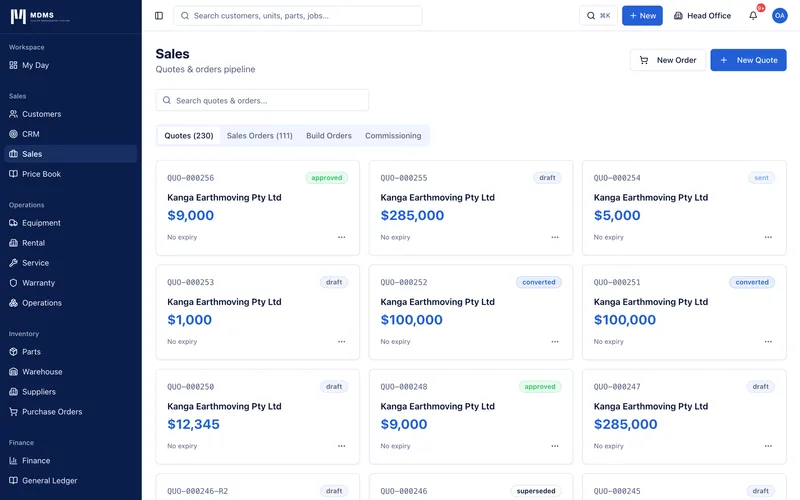
MDMS gives equipment dealers a complete sales management system designed around how equipment is actually sold. Manage leads through a visual pipeline, build detailed quotes with configurable options and live margin visibility, and convert approved quotes to sales orders with a single action. Every version of every quote is preserved, and customers can accept quotes digitally — no printing, scanning, or chasing signatures.
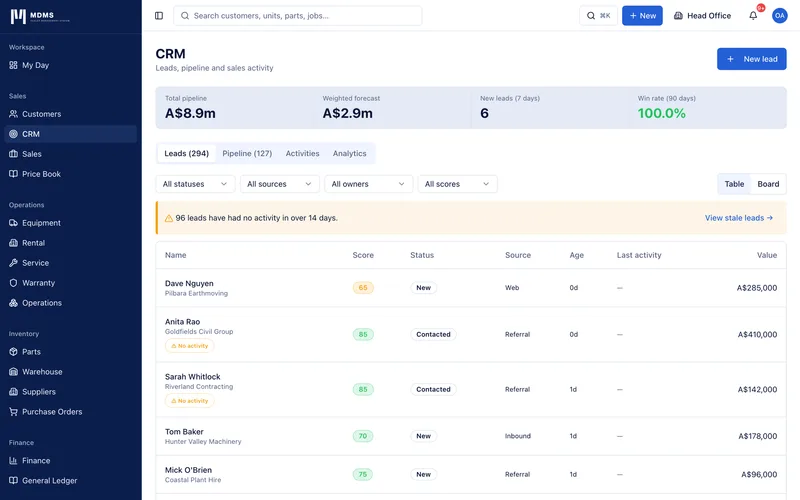
Lead pipeline with kanban board
Track every prospect through Discovery, Qualified, Proposal, Negotiation, Won and Lost stages with drag-and-drop simplicity. Weighted pipeline value and win rate calculated automatically.
Lead scoring
Each lead is automatically scored 0–100 based on engagement, activity recency, deal size, and stage progression — so your sales team focuses on the right prospects.
Quote builder with live margin
Add equipment, labour, parts, freight, and option lines to a quote. Unit cost and sell price tracked on every line. Margin % shown in real time — colour-coded green, amber, or red.
Product configurator (CPQ)
Build configurable equipment packages with required and optional add-ons. Mutually exclusive options are enforced automatically. Total configuration price updates as options are selected.
Quote versioning
Every revision creates a new version linked to the original. Superseded quotes are clearly marked. Customers always see the latest version; your team can compare across versions.
Customer e-signature on quotes
Send quotes by email. Customers sign directly in their browser — drawn signature or typed name, both legally captured with timestamp and IP address. No DocuSign subscription required.
Quote-to-sales-order conversion
One click converts an approved quote to a sales order. Line items, pricing, and margin carry through automatically. Build orders and supplier POs are spawned in the same action.
Sales order hub
The sales order is the central record — showing build order progress, purchase order status, commissioning stage, and profitability in a single view with a workflow progress strip.
Activity timeline per lead
Every call, email, note, and quote linked to a lead's history. Log activities with one click. Full CRM context available on the lead and customer detail pages.
Sales analytics
Pipeline value by stage, salesperson conversion rates, average deal size, quote-to-close time, and monthly revenue forecast — all calculated from live data.
Quote e-signature: no competitor offers this in the AU equipment dealer market
While Eclipse DMS, Texada, and simPRO all require customers to print, sign, and return documents, MDMS captures legal acceptance digitally. Customers click a link in their email and sign on any device in under 30 seconds.
Build Orders & Commissioning
The only equipment DMS in Australia with a structured build-to-delivery workflow.
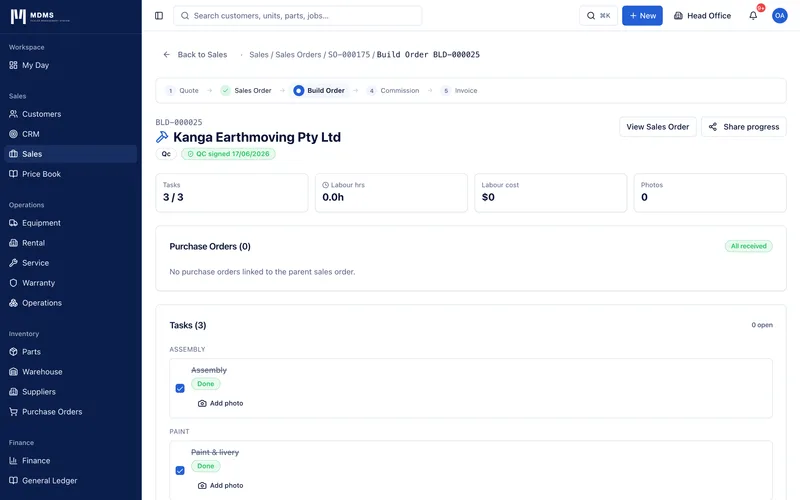
When equipment arrives from a distributor and needs dealer-fit options, configurations, or PDI work before delivery, MDMS tracks every task, every hour, and every part through a structured build order. Tasks can be blocked until linked parts arrive. Customers track progress in real time via a live portal link. No other equipment dealer DMS in Australia provides this workflow.
Task-based build workflow
Each build order is a sequence of tasks assigned to technicians. Tasks have estimated hours, parts requirements, and checklist items. Progress tracked as a percentage against the sales order.
PO gate — task blocking
Tasks can be linked to a purchase order line. If the required parts haven't been received from the supplier, the task is marked 'Waiting on parts' and cannot be started. Automatically unblocks when goods are received.
Labour time tracking
Technicians start and stop timers per task. Labour cost accumulates in real time. Actual vs quoted labour shown on the build order header — over-budget alerts flag immediately.
Photo attachments per task
Technicians photograph their work as they go. Photos are attached to each task and remain part of the build order record permanently. Useful for PDI evidence and warranty support.
QC checklist
Structured quality control checklist with Pass / Fail / N/A per item. Sign-off is blocked until all checklist items have a result. Ensures no step is missed before commissioning.
Commissioning workflow
Dedicated commissioning checklist. Customer signature captured on completion. Opening hour meter recorded. Commissioning status flows directly to the equipment unit's service history.
Customer build status portal
Share a unique link with the customer — they see live build progress, task completion percentage, and target delivery date without logging in. Eliminates 'where is my machine?' phone calls.
Build-to-invoice auto-chain
When commissioning passes, the equipment unit is marked sold, the sales order becomes ready to invoice, and the build cost is rolled into the profitability calculation automatically.
Build order templates
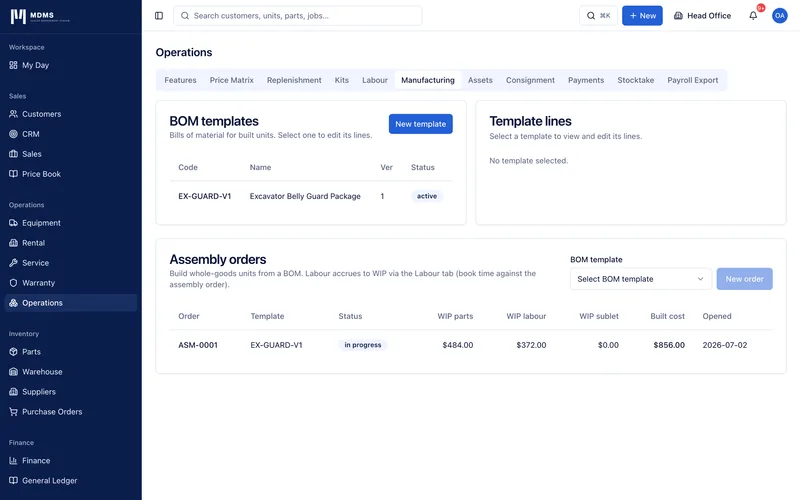
Create reusable task templates for common configurations. Applying a template to a new build order populates all tasks, checklists, and estimated hours in seconds.
Profitability dashboard
Quoted revenue vs actual labour vs actual parts vs PO costs, with projected and actual margin shown on the sales order — giving sales managers real-time deal profitability.
Build orders: the gap every Eclipse DMS dealer knows about
Dealers who receive units from distributors and perform dealer-fit options before delivery have no structured workflow in Eclipse DMS, Texada, simPRO, or Flyntlok. They use spreadsheets, whiteboards, and phone calls to manage what MDMS handles automatically with full cost tracking and customer visibility.
See MDMS vs Eclipse DMSWorkshop & Service Management
From job card to invoice — complete workshop management for equipment dealers.
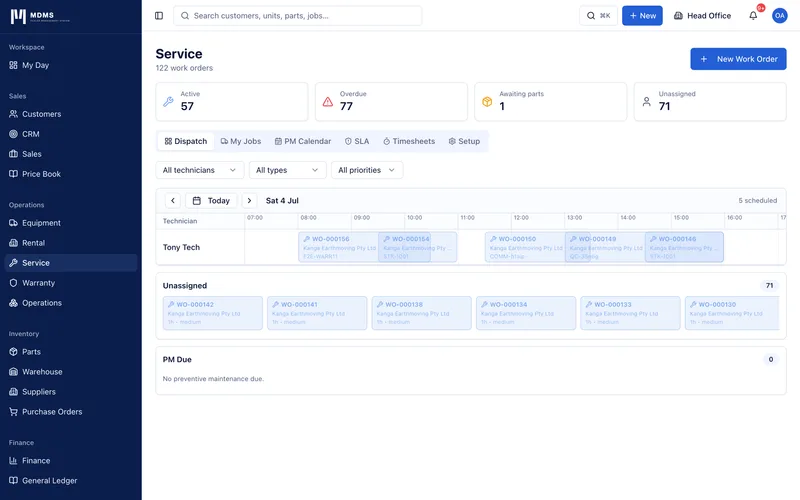
MDMS replaces the whiteboard and paper job cards that most equipment dealer workshops still rely on. Work orders track every job from the initial complaint through diagnosis, repair, parts usage, QC, and invoicing. The dispatch board gives service coordinators a real-time Gantt view of every technician's day. SLA clocks run automatically so nothing slips through.
Work order management
Create work orders for workshop, field, and internal jobs. Track status through Scheduled → In Progress → Complete → Invoiced. Full audit trail of every status change.
Dispatch board — technician Gantt
Visual calendar grid showing all technicians and their scheduled jobs. Drag to assign and reschedule. Unassigned jobs shown in a strip below. 'Now' indicator shows real-time position in the day.
SLA tracking
Set response and resolution SLA targets by job type or priority. Green / red SLA indicators on every work order. SLA breach alerts sent to service coordinators automatically.
Preventive maintenance scheduling
Create PM schedules triggered by hour meter readings or calendar intervals. MDMS alerts when equipment is due for scheduled maintenance and pre-populates the work order with the correct checklist.
Structured QC checklists
Assign checklist templates to job types. Technicians work through Pass / Fail / N/A items on each work order. Sign-off blocked until all items are resolved.
Parts issuance from warehouse
Issue parts directly from stock against a work order. Stock levels decrement immediately. Parts still on order shown as 'Waiting on PO'. Labour and parts costs build the invoice automatically.
Labour time logging
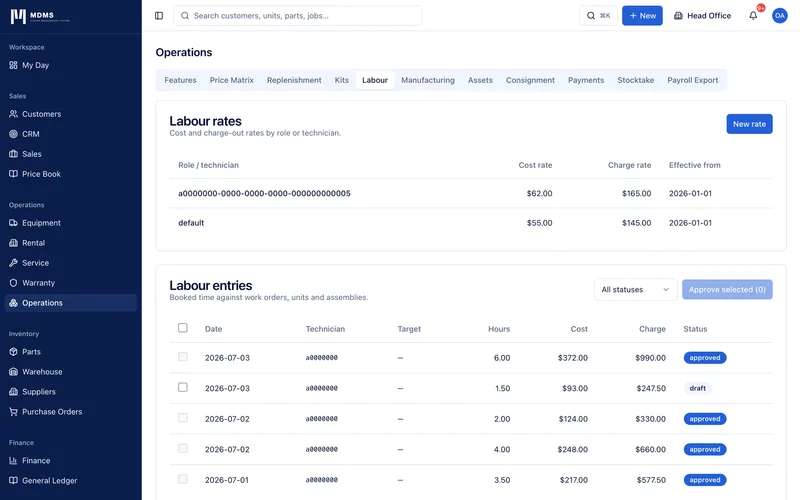
Start and stop timers per technician per job. Manual time entries also supported. All time entries roll up to labour cost and populate the invoice at the configured labour rate.
Customer notifications via email
Automated emails sent at each stage: booking confirmation, job started, technician on the way, job complete with summary. No manual follow-up required.
Photo capture on jobs
Technicians attach photos before/after work. Photos stored permanently against the work order and visible in the equipment unit's service history.
Technician timesheet
Weekly grid showing all technicians' hours by day. Colour coding for under/over utilisation. Drill-through to see individual work orders per day. Export to CSV for payroll.
Generate invoice from work order
Labour lines and parts lines from the work order populate the invoice automatically. Invoice number generated from sequence. Tax invoice formatted to AU GST requirements.
Job history per equipment unit
Every work order for a unit is linked to its asset record. The full service history — dates, complaints, corrections, hours, parts used — is available on the equipment unit detail page.
Field Service & Technician Mobile App
Designed for technicians working in paddocks, mine sites, and construction zones — with or without signal.
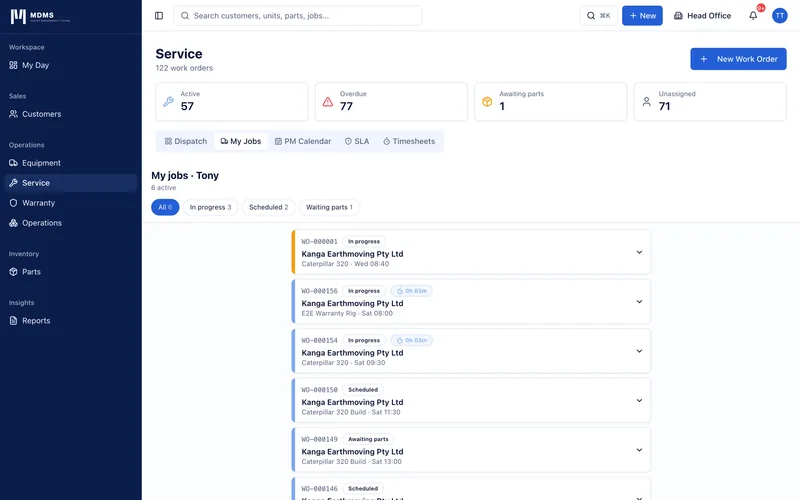
MDMS's field service experience is built for the reality of Australian equipment service work: remote sites, patchy mobile coverage, and technicians who need a simple tool that gets out of the way. The My Jobs view gives each technician only what they need to see. The completion wizard walks them through closing a job correctly every time. And when there's no signal at all, MDMS keeps working — syncing everything automatically when connectivity returns.
Role-specific My Jobs view
Technicians see only their assigned jobs for today and overdue. No access to finance, admin, or other staff's work. One tap to start, one tap to complete.
Offline-first PWA — works without signal
MDMS is a Progressive Web App that caches jobs locally. Start a job, take photos, fill in the cause and correction, and complete the checklist — all with zero signal. Changes sync automatically when connectivity returns.
Install to home screen
Add MDMS to the home screen on iOS or Android. Opens as a standalone app with no browser chrome. Launches directly to the My Jobs view — the fastest path to the technician's work.
GPS check-in and check-out
Device GPS coordinates are captured automatically when a technician starts and completes a job. Location recorded against the work order for verification, dispute resolution, and service reporting.
5-step job completion wizard
Guided completion: (1) hour meter reading, (2) cause and correction narrative, (3) checklist items, (4) photo capture, (5) confirmation. No step can be skipped that has been marked as required.
Mobile photo capture from device camera
Camera opens directly — not a file picker. Technician photographs the fault, repair, and final condition. Photos stored offline if no signal and uploaded automatically on sync.
Real-time field job tracking link for customers
When a technician starts a field job, a tracking link is automatically emailed to the customer. They can see the technician's status, name, and scheduled arrival time without logging in.
Open in Maps button
One tap opens the job's service address in the device's native maps app with directions. Works with Google Maps, Apple Maps, and Waze.
Pending sync indicator
While offline, a 'Pending sync' badge appears on each job with unsynced changes. When connectivity returns, an animated 'Syncing...' banner confirms the upload. 'All changes synced ✓' on completion.
Running elapsed timer
From the moment a job is started, a live elapsed time counter runs on the job card. Continues running while offline. Labour time calculated from start to completion automatically.
The only equipment DMS in Australia with offline field capability
Eclipse DMS has no mobile app. Texada's mobile app requires connectivity. simPRO's offline mode is limited. MDMS is the only purpose-built equipment dealer management system where field technicians can complete an entire job — start, photos, checklists, close — with zero network connectivity, and sync automatically when they return to coverage.
See MDMS vs TexadaEquipment Fleet & Asset Lifecycle
Every unit in your fleet tracked from purchase to disposal — with a full-history passport.
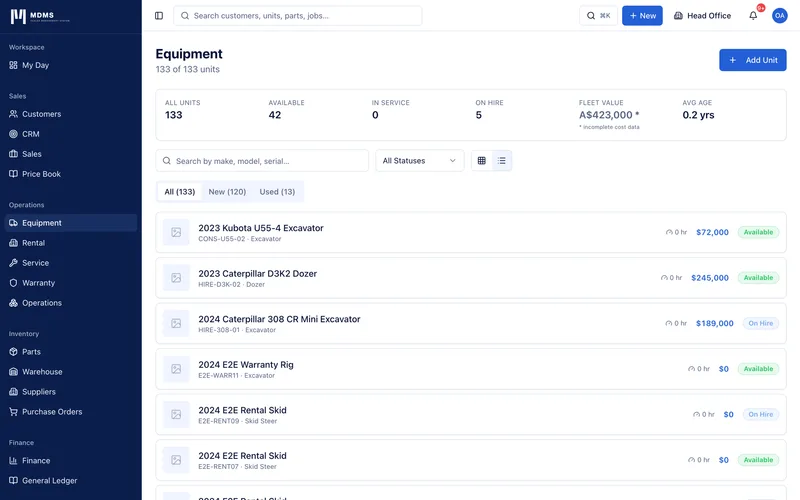
Every equipment unit managed in MDMS has a complete asset passport — a chronological record of every purchase order, build order, service job, rental contract, warranty claim, and hour meter reading associated with that unit. Nothing is lost. The history moves with the machine, not with the staff member who was there at the time.
Unit identity register
Make, model, year, serial number, stock number, condition, category, branch allocation and status for every unit. List view and photo grid view with one-click toggle.
Full-history asset passport
A chronological timeline of every event in the unit's life: purchase received, built out, commissioned, serviced, rented, sold. Each event links directly to the source record.
Hour meter tracking with trend
Every service completion and PM can log an hour meter reading. Readings accumulate into a trend chart. Service intervals are calculated automatically from the last reading.
Depreciation schedule
Enter the unit's purchase cost, depreciation method, and rate. MDMS calculates current book value automatically. Market value can be updated manually for fleet valuation reporting.
Fleet status at a glance
Status badges: Available, Reserved, In Build, Commissioned, In Service, On Hire, Sold, Retired. Status changes automatically as the unit moves through workflows.
Photo gallery per unit
Upload unlimited photos per unit. Set the primary photo for the grid view. Photos from work orders and build tasks are automatically associated with the unit's gallery.
QR code generation
Generate a QR code for any unit. Scanning it opens the unit's detail page directly. Print and attach to the machine for instant service history access in the field.
Multi-branch fleet view
Filter the fleet by branch, category, make, status, condition, or availability. Stats strip shows total fleet value, available count, on-hire count, and average age.
Telematics-ready structure
Equipment units are structured to receive OEM telematics data via AEMP 2.0 (ISO 15143-3) integration. When connected, hour meter readings, GPS location, fault codes, and fuel levels update automatically.
Service history tab
Every work order linked to the unit is listed chronologically — date, complaint, correction, technician, hours, cost. The most complete service record any buyer or insurer could ask for.
Rental Fleet Management
Fleet availability, conflict detection, billing automation, and damage management for hire businesses.
MDMS's rental module is built for equipment hire businesses — not adapted from a general-purpose software platform. The fleet availability calendar shows every unit's hire schedule at a glance. Conflict detection prevents double-booking before it happens. Billing periods generate invoices automatically. The return wizard captures condition, damage, and deposit reconciliation in a structured five-step process.
Fleet availability Gantt calendar
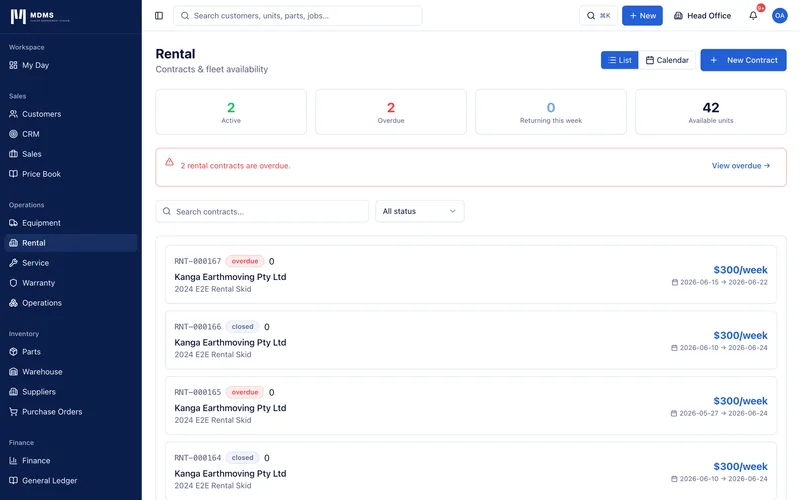
A horizontal timeline showing every rentable unit and its hire commitments. Bookings appear as colour-coded bars. Available gaps are visible at a glance. Today line shows the current position.
Conflict detection on booking
When creating a new rental contract, MDMS checks for clashes with existing active or scheduled bookings on the selected unit. Conflicts are flagged with the overlapping booking details and alternative units suggested.
Rental contract lifecycle
Rental quotes, active contracts, extended contracts, overdue contracts, and returned contracts each have appropriate status, actions, and billing states. Status machine enforces valid transitions.
Auto billing periods
When a contract has auto_billing enabled, billing periods are generated at the configured interval (daily, weekly, monthly). Each period produces an invoice that can be sent automatically.
Hire extension workflow
Extend an active contract with the extension amount shown and a conflict check run for the new end date. Extended_to date recorded separately. Billing continues automatically.
Five-step return wizard
(1) Return date and hour meter. (2) Fuel level and cleanliness. (3) Damage assessment with photo upload and itemised repair cost. (4) Deposit reconciliation — full refund or partial with deductions. (5) Summary and confirm.
Damage inspection records
Every return inspection creates a rental_inspection record with photos, damage items, and repair cost. Damage charges generate an invoice automatically. Deposit reconciliation calculated from the charges.
Deposit lifecycle management
Deposit status tracks: pending collection → collected → held → refunded in full → partially refunded. Deposit amount, collection date, and payment reference all recorded on the contract.
Overdue detection and alerts
Contracts past their end date are automatically flagged as overdue. The dashboard shows overdue count and days overdue per contract. Overdue reminder emails sent to customers automatically.
Fleet utilisation reporting
See what percentage of your fleet is earning at any given time. On-hire days vs available days per unit. Revenue per unit per period. Identify underperforming assets for disposal or remarketing.
Parts & Warehouse Management
Stock control, reordering, stocktake, and warehouse operations for equipment dealer parts departments.
Parts management in MDMS is built for the complexity of an equipment dealer's parts department — multiple suppliers per part, OEM and aftermarket alternatives, supersession chains, volume price breaks, and multi-branch stock levels. The warehouse module handles receiving, inter-branch transfers, stocktake, and bin location management, with barcode scanning built into every workflow.
Multi-branch stock levels
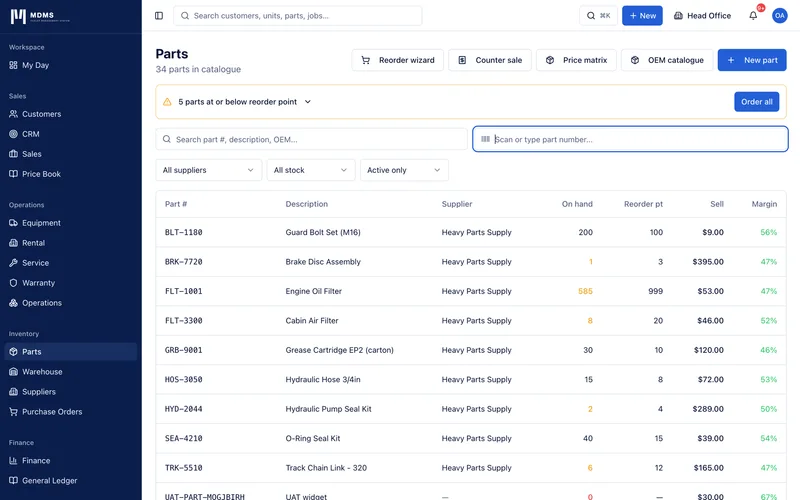
On-hand quantity tracked per branch. Inter-branch transfers create warehouse transactions that update both locations simultaneously. Total on-hand shown in the parts list with per-branch drill-down.
Supplier and OEM part number linking
Each part stores the OEM part number, supplier part number, minimum order quantity, and lead time days. Parts that supersede others are linked — MDMS suggests the replacement automatically.
Volume price breaks
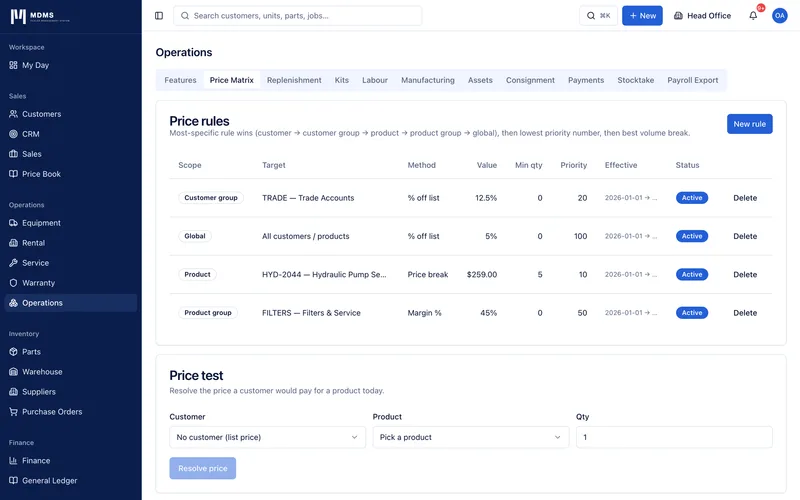
Configure quantity-based pricing: buy 1-9 at $X, 10-49 at $Y, 50+ at $Z. Price breaks apply automatically when creating purchase orders and quotes.
Auto reorder PO generation
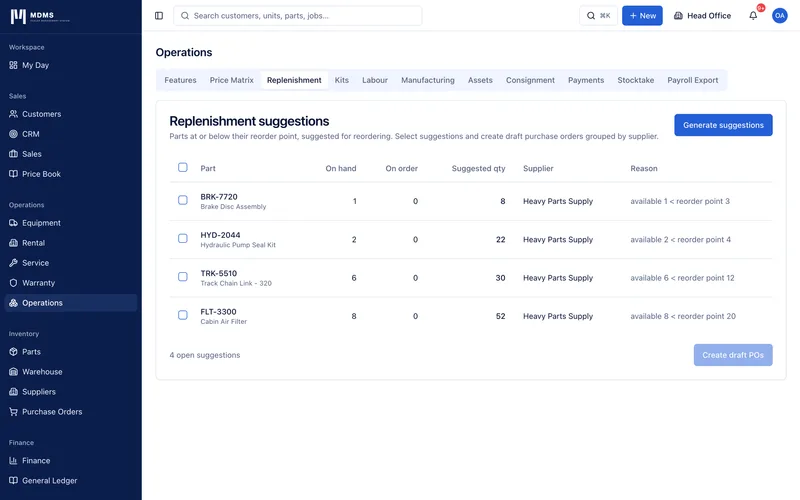
Set a reorder point and preferred supplier per part. When on-hand quantity falls to or below the reorder point, a low stock alert fires. The reorder wizard groups all low-stock parts by supplier and creates draft POs.
Barcode scan workflow
Type or scan a part number in the scan bar at the top of the parts list. Exact match navigates directly to the part. Multiple matches show a dropdown. No match prompts to create a new part.
Goods receiving
Receive goods against purchase orders line by line. Partial receipts update received quantities. Full receipt updates PO status and triggers the three-way match against the supplier invoice.
Inter-branch transfers
Transfer stock between branches with a source and destination pick. Two warehouse transactions created simultaneously. Stock levels update at both branches in real time.
Blind count stocktake
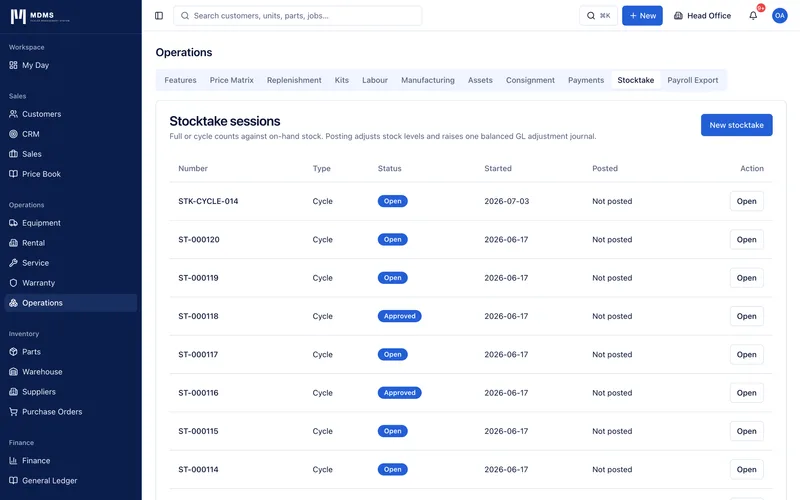
Start a stocktake with blind mode — staff enter counts without seeing the system quantity. Variances calculated on completion. Review and approve adjustments, which create warehouse adjustment transactions.
Price history tracking
Every change to a part's cost price or sell price is recorded with the date and the previous value. Price history tab on the part detail shows the full change log.
Kit and BOM support
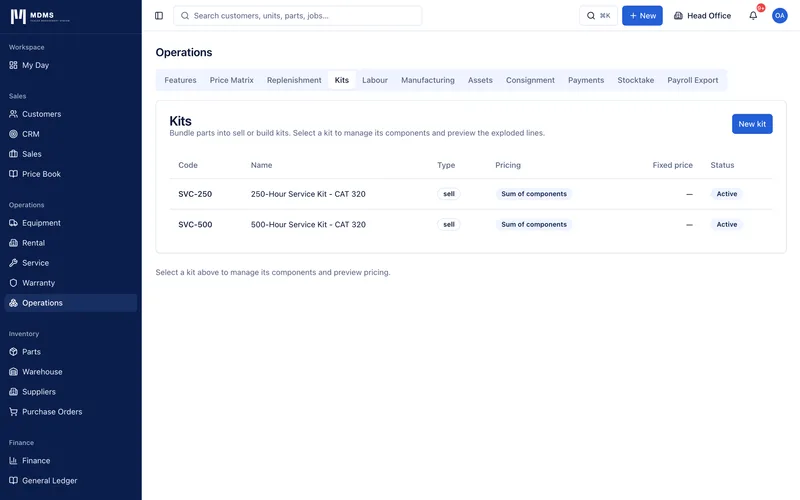
Standard job templates can include a bill of materials — a list of parts that make up the kit. BOM cost rolls up to the standard job price. Margin % shown against the kit sell price.
Parts usage analytics
See which parts have been used most frequently across work orders and sales orders. Identify slow-moving stock. Usage data informs reorder points and supplier performance reviews.
Warranty Recovery Management
From OEM claim submission to credit note — complete warranty lifecycle management with recovery analytics.
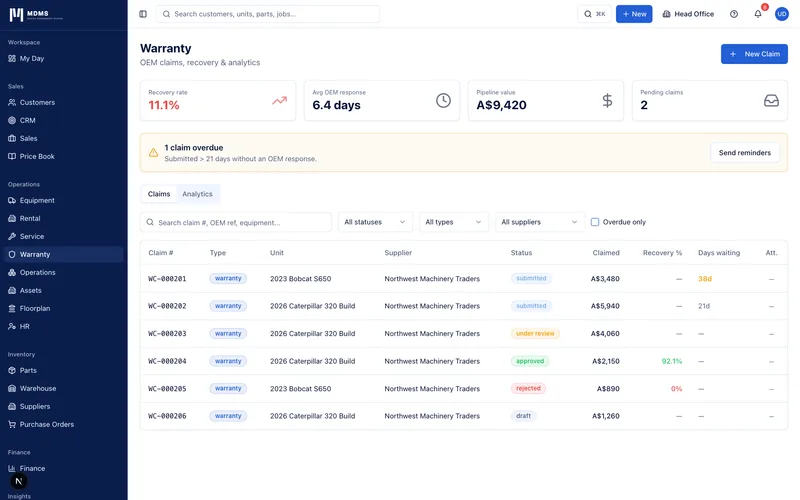
Warranty recovery is one of the highest-value and most under-managed revenue streams in equipment dealerships. MDMS gives warranty clerks a complete workflow from the moment a warranty-eligible fault is found on a work order through OEM submission, follow-up, approval negotiation, and automatic credit note creation. Recovery rate analytics tell you which OEMs pay fairly and which are systematically underpaying.
Warranty claim workflow
Claims progress through Draft → Submitted → OEM Response → Approved / Rejected → Paid. Each status has appropriate actions and a clear record of who changed what and when.
Claim types
Standard warranty, goodwill claims, campaign/recall claims, and dealer goodwill — each with appropriate fields. Claim type determines the OEM submission format and expected response time.
OEM correspondence log
Every interaction with the OEM recorded chronologically: submission date, response received, counter-offer, escalation. The correspondence tab is the complete paper trail if a claim is disputed.
Import lines from work order
Pull labour lines and parts directly from the linked work order into the warranty claim. Quantities and costs carry through. Claim lines match the OEM's required format.
Counter-offer management
If the OEM approves a partial amount, record the counter-offer. Decide to accept or dispute. Acceptance triggers credit note creation for the approved amount automatically.
Automatic credit note on payment
When a claim is marked paid, MDMS creates a supplier credit note in the finance module for the approved amount. Credit note is linked to the supplier invoice register and reduces the net AP balance.
Recovery rate analytics by OEM
Table of all OEMs showing: total claimed, total approved, and recovery rate as a percentage. Sorted ascending to identify OEMs with systemic under-approval. Monthly trend chart per OEM.
Days waiting tracker
Every submitted claim shows how many days it has been waiting for an OEM response. Overdue claims (past the expected response window) are highlighted. Reminder emails sent to warranty clerk automatically.
Recall pattern detection
MDMS cross-references failed part numbers across all warranty claims. If the same part number appears in multiple claims within a rolling window, a potential recall alert is raised — the only DMS in the AU market with this capability.
Attachment management
Attach OEM warranty forms, photos, technical reports, and correspondence to the claim. File type categorised (photo / OEM form / invoice / report). All evidence in one place for audit.
Recall pattern detection — protecting your OEM relationship and your customers
When the same part is failing across multiple machines, MDMS surfaces the pattern before it becomes a liability. No other equipment DMS on the Australian market provides automated recall detection. For dealers with significant OEM warranty volume, this feature alone justifies the platform.
Suppliers, Purchasing & AP
Purchase orders, three-way matching, and supplier payment runs — the complete procurement cycle.
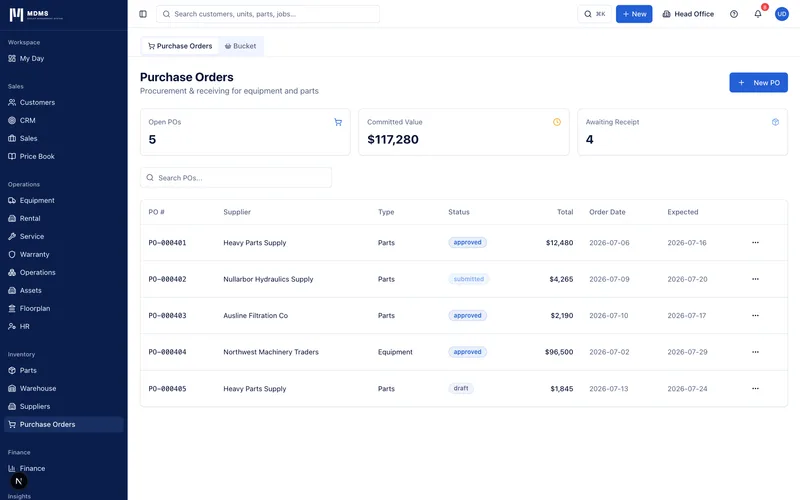
MDMS manages the full purchasing cycle from approved PO through goods receipt, supplier invoice entry, three-way match, and payment run with ABA file export. Supplier performance tracking shows which suppliers deliver on time and which are consistently late — information that should drive your purchasing decisions.
Purchase order management
Create, approve, and send purchase orders to suppliers with a PDF generated automatically. PO status tracks Draft → Approved → Sent → Partial → Received. Sent_at and tracking number recorded.
PDF PO generation with dealer letterhead
Every PO generates a professional PDF with the dealer's logo, ABN, and address. Emailed directly to the supplier's email address with one click. Reply-to set to the purchasing manager.
Three-way match
When a supplier invoice is entered, MDMS automatically compares PO total vs received cost vs invoice total. Exact matches are auto-approved for payment. Variances are flagged for manual review.
Goods receipt workflow
Receive goods against a PO line by line in the warehouse module. Partial receipts update received quantities. Full receipt triggers the three-way match and unblocks any PO-gated build order tasks.
Supplier performance tracking
On-time delivery rate, average lead time vs committed lead time, and year-to-date spend per supplier. Performance data updates automatically from PO history.
Payment run with ABA export
Select approved invoices due for payment. Review total and per-supplier amounts. Create payment run — a batch record of all payments. Export ABA file formatted for direct upload to Australian bank portals.
AP aging
All outstanding supplier invoices by age: current, 30 days, 60 days, 90+ days. Total by supplier and by period. Payment terms shown per invoice. Overdue items highlighted.
Supplier credit notes
Record credit notes against supplier invoices — warranty credit notes, overcharge returns, and goodwill credits all handled. Net AP balance updated automatically.
Finance, Invoicing & Accounting
AU-native invoicing with GST compliance, Xero sync, MYOB integration, and ABA payment files.
MDMS is designed around Australian financial requirements from the ground up. Every invoice is a compliant Australian Tax Invoice with correct GST breakdown. Xero and MYOB Advanced sync invoices and payments in real time. ABA files let you pay suppliers in bulk with a single bank upload. No separate accounting system is required for most dealers — and for those who use one, MDMS stays in sync automatically.
Australian Tax Invoice generation
Every invoice generated by MDMS is a compliant AU Tax Invoice: subtotal (ex-GST), GST amount (10%), and total (inc-GST) shown separately. Dealer ABN, address, and logo on every document.
Xero native sync
Invoices, credit notes, and payments recorded in MDMS push to Xero automatically. Xero invoice ID stored against every record. View in Xero link available on the invoice detail page.
MYOB Advanced integration
MDMS syncs invoices and payments with MYOB Advanced (Acumatica) for dealers who use MYOB as their accounting system. No manual re-entry. Reconciliation reports available in both systems.
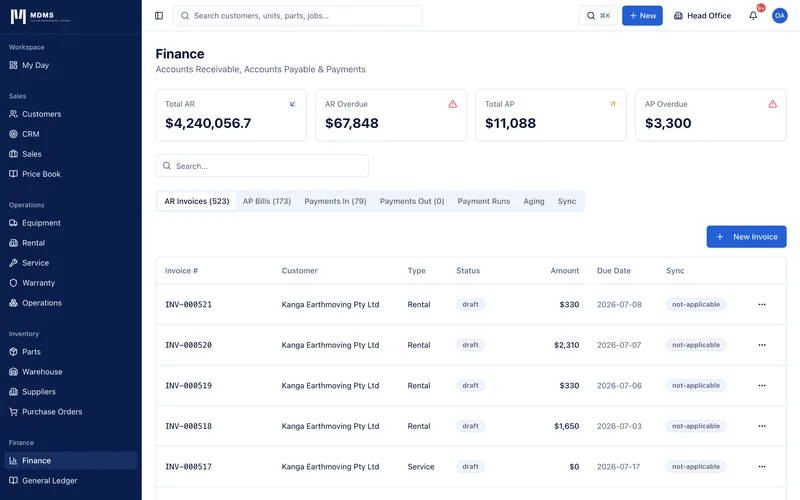
AR management with aging
Outstanding invoices listed by customer with current, 30, 60, 90+ day aging buckets. Customer balance auto-derived from invoices minus payments. Bulk statement generation for aged debtors.
Overdue invoice automation
Invoices past their due date are automatically flagged as overdue. Automated reminder emails sent to customers at configurable intervals. Bulk 'Send reminders' action for all overdue accounts.
Payment recording
Record payments against invoices: amount, method, date, reference. Invoice status moves to Partial or Paid automatically. Customer balance updates immediately via database trigger.
Credit notes
Create credit notes against paid or sent invoices with reason and amount. Credit note is linked to the original invoice. Customer balance adjusted. Xero/MYOB synced automatically.
ABA payment file export
Select approved supplier invoices for payment. Generate an ABA (Australian Banking Association) file in the correct 120-character fixed-width format. Upload directly to your bank portal — no manual payment entry.
Customer statements
Generate a statement for any customer showing all invoices, credit notes, and payments in the period. Statement PDF formatted with aging summary and closing balance. Bulk email to all customers.
P&L reporting
Revenue, cost of goods, gross profit, labour costs, and operating margin — all calculated from live invoice and payment data. Compare to prior period. Export to XLSX.
Customer Self-Service Portal
Your customers can view quotes, sign approvals, track their equipment, and monitor active jobs — without calling your office.
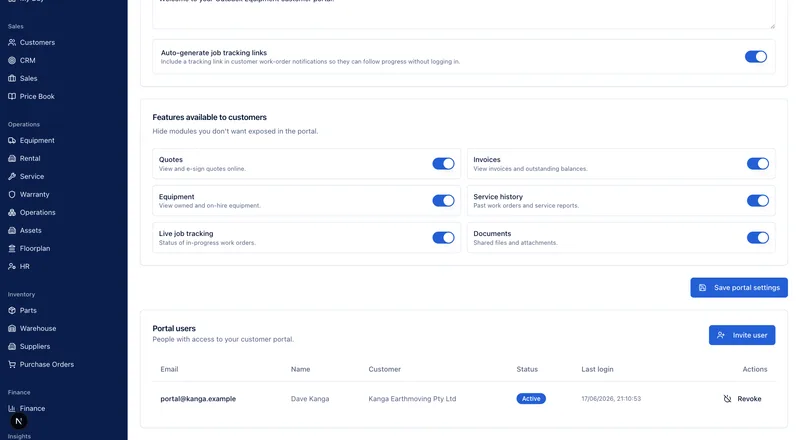
Every dealer gets a branded customer portal at their own URL. Customers log in with a magic link — no password to forget. They can see and accept quotes with a digital signature, view and download their invoices, track their equipment's full service history, and follow active jobs in real time. Every update is communicated by email. The result: fewer inbound calls, faster approvals, and customers who feel like they know exactly what's going on.
Branded portal per dealership
Each dealer gets their own portal URL (moderndms.com.au/portal/[your-slug]) with their logo, primary colour, and custom welcome message. Customers see your brand, not MDMS.
Magic link authentication
Customers enter their email and receive a one-time sign-in link. No password to set up or forget. Secure, convenient, and works on any device.
Quote viewing and digital acceptance
Customers see every quote sent to them — line items, subtotal, GST, and total. Accept with a drawn or typed digital signature captured with timestamp and IP address. Dealer team notified immediately.
Invoice access and PDF download
All sent invoices visible in the portal. Customers download a PDF copy at any time. Outstanding balance shown prominently. Reduces 'can you resend that invoice' requests.
Equipment register
Every unit owned by the customer listed with make, model, serial number, and current hour meter reading. Click through to see the full service history for any unit.
Service history timeline
Chronological list of all work orders for the customer's equipment: date, description of work, technician, and outcome. Customer-facing view only — no internal costs or notes visible.
Live job tracking link
When a field technician starts a job, a tracking link is automatically emailed to the customer. They see the technician's name, status, and estimated arrival — like tracking a parcel delivery.
Build status visibility
Customers with equipment in build see the current stage, task completion percentage, and target delivery date. Eliminates the 'when is my machine ready?' call entirely.
Dealer feature control
Dealers enable the portal per tenant and choose which sections to activate: quotes, invoices, equipment, service history, job tracking. Invite customers individually with one click.
All notifications via email
Every portal-relevant event triggers a branded email to the customer: quote sent, job booked, technician on the way, job complete, invoice issued. No SMS required — email handles everything.
The only equipment DMS with a customer-facing portal in the AU market
Eclipse DMS and simPRO do not offer customer portals. Texada offers a partial portal (Sparks) but without build tracking, offline field visibility, or AU-native invoicing. MDMS gives every dealer — including sole dealers on the entry plan — a fully branded customer portal from day one.
Compare to Texada SparksReports & Analytics
Real-time KPI dashboards, drill-through charts, scheduled reports, and export to XLSX.
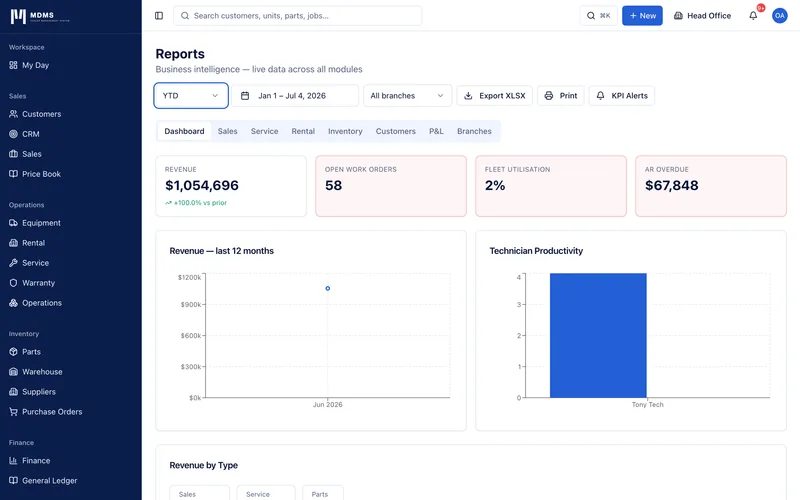
MDMS turns the data your team creates every day into actionable business intelligence. KPI tiles give management an instant health check. Drill-through charts let you click from a monthly revenue bar into the individual invoices that made it up. Scheduled reports deliver key summaries to the right people at the right time — without anyone running a manual export.
Real-time KPI dashboard
Revenue YTD, work orders completed, fleet utilisation rate, AR overdue total — all updating live. KPI tiles colour-coded green / amber / red against configurable thresholds.
KPI alert thresholds
Set warn and alert levels for each KPI. When a metric crosses a threshold, the tile changes colour and a notification is sent. Define what 'on track' means for your dealership.
Revenue bar chart with drill-through
12-month revenue bar chart. Click any bar to see all invoices for that month with customer names and amounts. One more click to the invoice detail.
Technician productivity analytics
Hours logged, hours billed, utilisation percentage, revenue generated, and work order count per technician for the selected period. Identify your most and least efficient staff.
Fleet utilisation chart
On-hire days as a percentage of available days per unit. Identify underutilised equipment for disposal or remarketing. Compare across branches.
Warranty recovery by OEM
Recovery rate percentage by OEM, sorted ascending. Claimed vs approved amounts. Monthly trend. Failed part pattern detection. The clearest view of whether your warranty department is leaving money on the table.
P&L reporting
Revenue, COGS, gross profit, labour costs, and operating margin for the selected period. Prior period comparison. Export to XLSX with one click.
Customer value report
Lifetime revenue, average invoice value, last transaction date, and outstanding balance per customer. Sorted by revenue to identify your most valuable accounts. At-risk customers (no invoice in 90+ days) highlighted.
Scheduled report delivery
Configure reports to be emailed automatically at daily, weekly, or monthly intervals. Specify recipients and format (XLSX). Reports arrive in the inbox — no login required.
Export to XLSX
Every report and every list in MDMS can be exported to XLSX. Multi-sheet workbooks for dashboard reports. Data in Excel for the team members who prefer to work there.
Platform, Security & Administration
Multi-tenant SaaS with row-level security, role-based access, audit logging, and guided onboarding.
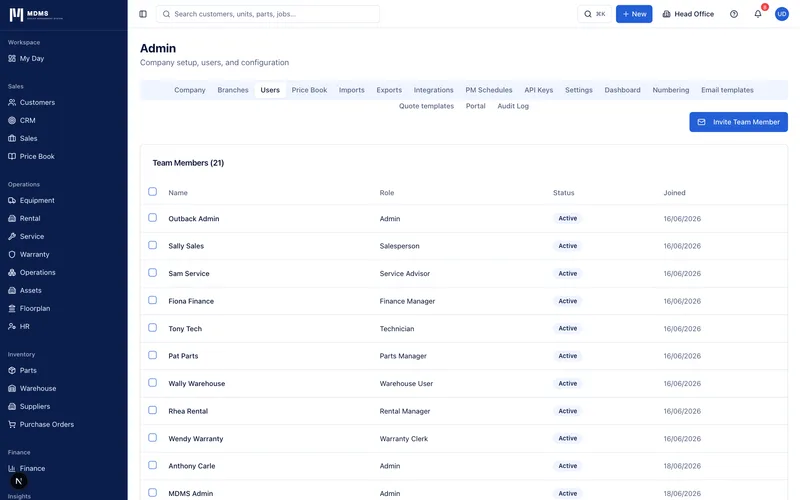
MDMS is a true multi-tenant SaaS platform — each dealership's data is isolated at the database level using PostgreSQL row-level security. No dealership can ever see another's data, regardless of how the application behaves. Role-based navigation, comprehensive audit logging, and a guided setup wizard mean new dealers are operational within hours, not months.
Guided setup wizard
Seven-step onboarding: company details, logo and branding, invite team, add branches, import customers, configure numbering, and launch. Sample data available for testing. No implementation team required.
Role-based access control
10 distinct roles: Owner, Admin, Manager, Sales, Service, Technician, Field Technician, Parts, Finance, and Viewer. Each role sees only the modules relevant to their work. Roles configurable per user.
Row-level security
Every database query is filtered by tenant_id at the Postgres level. No application-layer filtering can bypass this. A Tenant A user cannot see Tenant B data under any circumstances.
Audit log
Every significant action in MDMS is logged: who did what, to which record, at what time, from which IP. Filterable by action type, entity, and user. Exportable to CSV.
Multi-branch support
Create and manage multiple branches under one tenant. Stock levels, staff, and reporting separated by branch. Branch switcher in the top bar filters all lists to the selected branch.
Global search (Cmd+K)
Search across all modules simultaneously: customers, equipment, work orders, parts, invoices. Results grouped by type with direct navigation links. Available from any page.
In-app notifications
Real-time notification bell for important events: quote accepted, job assigned, low stock alert, overdue invoice, warranty reminder. Notifications link directly to the relevant record.
Document number sequences
Configure prefix and starting number for every document type: quotes, sales orders, work orders, invoices, purchase orders, rental contracts, warranty claims. Format preview shown in real time.
Branding configuration
Upload dealer logo, set primary colour, configure invoice footer text, ABN, address, and phone number. All PDFs and the customer portal use these settings automatically.
Email health and preview
23 email templates — from quote sent to overdue invoice reminder — all using dealer branding. Preview any email template from Admin with your real branding. Test send to your inbox with one click.
API key management
Generate API keys for integration with third-party tools. Keys scoped to read-only or read-write. Key rotation supported. Usage logged in the audit trail.
Real-time collaboration
Built on Supabase Realtime — when a technician updates a work order status, the dispatcher sees the change on the board within seconds without refreshing. No polling. No stale data.
Everything your dealership needs. Nothing it doesn't.
MDMS is the only cloud-native equipment DMS in Australia built with a self-service model. Sign up, configure your dealership in an afternoon, and be processing work orders today.
- 14-day free trial — no credit card
- Australian GST, Xero & MYOB included
- Zero implementation cost
- Build orders — unique in the AU market
- Offline field service app
- Customer portal included