MDMS AI: built into the ERP, not bolted on.
Ask your dealership anything in plain English. Review exactly what will change. Confirm it yourself.
14-day free trial with 500 Actions and no card. It uses the same platform, the same data and the same permissions as the rest of MDMS.

Real MDMS screens, fictional data.
Pick how you want to work
Ask in a chat, work one task at a time, get help beside the screen you are on, pick a named task, or keep using the normal screens.
Autopilot · PartsFictional data 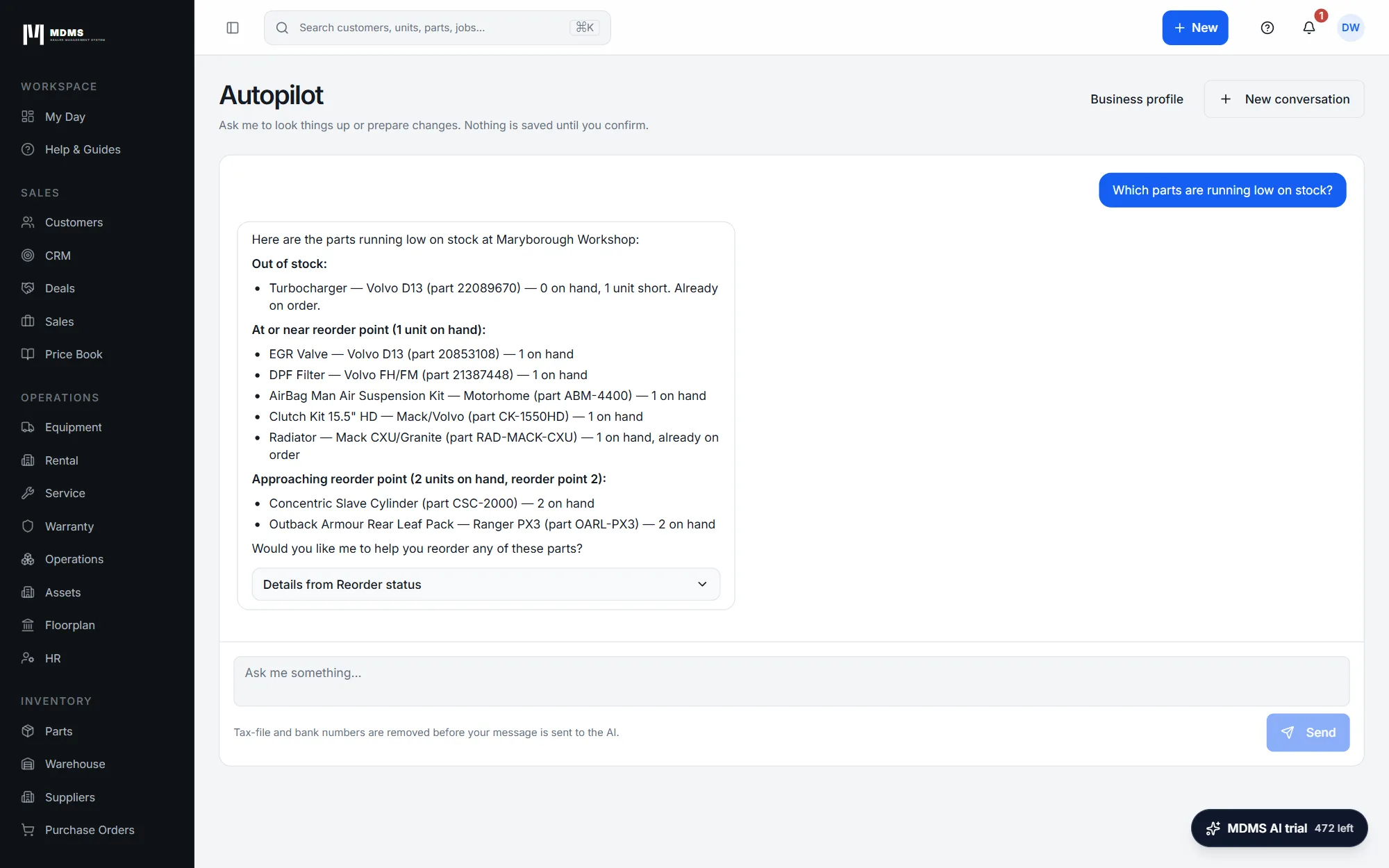 01 · A chat page that looks things up and prepares changes.
Autopilot
A chat page. It looks things up and prepares changes, and nothing is saved until you confirm. Each change appears as a preview card with the values that will be saved, a word to type to confirm, and an “I have reviewed this” box. Then Confirm or Dismiss. An admin can edit a Business profile that tunes it to the business.
When to use it. Use it when you want an answer from your own records, or a change prepared for you to review.
Guided AIFictional data 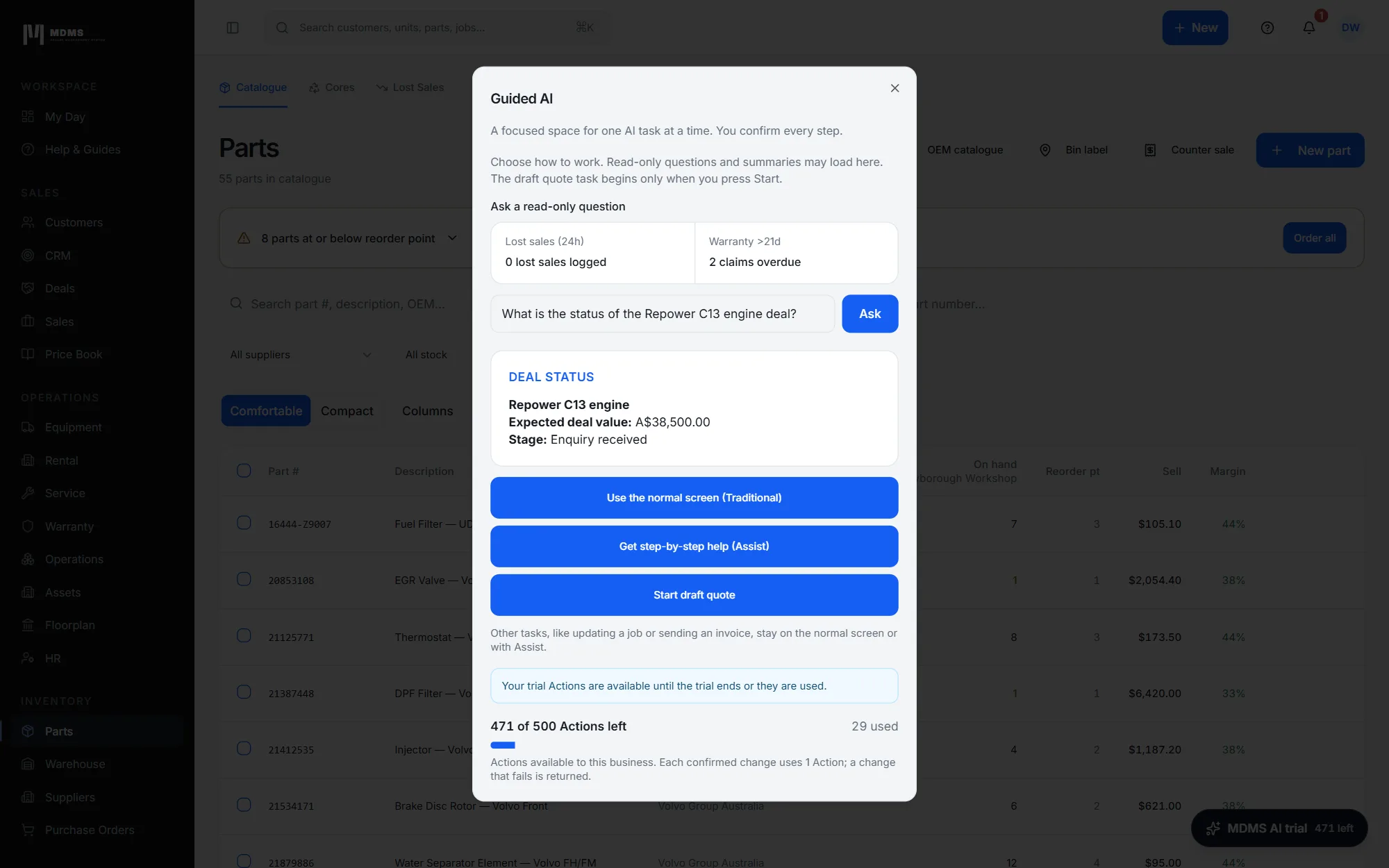 02 · A focused window for one task at a time.
Guided AI
A focused task window for one task at a time, where you confirm every step. Ask a read-only question, or press Start draft quote. You can also choose “Use the normal screen (Traditional)” or “Get step-by-step help (Assist)”.
When to use it. Use it when you want to stay on one task and see each step.
MDMS AI AssistFictional data 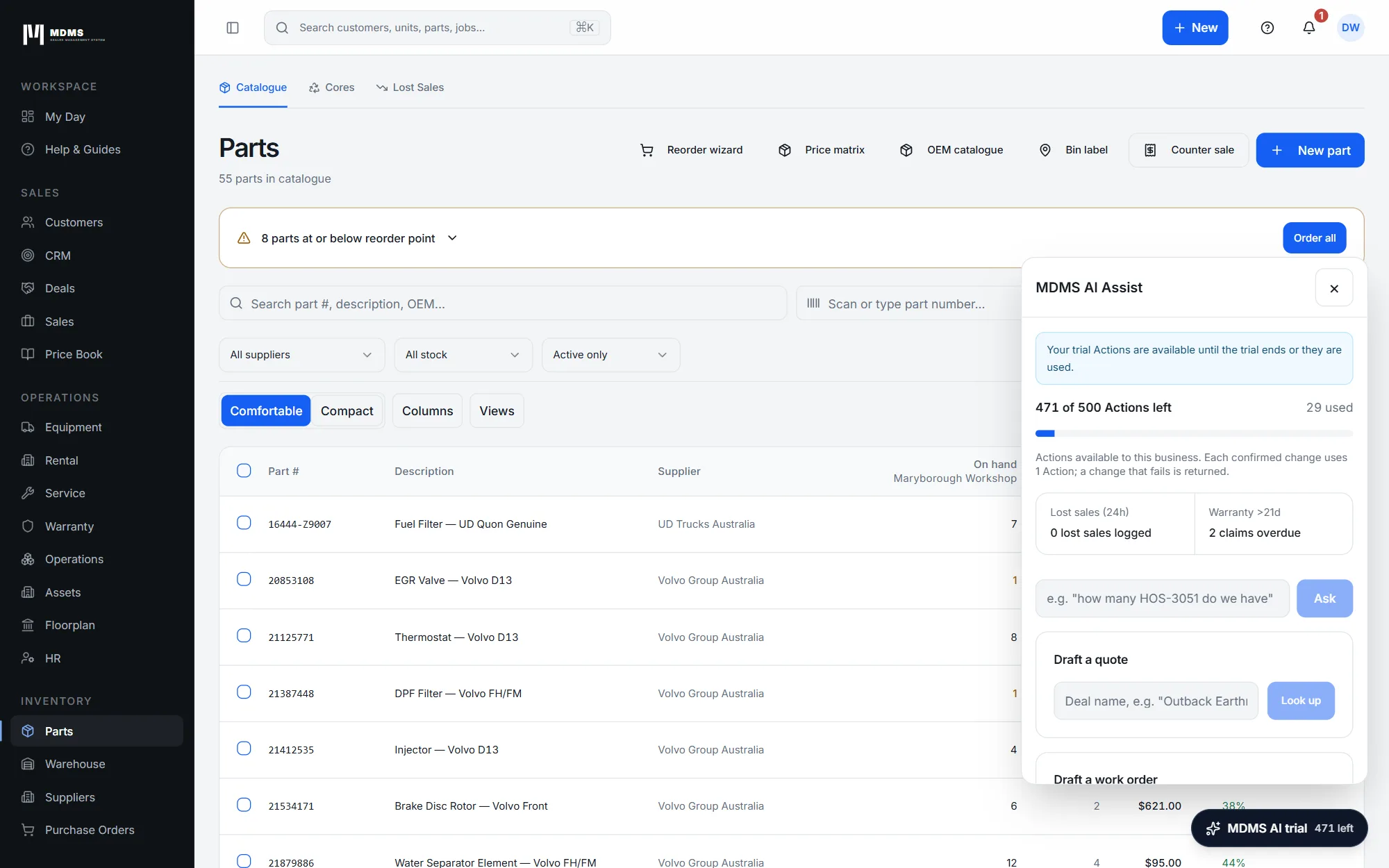 03 · A panel beside the screen you are on.
Assist
A panel beside the screen you are on. Ask questions, and prepare the drafts you are permitted to prepare: a quote, a work order, a replenishment purchase order or a follow-up message, when the right source exists.
When to use it. Use it when you are already on a screen and want help without leaving it.
ClerkFictional data 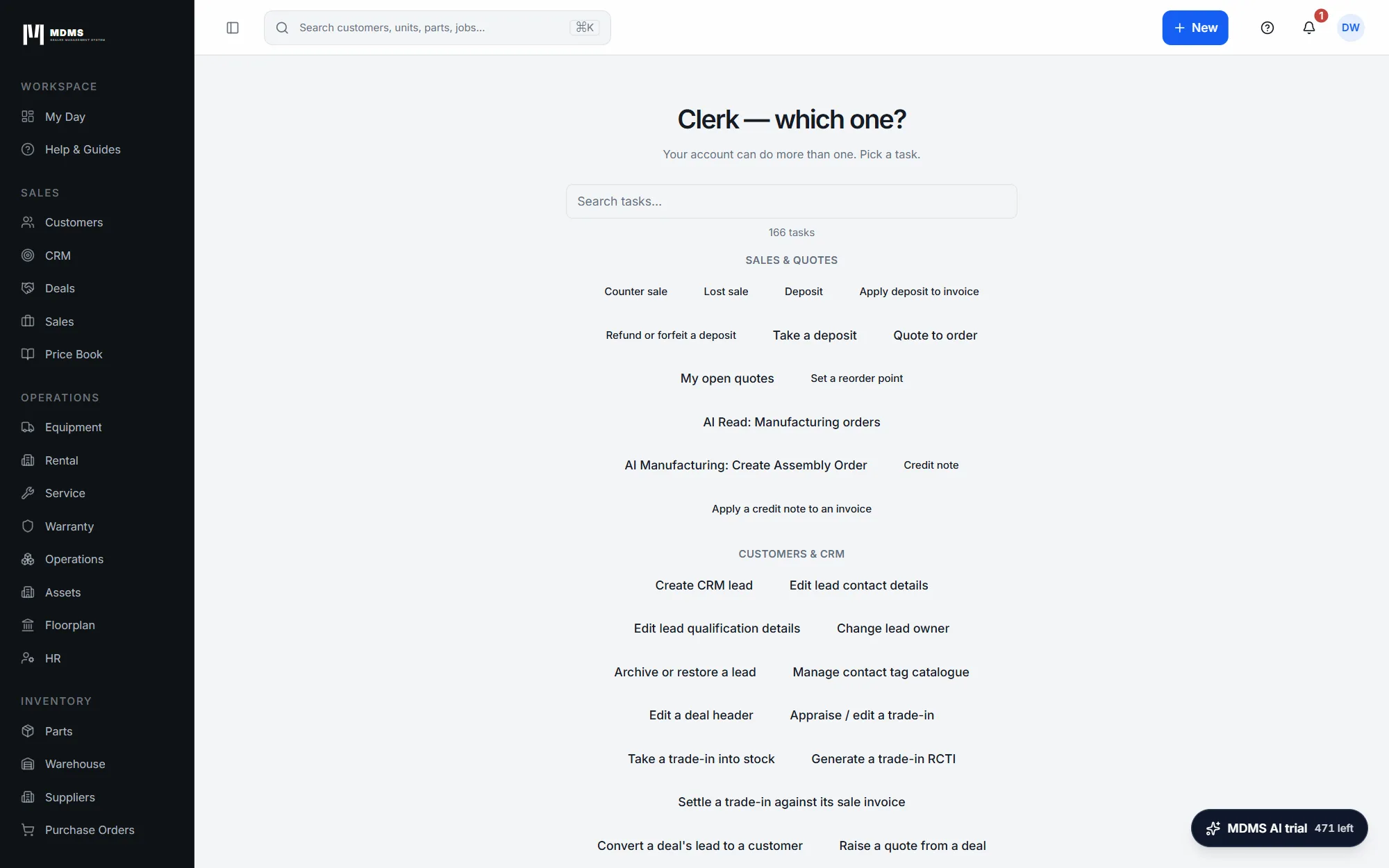 04 · The named-task picker.
Clerk
The classic named-task picker: “Clerk — which one?”. Search the tasks, or choose from the groups: Sales & quotes, Customers & CRM, Purchasing & receiving, People & scheduling, Guidance and Other.
When to use it. Use it when you know which task you want and would rather pick it than describe it.
Traditional · PartsFictional data 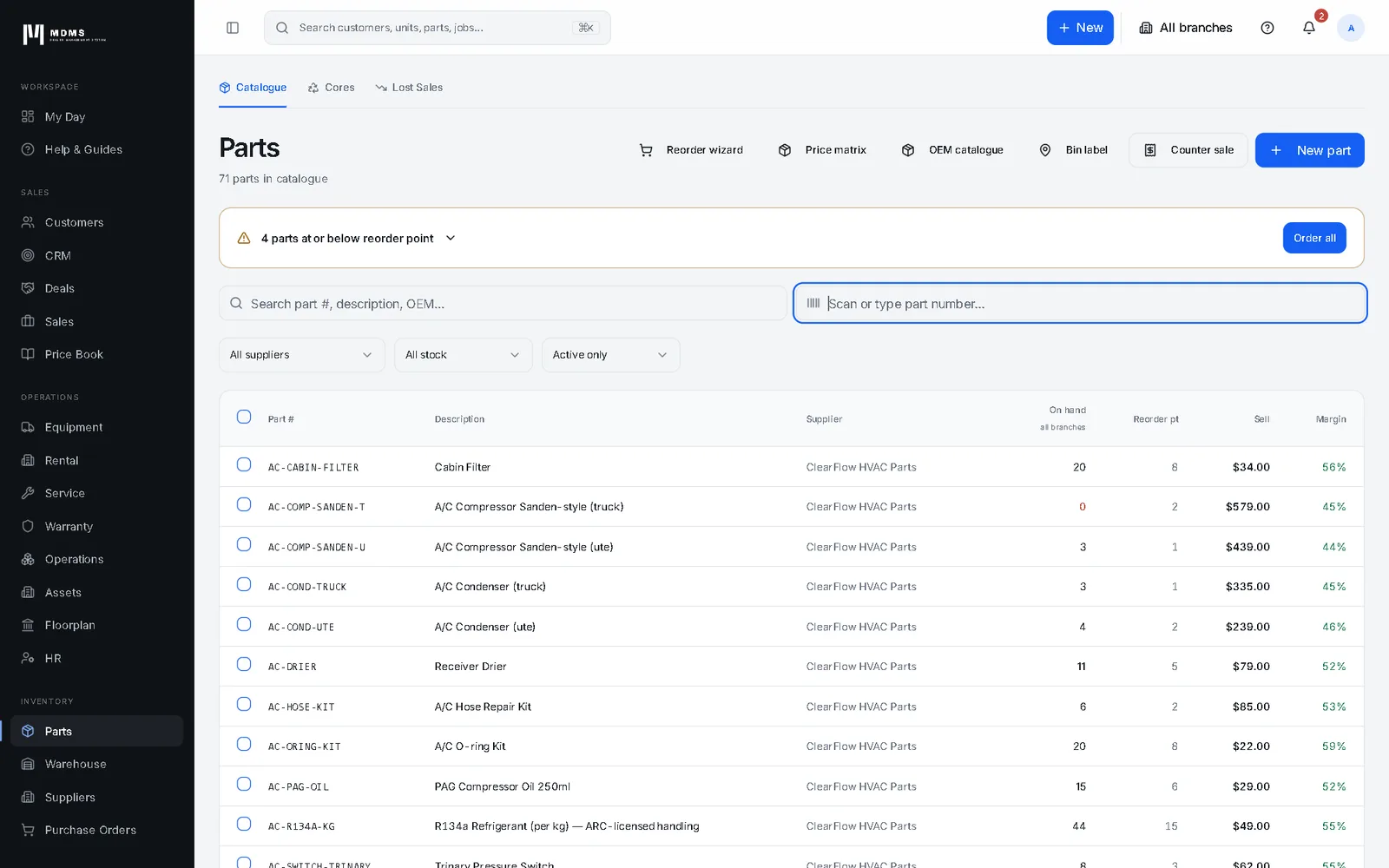 05 · The normal MDMS screens, unchanged.
Traditional
The normal MDMS screens, unchanged. AI is optional, and nothing forces anyone onto it.
When to use it. Use it whenever you prefer the screens you already know.


Real MDMS screens, fictional data.
Review it. Type the word. Then it saves.
Autopilot shows exactly what it would save, and waits for you.
A preview before anything is saved
You type the word to confirm
Your role still applies
Limits are enforced on the server
Tax-file and bank numbers are removed
A usage meter you can see
A read-only log: What MDMS AI did
The AI uses the same permissions, the same business rules and the same audit trail as people do.


Real MDMS screens, fictional data.
One login, one record of truth
MDMS AI sits on the same platform and data as parts, service, sales, finance, CRM, rental and warranty. What it can do depends on your modules and each user's role.

“Which parts are running low on stock?”
Answered from live stock: out of stock, at the reorder point, and approaching it.
See Parts & Warehouse
“What does our accounts receivable ageing look like?”
Receivables by age band, with the total overdue.
See Finance & Invoicing
“Which deals do we have in the Selling pipeline and what are they worth?”
Open deals by stage, with total and weighted value.
See CRM“Create a CRM lead for Bundaberg Cane Transport, interested in a fleet service plan”
Prepared as a preview, then saved once the person confirms.
See CRMReal MDMS screens, fictional data.
60+ lookups, read live from your records
Customers, contacts, suppliers, equipment and stock, parts on hand, low stock, reorder and supersessions, work order status, invoices and AR and AP ageing, GL reports (P&L, balance sheet, trial balance, cash flow, bank reconciliation), pipeline and deals, leads, follow-ups, purchase order match status, leave, competencies and more.
100+ tasks you confirm before they save
Across CRM (leads, converting leads to Sales or Procurement deals, deal tasks and activities, editing deals, raising a quote from a deal), Sales (quote to order, take a deposit), Equipment, Service and PM schedules, Parts and Warehouse, Rental, Warranty, Manufacturing, HR and scheduling, and Billing and onboarding helpers.
The counts above depend on your modules and role.
What MDMS AI does in each module
CRM
Ask about leads, deals and follow-ups, or have a new lead, a deal task or a quote raised from a deal prepared for you to confirm.
Sales & Quoting
Ask where a deal stands, start a draft quote, turn a quote into an order or take a deposit, each shown as a preview before anything is saved.
Service & Work Orders
Check work order status, and have service and PM schedule changes prepared for you to confirm.
Parts & Warehouse
Ask what is on hand, what is low, what is at its reorder point and what has been superseded, and have parts and warehouse tasks prepared for you to confirm.
Warranty
Ten warranty tasks can be prepared for you to review and confirm, depending on your role.
Finance & Invoicing
Ask about invoices and AR or AP ageing. Answers are read live from your records.
Tell Autopilot how your business talks
An admin can edit a Business profile that tunes Autopilot to your business.
- It is plain text that an admin writes and approves.
- There is a section for everyone in the business, and further sections for groups such as managers and principals, and sales and rental staff.
- Write business and branch names, product lines and how you word things. The page asks you not to write prices, costs, customer names, phone numbers, emails or staff details.

Real MDMS screens, fictional data.
An add-on, with Actions you can see
MDMS AI is its own line on the bill. It is optional, and the normal screens stay as they are.
Platform fee
- Includes 5,000 Actions a month
- A$4,579.80 a year if billed annually (15% off)
Per AI-enabled user
- Each user adds 500 Actions
- A$295.80 a year if billed annually
Free trial
- 500 Actions
- No card required
Top-up packs
- 2,500 ActionsA$149
- 10,000 ActionsA$499
- 50,000 ActionsA$1,999
Unused top-up Actions roll over and expire after 12 months.
Questions are free. Each change you confirm uses 1 Action; a change that fails is returned. Monthly included Actions do not roll over. MDMS AI needs the Finance module and at least one operating module. Prices are in AUD, excluding GST.

Real MDMS screens, fictional data.
The same Autopilot, at phone size
Autopilot at phone size, with the same answers and the same rule: nothing is saved until you confirm.
Questions are free. Each change you confirm uses 1 Action; a change that fails is returned.
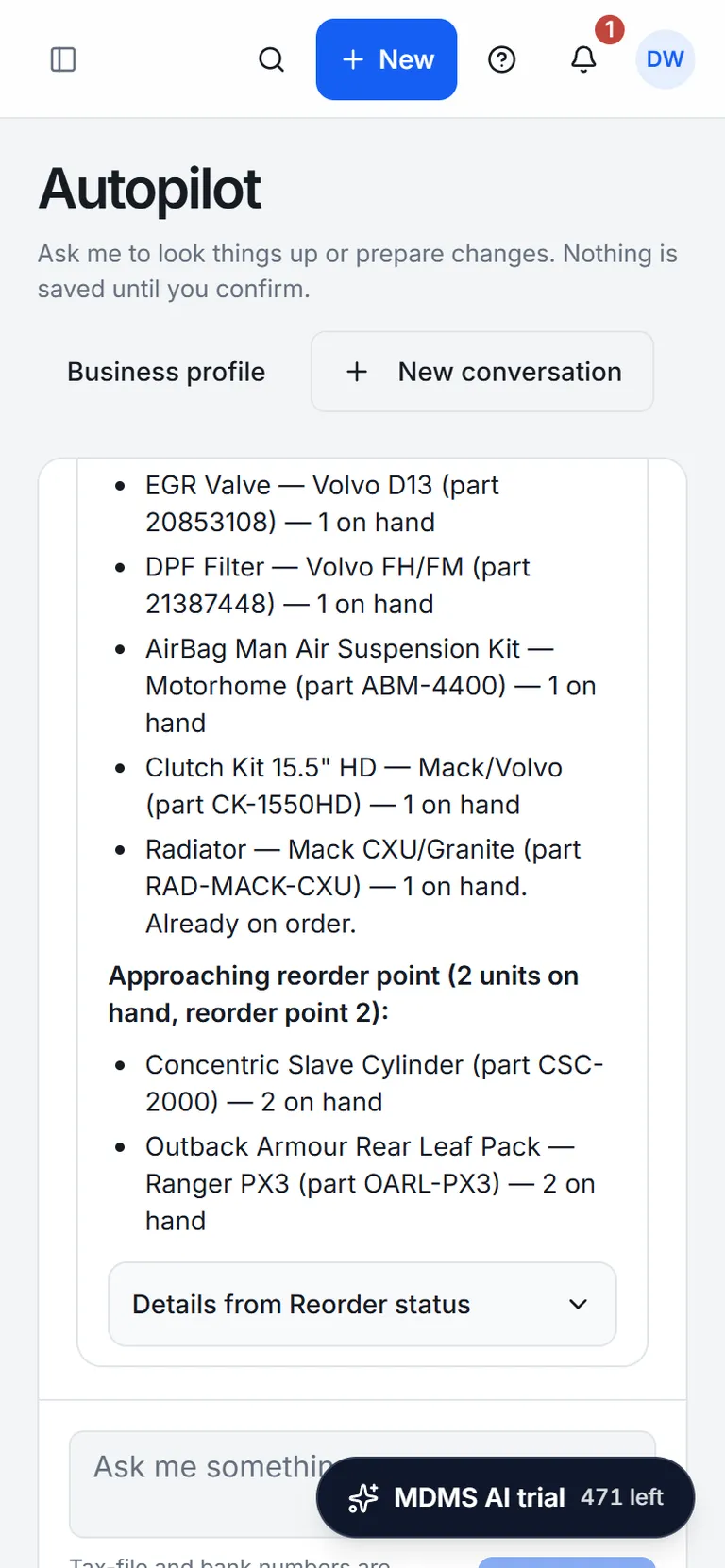
Real MDMS screens, fictional data.
Frequently asked questions
- What does MDMS AI cost?
- MDMS AI is an optional add-on. The platform fee is A$449 a month for the business (A$4,579.80 a year billed annually, 15% off) and includes 5,000 Actions a month. Each AI-enabled user is A$29 a month (A$295.80 a year) and adds 500 Actions. Top-up packs: 2,500 Actions for A$149, 10,000 Actions for A$499, 50,000 Actions for A$1,999. Unused top-up Actions roll over and expire after 12 months. Prices are in AUD, excluding GST. MDMS AI needs the Finance module and at least one operating module.
- What is an Action?
- Usage is metered in Actions. Questions are free. Each change you confirm uses 1 Action; a change that fails is returned. Monthly included Actions do not roll over.
- Can it change my data without me?
- No. Every change appears as a preview with the exact values that will be saved, before anything is stored. You confirm it yourself by typing the word shown on the card and ticking “I have reviewed this”. Dismiss cancels it. Nothing is saved until you confirm.
- Who can use it?
- People the business has set up as AI-enabled users. It follows each user’s role, so it works within what that role allows, and tasks for a module your business has not got are not offered.
- Does it replace my screens?
- No. Traditional, the normal MDMS screens, stays unchanged. AI is optional, and nothing forces anyone onto it.
- What does the trial include?
- 14 days and 500 Actions, with no card required. You can start it from Billing & Plan in the app.
- What can’t it do?
- There is no undo, so review the preview before you confirm. A read-only log, What MDMS AI did, lists the AI’s actions. There is no voice and no offline use. It does not cover every screen: what you can do depends on your modules and your role. The Business profile is a text profile that an admin edits.
14 days free, 500 Actions, no card.
Ask your dealership anything in plain English. Review exactly what will change. Confirm it yourself.