Inventory Management Software for Dealerships: DMS Guide
By MDMS Team · 27 July 2026

Inventory Management Software for Dealerships: DMS Guide
TL;DR:
- Australian equipment dealerships need a purpose-built dealer management system that tracks serialized assets and integrates workshop functions to improve margins. Choosing a system based on a sound data model, conducting a thorough audit, and phased implementation are critical for success. Post-launch, KPIs like inventory accuracy and stock turn help measure system effectiveness and ROI.
For Australian equipment dealerships, the right inventory management software for dealerships is a purpose-built, modular Dealer Management System (DMS) that treats every machine as a lifecycle record, not a generic SKU. Your system must include serialized asset tracking, workshop-integrated stock adjustments, multi-location visibility, and accounting integration with Xero or MYOB for Australian GST compliance. The practical next step: run a vendor demo using your own serialized data and workshop scenarios before committing to any platform.
AEM guidance frames inventory as integral to lifecycle decisions — pricing, fleet rotation, and after-sales outcomes all depend on the same machine record. A system that cannot connect those dots will cost you margin every month.
Table of Contents
- What inventory management software for dealerships must actually do
- How do you choose the right dealer inventory management system?
- What does a realistic implementation timeline look like?
- What KPIs should you track after go-live?
- Key Takeaways
- The data model is the decision most dealers get wrong
- Moderndms: purpose-built for Australian equipment dealerships
- FAQ
- Useful sources and further reading
What inventory management software for dealerships must actually do
Equipment dealerships have fundamentally different inventory needs than retail or automotive stock management. A machine sitting in your workshop is not available for sale, but a generic system may still list it. A purpose-built dealer inventory management system resolves that by keeping status, location, and condition synchronized across every department.
The features that materially affect your margins and turn rates:
- Serialized asset tracking — VIN, chassis number, or serial number as the primary record key, not a generic item code
- Condition and valuation fields — hours, meters, attachments, and condition grade tied directly to the unit record so pricing reflects reality
- Location and status fields — yard, workshop, in transit, rental pool, or sold; real-time status prevents double-selling
- Multi-location stock visibility — stock across multiple yards or branches visible from one screen
- Workshop-to-inventory integration — parts consumed on a job card automatically adjust inventory so you avoid end-of-month reconciliation cycles
- Parts and warehouse integration — bin locations, reorder points, and supplier links connected to the same platform
- Offline-capable stocktake — yard counts that sync later to the system of record, preventing shadow spreadsheets from diverging
Pro Tip: Treat the inventory data model as your primary design decision before you evaluate any user interface. Map out whether your stock is unit-level (serialized machines), item-level (parts), or serialized components (attachments on a machine) — and confirm your shortlisted DMS handles all three before you book a demo.
How do you choose the right dealer inventory management system?
Start with an audit, not a demo. Map where your inventory data currently lives: which spreadsheets, which people update them, and where double-entry happens between sales, service, and accounts. That audit becomes your acceptance criteria for any vendor.

Match your use case to required modules. A single-yard dealer with no rental fleet needs serialized tracking, parts integration, and Xero connectivity. A multi-yard operator with a rental pool also needs branch-level stock visibility, rental contract management, and marketplace syndication. Know which category you are before you open a vendor conversation.
Ask these questions during every demo:
- Can you export the full data model in a standard format, and who owns the data?
- Does the stocktake app work offline and sync on reconnection?
- How does a workshop job card automatically adjust parts inventory?
- Can you push listings to Australian marketplaces from one screen?
- What does the Xero integration actually sync — invoices only, or stock cost and margin data too?
- What migration support is included, and what does data cleansing look like in practice?
Red flags to watch for. A system that tracks only fixed items (no serialized records) will force manual workarounds the moment a machine goes into service. If workshop reconciliation is a manual month-end task rather than an automatic adjustment, your parts margin reporting will always lag. Closed APIs and vague data-ownership terms are also signals that you will face lock-in costs later. Centralizing functions across parts, service, and sales is the whole point — a system that cannot do it natively is not a DMS, it is a more expensive spreadsheet.
What does a realistic implementation timeline look like?
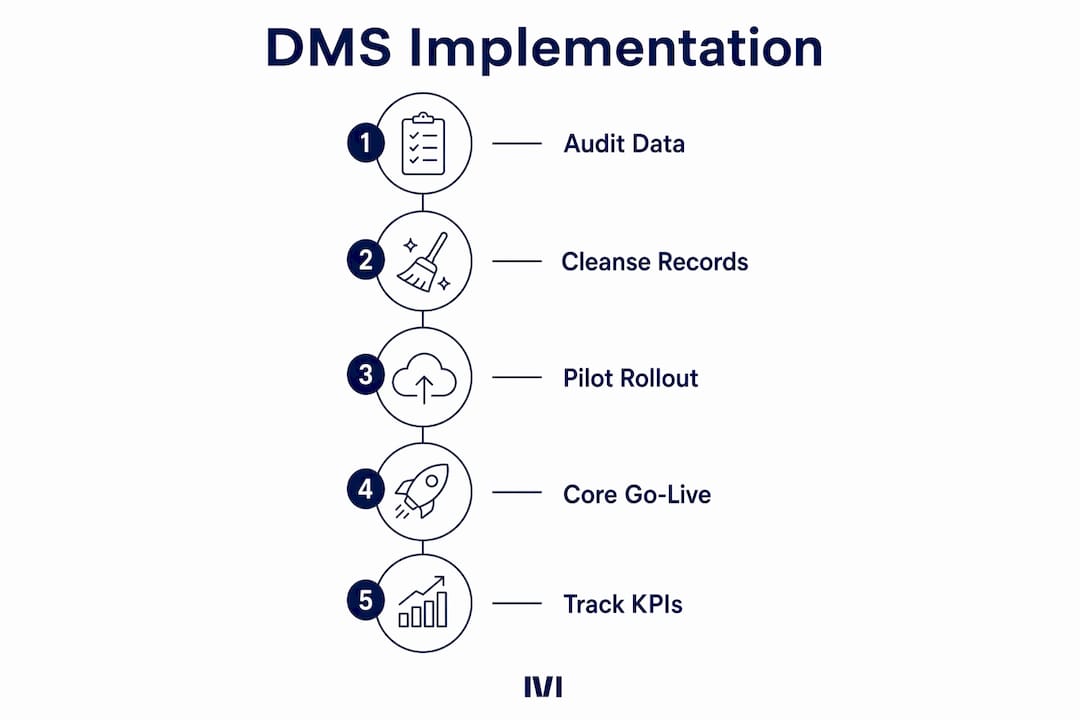
A phased rollout is risk control, not just project preference. Validating your stock master data early reduces downstream integration failures when you turn on accounting or marketplace connections.
| Phase | Typical Duration | Success Milestone |
|---|---|---|
| Pilot (inventory + CRM) | 2–4 weeks | Serialized records validated, status fields agreed |
| Data cleanse and migration | 2–4 weeks | Duplicates removed, condition fields populated |
| Core go-live | 1–2 weeks | Live catalogue active, availability statuses enforced |
| Integrations (Xero, marketplace) | 2–4 weeks | Invoices syncing, listings pushing without manual entry |
| Optimization and reporting | Ongoing | KPIs baselined, workshop adjustments running automatically |
Implementation checklist:
- Define pilot scope — select one yard or one stock category to validate the data model
- Cleanse source data — remove duplicates, standardize serial numbers, populate condition fields
- Validate migration — spot-check serialized records against physical stock before go-live
- Appoint internal champions from sales, service, and accounts to own training in each department
- Set go-live cutoff criteria — agree on what “ready” looks like before switching off the old system
- Stage marketplace syndication — activate listings feeds only after availability statuses are enforced and verified
Data cleansing and internal champions are not optional steps. Exposing incorrect availability data during migration is one of the most common and costly rollout mistakes equipment dealers make.
Pro Tip: Use mobile barcode scanning via smartphone for your pilot stocktake rather than investing in dedicated handheld terminals. It reduces hardware overhead and lets your team validate the offline sync workflow before go-live.
What KPIs should you track after go-live?
Measure your baseline before migration so you can track the delta after core go-live. Without a before-and-after comparison, you cannot demonstrate ROI to ownership or identify where the system is underperforming.
Inventory accuracy is the percentage variance between your system records and a physical count. Run cycle counts by category monthly in the first quarter after go-live. Stock turn measures how many times your inventory sells through in a year; tracking it by category reveals which machines are sitting too long. Parts fill-rate tells you what proportion of parts requests are fulfilled from on-hand stock on the first request — a direct indicator of purchasing and reorder discipline.
Admin hours saved is often the most visible early win. Dealers who move from disconnected spreadsheets to an integrated dealer inventory management system report recovering meaningful hours per week previously spent on manual reconciliation and duplicate data entry. Days-to-listing measures how quickly a machine goes from acquisition to live marketplace listing; shortening it directly improves stock turn. Workshop parts usage reconciliation rate tracks what percentage of parts consumed in the workshop are automatically adjusted in inventory versus manually corrected at month end — the closer to 100%, the cleaner your margin reporting.
Key Takeaways
A purpose-built, modular DMS with serialized tracking and workshop integration is the correct choice for Australian equipment dealerships — generic inventory tools will cost you margin and reconciliation time.
| Point | Details |
|---|---|
| Serialized tracking is non-negotiable | Every machine needs a VIN/serial record with condition, location, and status fields to prevent double-selling and pricing errors. |
| Workshop integration eliminates reconciliation | Parts consumed on job cards must automatically adjust inventory; manual month-end reconciliation delays margin reporting. |
| Phased rollout reduces risk | Start with inventory and CRM, validate master data, then add Xero integration and marketplace syndication. |
| Measure baseline before migration | Record inventory accuracy, stock turn, and admin hours before go-live so you can quantify improvement after. |
| Moderndms fits the checklist | Moderndms covers serialized asset tracking, workshop-to-inventory adjustments, Xero/MYOB integration, and offline stocktake in one modular platform built for Australian dealers. |
The data model is the decision most dealers get wrong
Most dealership teams spend their evaluation time comparing user interfaces and pricing tiers. The decision that actually determines whether a DMS delivers is the data model: how the system structures a machine record and whether that record connects cleanly to quotes, build orders, workshop job cards, rental contracts, and marketplace listings.
Dealers who skip this step often end up with a system that looks modern but forces the same manual workarounds as the spreadsheet it replaced. The symptom is familiar: a machine goes into the workshop, disappears from the available stock list in someone’s head but not in the system, and gets quoted to a customer anyway. That is not a training problem. It is a data model problem.
The other underestimated factor is adoption. A well-designed system with poor internal ownership will underperform a simpler system with clear champions in sales, service, and accounts. Appoint those champions before go-live, not after.
Moderndms: purpose-built for Australian equipment dealerships
Spreadsheets and disconnected accounting systems are a scavenger hunt every time a customer asks about a machine’s availability or service history. Moderndms replaces that entire stack with a single platform covering serialized inventory and asset tracking, workshop and parts integration, rental fleet management, and Xero/MYOB accounting connectors — all built specifically for the way Australian equipment dealerships operate.

Setup takes under an hour for core modules. Your data stays yours, with no vendor lock-in and full export capability. Australian GST compliance is built in, not bolted on. Dealers using Moderndms report recovering up to 10 hours per week in admin time previously lost to manual reconciliation and duplicate entry. The workshop-to-parts integration means job card consumption adjusts inventory automatically — no month-end catch-up required.
Request a live demo focused on your serialized tracking scenarios and workshop workflow. Moderndms can run a data migration proof-of-concept using your own stock data so you see exactly how your records map before you commit. Book a demo and start with a small pilot — it is the lowest-risk way to validate fit before full rollout.
FAQ
What is the best inventory management software for equipment dealerships in Australia?
A purpose-built DMS with serialized asset tracking, workshop-integrated stock adjustments, and Xero/MYOB integration is the right category. Moderndms is built specifically for Australian equipment dealerships and covers all of these requirements in one modular platform.
How long does a DMS implementation typically take?
A phased rollout typically runs several weeks from pilot to core go-live, depending on data quality and the number of integrations. Starting with inventory and CRM before adding accounting and marketplace connections reduces risk significantly.
Why does workshop integration matter for inventory accuracy?
When parts consumed on workshop job cards automatically adjust inventory, you eliminate manual month-end reconciliation and get accurate margin reporting in real time. Without that integration, your parts stock figures are always behind.
What data should I cleanse before migrating to a new DMS?
Remove duplicate records, standardize serial numbers and VINs, populate condition and hours fields, and verify location and status data against physical stock. Clean master data before migration prevents downstream errors in pricing, listings, and accounting.
Does Moderndms support offline stocktaking?
Yes. Moderndms includes an offline-capable mobile app that supports yard and warehouse counts without a live connection, syncing to the system of record when connectivity is restored.
Useful sources and further reading
The sources below cover the specific topics referenced throughout this article. Use them to dig deeper into feature definitions, stocktake methods, phased rollout guidance, and platform comparisons.
| Topic | Source |
|---|---|
| Equipment lifecycle and DMS rationale | AEM — Why dealers getting more from your heavy equipment DMS matters |
| Choosing a heavy equipment DMS and phased rollout | Machineric — How to choose equipment management software |
| Workshop parts and stock integration | Foresiight — Stock management for mower stores |
| Offline stocktake and sync | DataScan — Stocktake solution |
| Mobile barcode scanning for stocktakes | BSimple — Barcode inventory management |
| Centralizing dealership data across departments | Xenex Systems — Why you need a reliable DMS |
| Moderndms features and module overview | Moderndms — Features |
| Moderndms parts and warehouse management | Moderndms — Parts management |