Cut Config Time to 10 Minutes: DMS Build-to-Order for Dealers
By MDMS Team · 13 September 2026
Cut Config Time to 10 Minutes: DMS Build-to-Order for Dealers
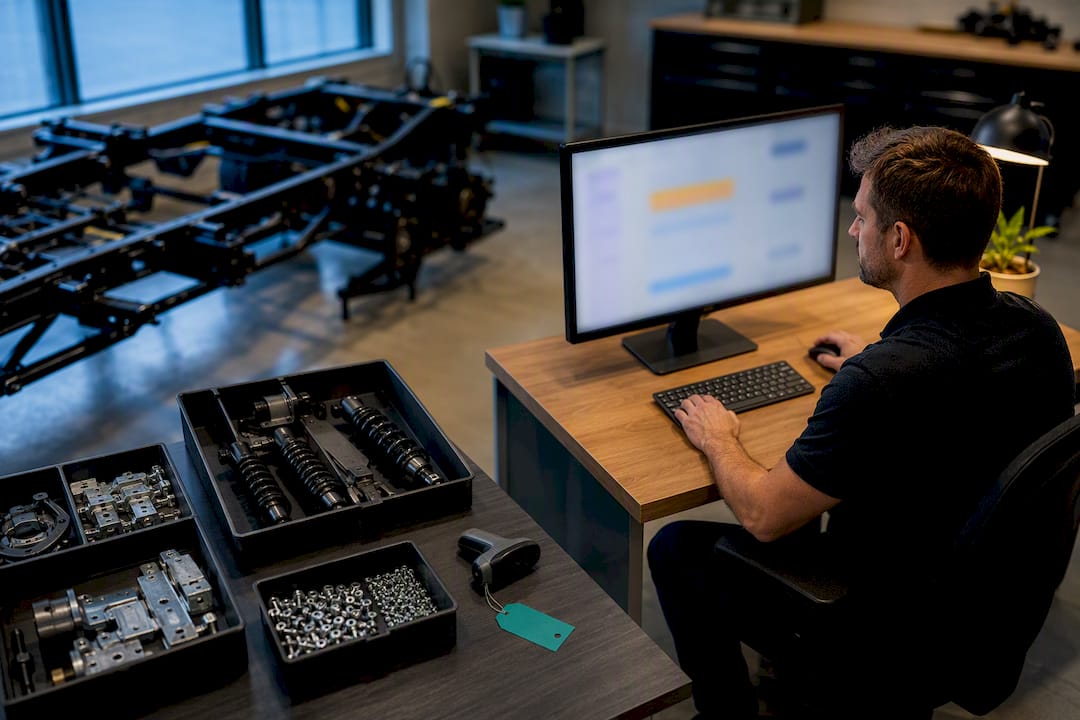
A dealer build-to-order process must be run as an integrated DMS lifecycle module that combines rules-based CPQ, parts kitting, and a digital commissioning workflow. That means configuration, procurement, assembly, commissioning, and delivery all live inside one unit record instead of scattered spreadsheets and paper checklists. Dealerships that adopt this model report faster configuration, fewer commissioning errors, and less time spent chasing signatures across departments.
TL;DR:
- Implementing a single, integrated DMS lifecycle module reduces configuration time from hours to minutes and minimizes errors across stages.
- Assigning clear ownership roles for each build stage, especially a single commissioning owner, prevents delays due to fragmented responsibility.
- Rules-based CPQ significantly decreases configuration time and prevents invalid options, streamlining the entire build and approval process.
- Tying purchase orders to serial numbers enables early detection of supply shortages, reducing build stalls caused by parts delays.
- Piloting specific modules like CPQ or commissioning workflows on one product line allows gradual adoption and demonstrates measurable time savings.
Table of Contents
- What Is the Build-to-Order Process for Equipment Dealers?
- What Happens at Each Stage of a Build-to-Order Workflow?
- Who Owns Each Step of the Build?
- Which DMS Features Actually Reduce Build Friction?
- How Long Should Commissioning Actually Take?
- How Do You Roll Out a Build-to-Order Workflow?
- What Goes Wrong in Build-to-Order, and How Do You Prevent It?
- How Should You Communicate With Customers During a Build?
- Should You Offer More Options or Fewer?
- How Do Supply Chain Delays Affect Build Timelines?
- Can Data and AI Improve Build-to-Order Workflows?
- Why This Lifecycle Approach Matters
- How ModernDMS Runs Your Build-to-Order Lifecycle
- Sources
- FAQ
What Is the Build-to-Order Process for Equipment Dealers?
For an equipment dealership, the build-to-order process is the sequence of steps a new configurable unit moves through between the moment a customer confirms an order and the moment they take delivery. It is not the manufacturing supply-chain concept of building only after an order lands. Here, “build to order” describes the dealer’s own build, assembly, and commissioning workflow for units that arrive from the OEM partially built or as components needing configuration, kitting, and final assembly before they can go out the door.
The workflow runs through five connected stages:
- Configuration (CPQ): Sales locks in the build spec using a rules-based configurator that prevents invalid option combinations.
- Procurement and kitting: Parts staff generate purchase orders and assemble kitting packs tied directly to that unit’s serial number.
- Assembly and inspection: The workshop builds the unit, records safety checks, and verifies fluid levels and torque specs.
- Commissioning and digital sign-off: A named owner walks the customer through operation and records approvals electronically.
- Delivery and handover: Final paperwork, invoicing, and asset registration close out the deal.
Sales, parts, and the workshop each touch the same unit record rather than passing information through emails or printed job sheets. That single-record approach is what equipment-sales DMS modules are built around, linking sales, parts, service, and invoicing so nothing gets re-entered or lost between departments.
What Happens at Each Stage of a Build-to-Order Workflow?
Each stage carries its own checklist, and skipping a check at one stage almost always creates rework at the next.
1. Preparation. Confirm the customer order in writing, verify financing or deposit status, and check that delivery-site conditions (access, power, operator availability) are ready before committing shop time.
2. Configuration. Run the build through a rules-based CPQ tool that validates option compatibility in real time. One documented case shows configuration time dropping from three hours to ten minutes once a dealer moved from manual spec sheets to a validated configurator. The output should be a locked build spec and a priced quote the customer signs off on.
3. Procurement and kitting. Once the quote is accepted, generate purchase orders automatically and tie every part to the unit’s serial number. Kitting packs should be pulled and staged before the unit reaches the bay, not assembled on the fly while a technician waits.
4. Assembly and inspection. Record the serial number, run safety checks, verify fluids, and log inspection photos against the unit record. This is where paper checklists fail most often. A logged, timestamped digital record is the difference between a defensible warranty position and a dispute six months later.
5. Commissioning and digital sign-off. Walk the customer or operator through startup, controls, and maintenance basics. Record the sign-off electronically, with a named commissioning owner attached to the unit. This step should automatically trigger the first scheduled service reminder.
6. Delivery and handover. Issue final documents, trigger the invoice, and enter the asset into the customer’s record for future service and parts history.
Pro Tip: Attach kitting SKUs to the CPQ rule set itself, so accepting a quote automatically drafts the purchase order. Dealers who wait until after the sale to figure out parts lists lose days they never get back.
Who Owns Each Step of the Build?
Fragmented ownership is the single biggest cause of commissioning delays. When five people each think someone else is handling the final sign-off, the unit sits finished but undelivered for days.
Assign these roles explicitly for every build:
- Sales coordinator: owns the quote and customer confirmation through configuration.
- Parts or kitting lead: owns purchase orders and kitting accuracy.
- Shop foreman: owns assembly, inspection, and safety checks.
- Commissioning owner: one named person responsible for training, sign-off, and warranty activation.
- Delivery coordinator: owns final documents, invoicing, and handover logistics.
The rationale for a single owner per unit is straightforward: digital sign-off paired with one accountable owner is one of the fastest ways to eliminate commissioning delays and reduce warranty exposure. Build in clear handoff gates, each stage cannot start until the prior one is marked complete in the system, so escalation happens automatically instead of through a phone call three days late.
Which DMS Features Actually Reduce Build Friction?
Not every dealer management system handles configurable builds well. Before committing to a platform, require these core capabilities:
- Rules-based CPQ that blocks invalid configurations at the point of quote, not after the parts order ships.
- Parts and kitting management tied to serial numbers rather than generic stock codes.
- Purchase order and supplier management that auto-generates once a quote is accepted.
- Service job automation that creates the first maintenance job directly from the commissioning record.
- Digital commissioning workflows with photo capture, operator sign-off, and timestamped approvals.
- Asset and serial tracking that follows the unit from build through resale.
Integration matters as much as features. Your DMS should connect to accounting platforms like Xero or MYOB, pull OEM configuration data so quotes reflect current build rules, and sync with parts suppliers for real-time availability. Configit’s configuration lifecycle approach illustrates why centralizing configuration truth in one engine, rather than scattering it across spreadsheets, keeps dealer portals and ordering systems consistent.
You don’t need to roll out every module at once. Piloting a CPQ tool or a commissioning workflow on a single product line proves the time savings before you commit to a full-platform switch, which lowers both cost and staff resistance.
How Long Should Commissioning Actually Take?
Configuration and commissioning are the two stages where digital workflows produce the clearest, most measurable gains. Track these KPIs from day one of any pilot:
- Order cycle time (quote to delivery)
- Time-to-commission (assembly complete to customer handover)
- First-time-right rate (builds requiring no rework)
- Warranty dispute rate
- Admin hours saved per week
The benchmark to beat: a structured digital commissioning workflow can compress the process from days to hours, and rules-based CPQ has cut configuration time from three hours to ten minutes in at least one documented case.
Run a simple 30/60/90 measurement plan: baseline your current cycle time in the first 30 days, pilot the digital workflow on one product line over the next 30, then compare full metrics at day 90 before scaling dealership-wide.
How Do You Roll Out a Build-to-Order Workflow?
Rolling out a new workflow works best in stages rather than as a single cutover. Try this sequence:
- Map every handoff in your current process, from quote to delivery, and note where information currently gets re-entered or lost.
- Assign one commissioning owner per unit type before you pilot anything else.
- Pilot with a single product line rather than your entire inventory, so early mistakes stay contained.
- Enable CPQ validation rules for that product line’s configurable options.
- Create kitting SKUs tied to serial numbers so parts orders generate automatically from accepted quotes.
- Configure PO-to-job triggers so purchasing and workshop scheduling move together.
- Enable mobile sign-off for commissioning so technicians and customers can complete approvals on-site.
- Train staff and update SOPs to reflect the new handoff gates before you expand beyond the pilot line.
- Measure baseline KPIs at 30, 60, and 90 days to justify wider rollout.
Pro Tip: Run the pilot on your highest-volume configurable product, not your most complex one. You want a fast, visible win, not a stress test.
What Goes Wrong in Build-to-Order, and How Do You Prevent It?
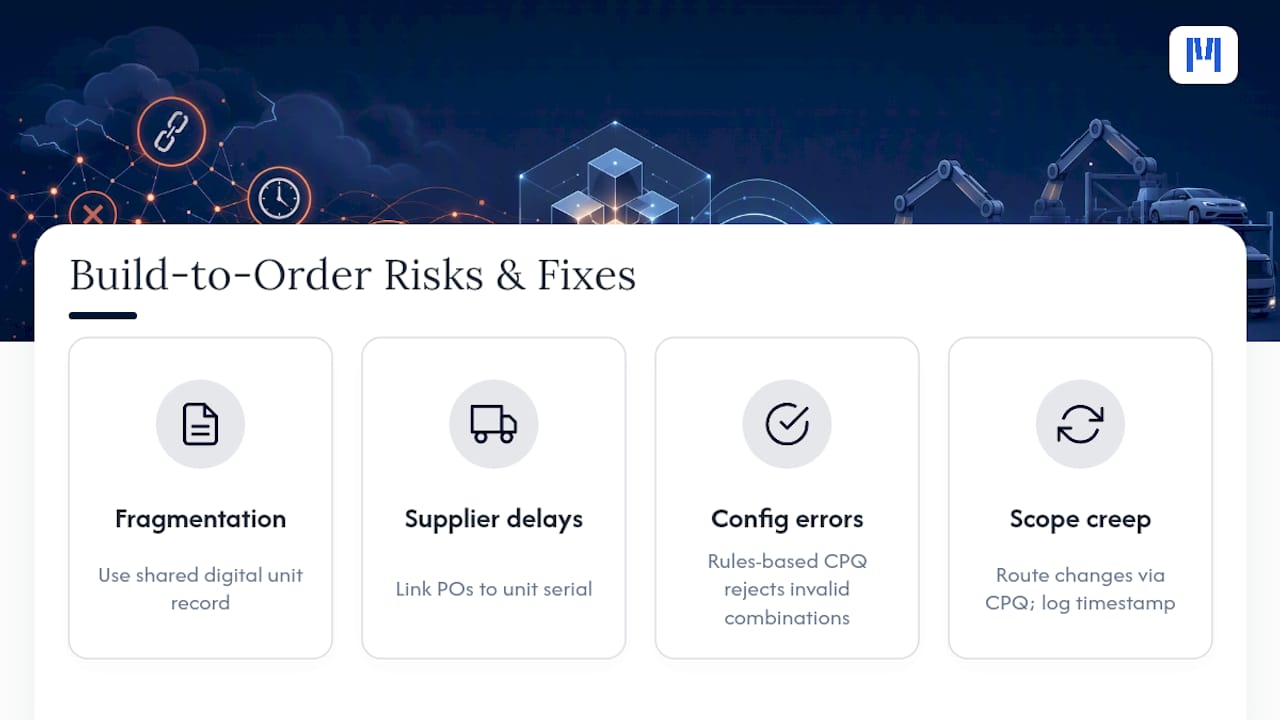
The most common failure point is a fragmented process, one where builds move on paper checklists, spreadsheets, or verbal handoffs between departments. Without a shared digital record, commissioning steps get missed, warranty documentation goes missing, and units sit finished but undelivered while everyone assumes someone else has the paperwork.
Supplier delays are the second recurring risk. When a kitting pack is short one part, a unit can stall in the bay for days, and if that shortage isn’t flagged against the specific unit record, the delay often isn’t visible until a customer calls asking where their machine is. The fix is tying purchase orders to the unit’s serial number from the start, so a shortage shows up as a blocked build, not a surprise.
Configuration errors cause the third major category of risk. A sales rep who manually keys in an option set can accidentally quote an incompatible combination, and that error usually isn’t caught until the workshop tries to assemble it. Rules-based CPQ closes this gap by rejecting invalid combinations at the point of quote rather than at the point of assembly.
Finally, watch for scope creep during the build itself. Customers sometimes ask for a change mid-assembly, and without a formal change-order process tied to the unit record, that request can quietly shift delivery dates and costs without anyone updating the original quote. Require every mid-build change to route through the same CPQ validation the original order used, and log it against the unit record with a new timestamp.
How Should You Communicate With Customers During a Build?
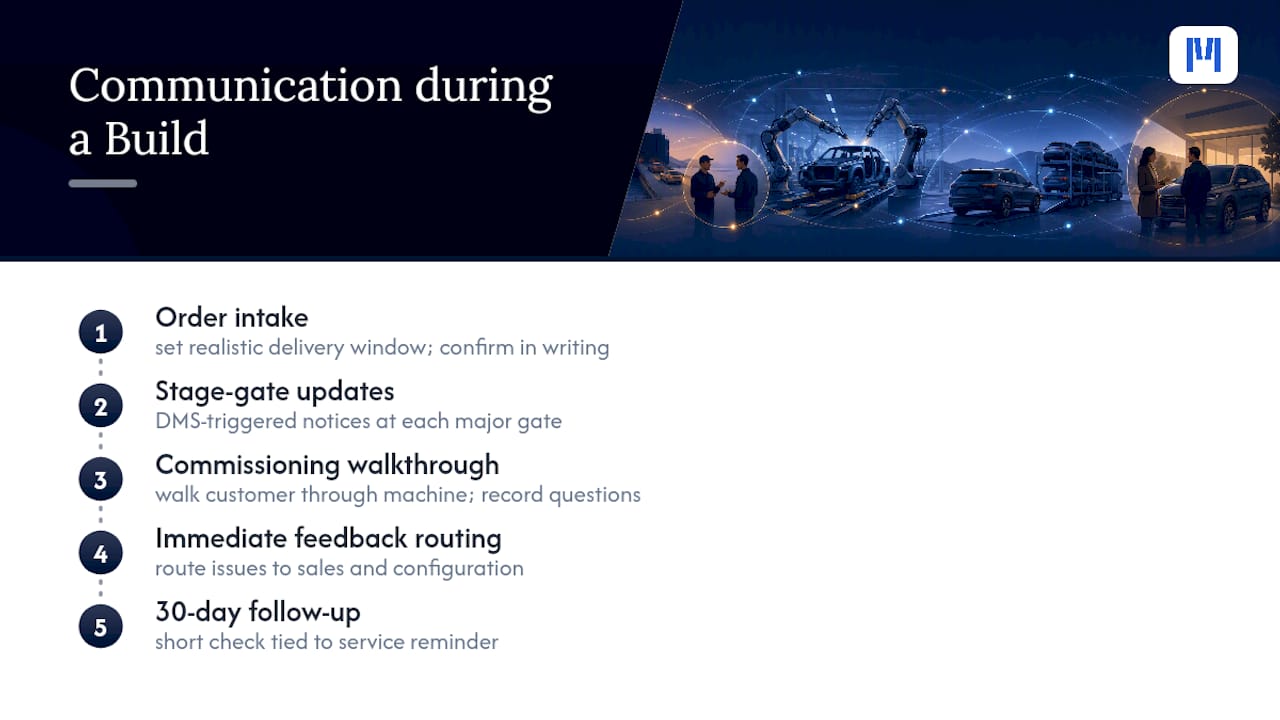
Silence is the fastest way to turn a routine build delay into a frustrated customer call. Set expectations at order intake: give the customer a realistic delivery window based on current parts availability, not an optimistic guess, and confirm that window in writing alongside the signed quote.
Send a status update at each major stage gate, order confirmed, kitting complete, assembly underway, commissioning scheduled, rather than waiting for the customer to ask. This is far easier when your DMS ties customer contact information directly to the unit record, so a status change can trigger an automated notification instead of relying on someone remembering to call.
Commissioning day itself is your best feedback opportunity. Walk the customer through the machine in person, record their questions, and note any operator concerns directly against the unit record. If a customer flags something during the walkthrough, whether it’s a control they find confusing or an accessory they expected but didn’t get, that feedback should route back to sales and configuration immediately, not get lost after delivery.
Post-delivery, a short follow-up at the 30-day mark (tied to that first automatically scheduled service reminder) closes the loop and gives you an early signal on any commissioning gaps before they turn into warranty disputes. Dealers who build this touchpoint into their process consistently catch operator-error issues before they escalate into a service call.
Should You Offer More Options or Fewer?
Every configurable option you offer adds a branch to your CPQ rule set, and every branch adds a way for a build to go wrong if that rule isn’t tested. The trade-off between customization and standardization isn’t really about what customers want. It’s about what your validation rules and kitting inventory can support reliably.
Standardizing your most popular configurations into pre-validated “packages” gives customers a faster quote and gives your parts team a kitting SKU that’s already proven. Reserve full custom configuration for the builds that genuinely need it, specialized attachments, unusual site requirements, or fleet-specific standardization requests from a repeat customer.
A practical rule: if only a small percentage of your builds use a particular option combination, question whether it’s worth maintaining as a standing CPQ rule versus handling it as a manual, sales-manager-approved exception. This keeps your rule set lean and your kitting inventory predictable, without telling customers no on the requests that actually matter to them.
How Do Supply Chain Delays Affect Build Timelines?
A build-to-order timeline is only as reliable as its weakest supplier link. When a single component runs late, whether it’s an OEM-sourced part or a third-party accessory, the entire unit can stall even if every other part of the build is ready.
The dealers who handle this best don’t try to eliminate supply risk; they build visibility into it. Tying every purchase order to the specific unit’s serial number means a delayed part shows up as a flagged blocker on that build, not a line item buried in a general parts backlog. That visibility lets your commissioning owner reset customer expectations early instead of discovering the problem the day delivery was promised.
Where possible, order long-lead-time components before the full configuration is finalized, especially for standardized packages where the base components rarely change. This is one area where standardizing popular configurations pays off twice: it shortens configuration time and gives you a predictable parts list you can stock ahead of demand rather than order reactively.
Can Data and AI Improve Build-to-Order Workflows?
Every stage of a digitized build-to-order workflow throws off data: configuration choices, kitting delays, commissioning times, warranty triggers. Once that data lives in one unit record instead of scattered spreadsheets, it becomes possible to actually analyze it instead of just filing it.
The most useful application right now isn’t predictive AI, it’s pattern recognition on your own historical builds. Which configuration combinations correlate with the longest kitting delays? Which commissioning owners consistently close units fastest, and what are they doing differently? Which suppliers show a pattern of late delivery on specific parts? These are questions a dealership can answer today with clean historical data and basic reporting, no advanced AI required.
Where AI genuinely helps is in flagging anomalies before they become problems, a build tracking meaningfully slower than similar past builds, or a configuration request that resembles combinations that historically triggered rework. As more dealer platforms build analytics directly into commissioning and CPQ modules, expect this kind of early-warning capability to become a standard feature rather than a premium add-on.
Why This Lifecycle Approach Matters
We’ve watched too many dealerships treat build-to-order as a side process, handled with a spreadsheet here and a paper checklist there instead of a core part of the deal record. That gap is where warranty disputes and delivery delays actually come from, not from any single department dropping the ball, but from nobody owning the whole build.
The conventional advice to “just communicate better between departments” misses the real fix. Departments don’t need better communication; they need to stop needing to communicate about basic facts in the first place. When configuration, kitting, and commissioning all live in one unit record, sales doesn’t have to call the workshop to check status, and the workshop doesn’t have to guess what the customer actually ordered.
Quick setup and modular rollout matter here for a practical reason: dealerships that try to overhaul everything at once usually stall halfway through. Piloting one workflow on one product line, then expanding once it proves out, is how you get staff buy-in without a six-month change-management project. If you’re weighing where to start, we’re glad to help map a pilot around your highest-volume configurable line.
— ModernDMS
How ModernDMS Runs Your Build-to-Order Lifecycle
Moderndms is built around exactly the lifecycle this article describes: one unit record that follows a build from quote to delivery, instead of five disconnected tools that each hold half the story.

Configuration runs through a rules-based CPQ module that validates option combinations before a quote goes out. Once accepted, that quote flows into parts and kitting management so purchase orders generate automatically instead of waiting for someone to remember to raise them. Assembly and inspection connect to workshop service and work order tools, and commissioning uses digital sign-off tied to a named owner, with the first service reminder created the moment the customer signs off. Finance integrations with Xero and MYOB close the loop on invoicing without duplicate data entry.
You can pilot a single module, CPQ or commissioning, without committing to a full platform swap. Dealers report saving administrative work once these modules replace manual handoffs. If you manage configurable new-unit builds, the equipment dealer software page is the fastest way to see how the modules map to your current workflow, or book a demo to walk through a pilot on your highest-volume product line.
Sources
- BDO: Automotive insights (case examples)
- FleetRabbit: Reducing construction equipment commissioning delays
- Configit: configuration management for equipment manufacturers
FAQ
How Long Should Commissioning Take on a New Unit?
With a digital commissioning workflow, most dealers can complete commissioning within hours rather than the days a paper-based process typically requires, according to FleetRabbit’s analysis of construction equipment delays.
Who Should Own a Unit During the Build-to-Order Process?
One named commissioning owner should be assigned per unit, responsible for training, sign-off, and warranty activation, so accountability never gets split across multiple people.
What Is the Difference Between Configure-to-Order and Build-to-Order for a Dealer?
Configure-to-order refers to the CPQ step of validating and pricing a build spec, while build-to-order covers the full lifecycle from that configuration through procurement, assembly, commissioning, and delivery.
How Much Time Can Rules-Based CPQ Actually Save?
One documented case saw configuration time drop from three hours to ten minutes after switching from manual spec sheets to a validated configurator.
Does ModernDMS Support the Full Build-to-Order Workflow?
Yes. Moderndms combines CPQ, kitting, purchasing, service, and digital commissioning inside one unit record, with modular rollout so dealers can pilot a single stage before scaling to the full workflow.