Save 10 Hours: AI Service Scheduling Playbook for Equipment Dealers
By MDMS Team · 7 September 2026

Save 10 Hours: AI Service Scheduling Playbook for Equipment Dealers
AI service scheduling automatically assigns workshop and field jobs by weighing constraints like technician skills, availability, travel time, and parts inventory, then rebooks around conflicts in real time. For a dealership, the payoff is fewer double-bookings and hours of dispatcher time returned every week. One equipment-hire operator cut admin time significantly after automating its booking and fleet scheduling.
TL;DR:
- AI scheduling systems can reduce double-bookings and manual rescheduling by real-time checking of technician skills, availability, and parts inventory.
- Successful implementation requires high-quality data, API access, and a focused pilot on high-volume use cases, typically lasting two to six weeks.
- Key KPIs to track include admin hours, booking conflict reduction, technician utilization, and first-time fix rates, with measurable improvements possible after deployment.
- Integration depth matters; vendors must connect seamlessly with dealer management systems, parts inventory, telematics, and finance platforms for maximum effectiveness.
- Off-the-shelf platforms like ModernDMS allow rapid deployment, with setup in about an hour and the ability to expand to rental or field service modules quickly.
Table of Contents
- What AI Service Scheduling Does for Dealer Operations
- What Features Should You Look for in Scheduling Software?
- How to Roll Out AI Scheduling Without Disrupting Your Workshop
- What KPIs Prove AI Scheduling Is Working?
- How ModernDMS Approaches Service Scheduling for Dealers
- Should You Buy or Build Your Scheduling System?
- Get Started With ModernDMS Scheduling
- Sources
- FAQ
What AI Service Scheduling Does for Dealer Operations
AI service scheduling replaces the whiteboard, the spreadsheet, and the dispatcher’s memory with a system that matches jobs to technicians using rules your team already follows, just applied consistently and instantly. It checks who has the right certification for a job, whether a part is in stock at the branch that technician is closest to, and whether the appointment fits inside a customer’s service-level agreement. This is the same logic behind enterprise field service platforms: constraint-based scheduling weighs skills, SLAs, travel time, inventory, and asset priority together rather than one at a time.
The dispatching layer matters just as much as the initial booking. When a technician calls in sick or a machine breaks down mid-route, the system re-optimizes the day’s schedule instead of forcing your service manager to work the phones.
The measurable gains show up fast:
- Fewer double-bookings because the system checks real-time availability before confirming a slot
- Higher technician utilization from tighter routing and less dead travel time
- Better first-time fix rates because the right parts and skills get matched to the job upfront
- Admin hours returned to your service desk instead of spent on manual rescheduling
Statistic Callout: A case study on an equipment-hire operator found that automated booking paired with predictive maintenance scheduling cut unplanned downtime by 40% and lifted fleet utilization by 35%.
What Features Should You Look for in Scheduling Software?
Not every scheduling tool built for offices or retail translates to a dealership floor. Your evaluation list needs to reflect the reality of workshops, rental yards, and technicians working out of a van.
Here’s what to check before you sign anything:
- Skills and certification matching so jobs only route to technicians qualified to do them.
- Route and ETA calculation that accounts for real travel time, not straight-line distance.
- Offline-capable mobile app for technicians working in areas with patchy signal.
- Live asset and inventory sync so a booking never gets confirmed against a part that isn’t actually in stock.
- Two-way DMS integration so schedule changes update work orders, invoicing, and customer records automatically.
Integration depth is where most scheduling tools quietly fall short. Ask vendors directly whether the system reads and writes to your dealer management system, or just layers on top of it as a disconnected calendar. Confirm it connects to your parts inventory, your telematics or telemetry feeds if you run a rental fleet, and your accounting platform, whether that’s Xero or another ledger. A booking portal that can’t talk to your parts system will happily schedule a repair using a part that sold an hour earlier.
Data residency and call logging matter too, especially if your dealership operates under service contracts with data-handling clauses. Ask where customer and job data is stored, how long call or booking logs are retained, and what happens to that data if you switch providers.
Pro Tip: Ask any vendor to walk through a reschedule scenario live during the demo. How the system handles a canceled job in real time tells you more about its dispatch logic than any feature sheet.
Red flags worth walking away from: vendors who can’t explain their scheduling logic beyond “AI decides,” systems that require a separate login from your core DMS, and any platform that locks your historical job data behind an export fee.
How to Roll Out AI Scheduling Without Disrupting Your Workshop
A phased pilot beats a full-floor switchover every time. Dealerships that rush a company-wide launch tend to generate the exact chaos they were trying to eliminate.
- Clean your master data first. Scheduling only works as well as the technician availability, skill records, and asset status feeding it. Inaccurate data produces poor matches and more manual overrides, not fewer.
- Confirm API access to your DMS, parts inventory, and telematics feeds before you touch a pilot schedule.
- Pick one high-volume use case for the pilot, such as routine workshop bookings or a single rental depot, rather than trying to automate everything at once.
- Set baseline KPIs before you flip the switch, including current admin hours per week and current double-booking rate.
- Run the pilot for two to six weeks, long enough to cover a full booking cycle but short enough to course-correct quickly.
- Train dispatchers and technicians separately. Dispatchers need to trust the override controls; technicians need to trust the mobile app actually reflects their real schedule.
Watch for these signals before scaling past the pilot:
- Dispatcher override rate is dropping week over week
- Technicians are checking the mobile app instead of calling the office for job details
- Booking conflicts are trending down against your baseline
Once those trends hold for two consecutive weeks, you have a defensible case to roll out to additional branches or service lines.
What KPIs Prove AI Scheduling Is Working?
Track five numbers before and after rollout: admin hours spent on scheduling per week, bookings completed per technician per day, fleet or workshop utilization rate, first-time fix rate, and double-booking frequency. Without a documented baseline, you have no way to prove the system is earning its subscription cost.
- Admin hours saved — compare dispatcher hours logged on scheduling tasks before and after
- Utilization rate — track billable hours or fleet hours against total available hours
- Double-booking rate — count conflicts caught before versus after go-live
- First-time fix rate — measure jobs closed on the first visit without a return trip
Statistic Callout: The equipment-hire case referenced earlier saw fleet utilization climb 35% and unplanned downtime fall 40% after integrating booking automation with predictive maintenance scheduling, giving dealerships a real benchmark to model their own pilot against.
Measure using a consistent reporting cadence, weekly during the pilot and monthly after rollout, pulling data from the same source each time. The most common pitfall is comparing numbers pulled from different systems or time windows, which makes results look better or worse than reality. Also watch for seasonal booking spikes skewing a short pilot window; a two-week pilot during a slow month will overstate gains.
How ModernDMS Approaches Service Scheduling for Dealers
ModernDMS builds scheduling directly into the dealer workflows you already run, rather than bolting a separate calendar tool onto your DMS. The service management module connects workshop bookings, technician dispatch, and work orders in one place, so a scheduling change updates the job record automatically instead of needing a second entry.
What that looks like in practice:
- A customer-facing booking portal that captures service requests without a phone call
- An offline-capable mobile field app so technicians can update jobs without signal
- Native Xero integration so completed jobs flow straight into invoicing
- Modular rollout, so you can turn on service scheduling without touching parts, sales, or rental modules yet
- Setup for individual modules in under an hour, with full data ownership and no lock-in if you ever migrate
Dealer teams have reported saving up to 10 hours a week that used to go into manual booking and rescheduling. The practical next step is a short pilot on one service line, workshop bookings are the usual starting point, before expanding into rental fleet or field technician scheduling.
Should You Buy or Build Your Scheduling System?
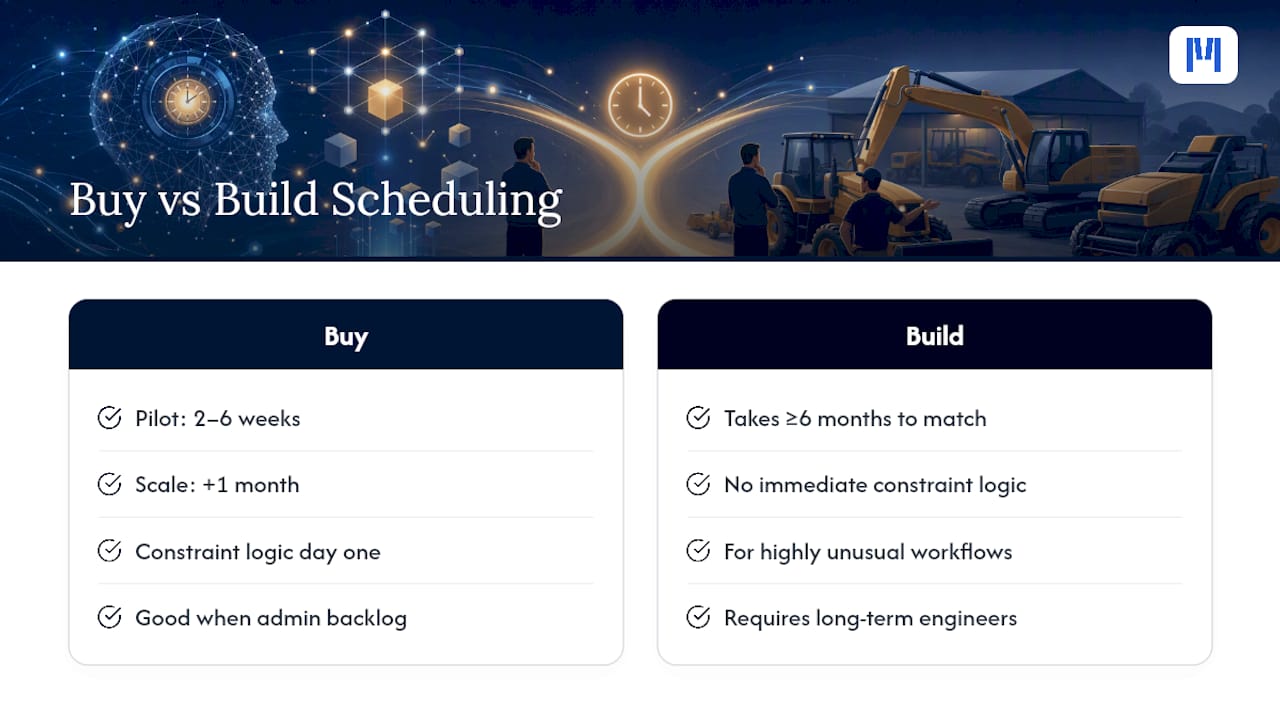
Buying wins on speed almost every time. A configured platform gets a pilot running in weeks and gives you proven constraint logic on day one, which matters most when admin backlog is already costing you technician hours.
Building only makes sense when your workflows are genuinely unusual, think highly custom rental contract terms or a fleet with unique telemetry requirements, and you have the internal engineering capacity to maintain it for years, not just launch it. Most dealerships don’t have that spare capacity sitting around. A realistic buy timeline runs two to six weeks for pilot, then another month to scale. A build project realistically takes six months or more before it matches what an off-the-shelf platform does on day one.
— ModernDMS
Get Started With ModernDMS Scheduling
ModernDMS gives dealerships a faster path to organized scheduling than building custom tooling or stitching together disconnected apps, without the months-long build timeline or the ongoing engineering overhead that comes with it.

The platform’s service management tools bring workshop bookings, technician dispatch, and work orders into one modular system, so you can turn on scheduling for your service department without touching sales, parts, or finance until you’re ready. If your dealership runs a rental fleet alongside workshop service, the rental management module extends the same scheduling logic to asset bookings and contract terms. And if a custom connector to a telematics feed or third-party app is part of your integration needs, partners like FlowLab build that bespoke integration work.
Map your current scheduling workflow, then request a demo to see how it fits your service desk, or start a trial to pilot it on one branch before rolling it out fleet-wide.
Sources
- PSG Plant Hire Case Study — AI Booking Automation and Fleet Management | Valenor
- IBM Maximo Field Service Management
FAQ
What Is AI Service Scheduling for a Dealership?
It’s software that automatically assigns workshop, field, and rental jobs by checking technician skills, availability, travel time, and parts inventory together, instead of a dispatcher checking each manually.
How Long Does It Take to Set Up AI Scheduling?
A single module, like a service booking portal, can be configured in under an hour with a platform like ModernDMS, though most dealerships still run a two to six week pilot before scaling to additional branches.
What Results Can a Dealership Expect From AI Scheduling?
Case studies show admin time reductions as high as 60% and fleet utilization gains of 35% when booking automation is paired with predictive maintenance scheduling; dealer teams using ModernDMS report saving up to 10 hours a week on scheduling admin.
Does AI Scheduling Work for Rental Fleets, Not Just Workshops?
Yes. The same constraint logic that matches technicians to workshop jobs applies to rental assets, checking availability, maintenance status, and contract terms before confirming a booking.
What Should I Check Before Choosing a Scheduling Vendor?
Confirm two-way integration with your DMS, parts inventory, and accounting platform, along with offline mobile support and clear answers on data ownership if you ever need to migrate.