Customer Service Portal for Equipment Dealers: Cut Calls, Capture Parts Sales
By MDMS Team · 1 August 2026

Customer Service Portal for Equipment Dealers: Cut Calls, Capture Parts Sales
TL;DR:
- A customer service portal is a branded, self-service platform that centralizes records, service requests, parts, and documentation for equipment dealerships. It significantly reduces support calls, improves operational efficiency, and strengthens customer retention through white-labeled, integrated tools. Launching with core features like service requests, documentation access, and parts ordering ensures quick value delivery and long-term adoption.
A customer service portal is a branded, integrated self-service layer that centralizes asset records, service intake, parts ordering, and documentation into a single digital channel your customers access on your terms. For Australian equipment dealerships, this is not a nice-to-have web feature. It is a retention channel. Dealers who reach a high level of adoption typically see inbound support contacts drop significantly, freeing your service team to focus on billable work rather than status calls.
The recommended starting point: a modular pilot with a few core features across selected high-value accounts, using Moderndms as your Australia-native platform. A pilot scope of service request intake, digital documentation access, and parts reordering gives you measurable operational gains within 3–6 months, with typical ROI realized in 9–15 months, without over-engineering the launch.
- Pilot scope: service requests, documentation access, parts reordering
- Expected early outcome: 40–60% reduction in routine inbound contacts
- Platform: Moderndms, built for Australian equipment dealerships with Xero integration and offline field service
Table of Contents
- What does a customer service portal actually do for equipment dealers?
- What business outcomes should your dealership expect?
- Which features should you launch first?
- How should the portal integrate with your DMS and accounting systems?
- How do you roll out a portal without disrupting operations?
- What KPIs should you track, and what results are realistic?
- What mistakes do dealers make, and how do you avoid them?
- Why Moderndms is the right platform for Australian equipment dealers
- Key Takeaways
- What dealers who modernized actually experienced
- Get started with Moderndms: book a demo or request a pilot
- Useful sources and further reading
- FAQ
What does a customer service portal actually do for equipment dealers?
A dealer customer portal is a secure, branded web environment where your customers — fleet managers, site supervisors, and procurement teams — can view their assets, check service history, download manuals, raise work orders, and reorder parts without calling your branch. Think of it as moving the service counter online, with full asset context attached to every interaction.
The users who benefit most are the ones who currently generate the most phone traffic:
- Fleet managers checking machine status, warranty coverage, and service due dates
- Site supervisors logging breakdown requests and tracking technician dispatch
- Procurement contacts reordering consumables and parts against known serial numbers
- Finance contacts accessing service reports and invoices for compliance records
The operational pain is familiar: your service advisors spend a significant portion of their day answering calls that could be self-served. Asset context is missing when a customer calls, so the advisor has to hunt through records before they can help. A well-built customer portal eliminates that scavenger hunt by surfacing asset history, open tickets, and warranty status the moment a customer logs in. Data ownership and regional data residency matter here too — your customer data should stay under your control, not locked inside a vendor’s infrastructure.
What business outcomes should your dealership expect?
The operational wins are direct and measurable. Call deflection is the most immediate: once adoption reaches a healthy level, routine status calls and parts reorder calls decrease significantly. Your service advisors gain time to handle complex jobs, and first-time fix rates improve because technicians arrive with full asset context rather than incomplete notes.
Operational outcomes:
- Fewer inbound calls and emails for status updates, parts availability, and service bookings
- Faster technician dispatch because service requests arrive with asset serial numbers and service history attached
- Reduced admin hours — Moderndms users report up to 10 hours/week saved in administrative tasks
- Higher parts attachment rates as customers reorder directly through the portal
The strategic gains are where the portal earns its place as a retention tool. Deploying the portal under your own domain creates what practitioners call digital retention: customers interact with your brand daily, not a vendor’s app, which deepens the relationship and makes switching to a competitor meaningfully harder. White-labeling the portal on your own domain preserves brand equity and strengthens customer ownership of the relationship. Parts e-commerce revenue grows as reordering becomes frictionless, and renewal conversations become easier when a customer can see their full service and warranty history in one place.
Benchmark: Industrial OEM portals report a 40–60% reduction in routine inbound contacts and a 15–25 point improvement in first-time fix rates once adoption matures.
Which features should you launch first?
Launch with the three features that deliver the fastest, most visible value to both your team and your customers. Adding too many features at once is the single most common reason portal rollouts stall.
Priority features for your pilot:
- Service request intake tied to asset records: customers log a breakdown or service request against a specific serial number, with photos and notes attached. Your service team receives a structured ticket with full asset context.
- Digital documentation and service history access: manuals, compliance certificates, service reports, and warranty documents available per machine, 24/7. This alone eliminates a significant category of inbound calls.
- Parts ordering and reorder flows: customers reorder consumables against known machine records, reducing order errors and accelerating fulfillment through your parts management workflow.
Secondary features to add after adoption is proven:
- Warranty and contract visibility with expiry alerts
- Quote approvals for scheduled services
- Preventive maintenance reminders triggered by service intervals
- IoT or telematics alerts for connected equipment
Pro Tip: White-label the portal on your own domain from day one. Customers who interact with your brand’s URL daily perceive the relationship as yours, not the software vendor’s. This materially affects long-term stickiness and makes the portal a genuine retention asset.
How should the portal integrate with your DMS and accounting systems?
Data should travel once. The portal is only as useful as the data behind it, which means every asset record, service ticket, and parts order must flow through a single authoritative source rather than being re-entered across systems.

| Data Flow | Direction | Sync Type | Authoritative System |
|---|---|---|---|
| Asset master (serial numbers, specs, warranty) | DMS → Portal | Real-time | DMS / build order records |
| Service requests | Portal → DMS/FSM | Real-time | DMS service module |
| Parts orders | Portal → Inventory & Accounting | Real-time | DMS parts/warehouse |
| Invoices and service reports | DMS → Portal | Batched or real-time | DMS finance module |
| User identity (SSO) | Identity provider → Portal | Session-based | Identity provider |
Integration checklist before go-live:
- Confirm read/write vs. read-only access for each data type — customers should never be able to edit asset master records
- Map user identities so a customer’s portal login connects to their account records without manual linking
- Verify audit trails are captured for every service request and parts order
- Confirm data residency: Australian customer data should remain in Australian-hosted infrastructure
- Test Xero or MYOB posting for parts orders and service invoices before launch
Moderndms integrates with Xero and MYOB natively, so parts orders and service completions post to your accounting system without manual export. The offline-capable field service app synchronizes with the central system when connectivity returns, which matters for dealers running jobs on remote sites across Australia. For teams navigating broader cloud modernization alongside a portal rollout, having a clear integration architecture before launch prevents duplicated asset masters — one of the most common and costly pitfalls.
How do you roll out a portal without disrupting operations?
A phased rollout protects your team and your customers from a disruptive big-bang launch. The goal in the first 90 days is proof of value, not full deployment.
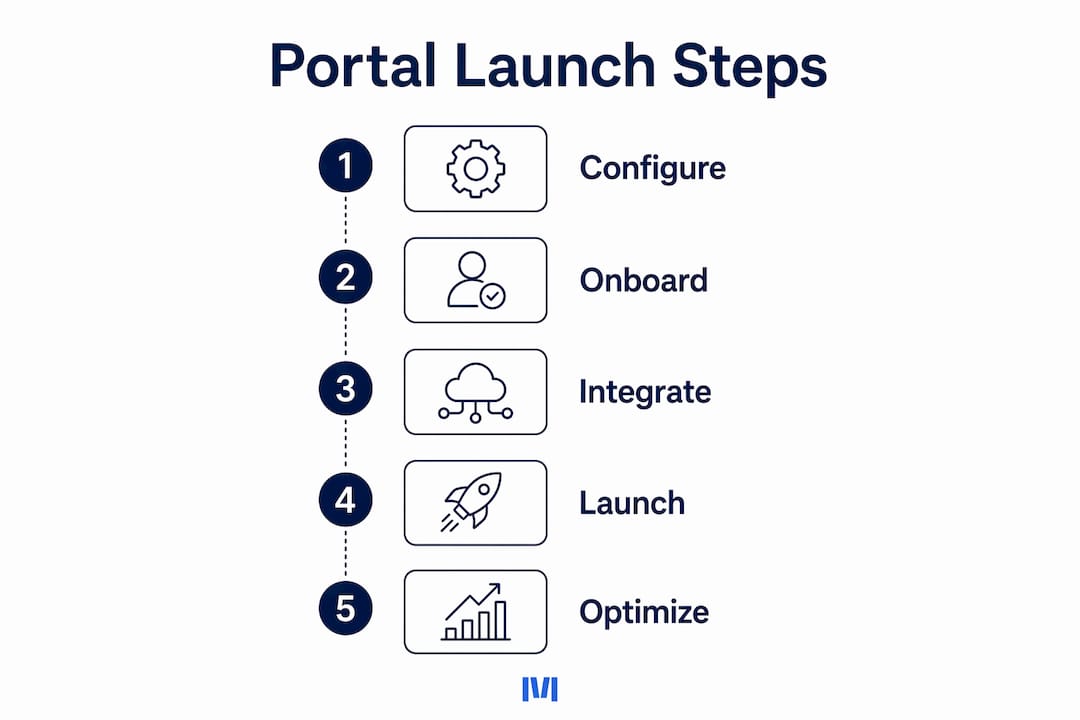
- Select your pilot accounts (weeks 1–2). Choose 5–10 accounts with engaged service teams and a history of repeat parts spend. These customers are most likely to adopt quickly and generate measurable ROI data.
- Configure your 3 core features (week 2–3). Basic configuration in Moderndms takes under an hour. Set up service request intake, documentation access, and parts reordering. White-label the portal on your domain before any customer sees it.
- Run onboarding for pilot customers (weeks 3–4). Provide short video walkthroughs (2–3 minutes), a guided first-login experience, and a drop-in support window for the first two weeks. Assign a digital experience owner internally to handle questions.
- Collect feedback and iterate (months 2–3). Track portal logins, service requests submitted, and parts orders placed. Interview 3–5 pilot customers. Fix friction points before scaling.
- Scale by account tier (months 3–6). Roll out to your next tier of accounts, adding secondary features only after adoption in the pilot group exceeds 60%.
Pro Tip: Assign a named digital experience owner before launch — someone accountable for onboarding new customers, auditing content freshness, and reviewing adoption metrics monthly. Portals without an owner decay quickly.
What KPIs should you track, and what results are realistic?
Track a small set of metrics from week one. More metrics than your team can act on become noise.
Core KPIs:
- Inbound contact deflection rate: target 40–60% reduction after good adoption
- Admin hours saved per week: Moderndms users report up to 10 hours/week
- First-time fix rate: expect a 15–25 point improvement as technicians arrive with full asset context
- Parts attachment rate: portal-driven parts orders as a percentage of total parts revenue
- Portal active usage: percentage of accounts logging in at least once per month
- Renewal attachment lift: service contract renewals influenced by portal engagement
ROI typically materializes within 9–15 months, with early operational gains visible in 3–6 months. Parts revenue uplift of 15–35% is achievable once customers can reorder without friction. Report weekly on adoption and monthly on revenue attachment to give leadership a clear picture.
What mistakes do dealers make, and how do you avoid them?
The most common failure mode: launching a portal with incomplete asset histories. Customers who log in and find missing service records or blank warranty fields call your branch anyway — and they are now frustrated rather than neutral. A portal with bad data increases support volume rather than reducing it.
Pitfalls and prevention steps:
- Over-building at launch: limit the pilot to 3 features. Every additional feature at launch adds training burden and delays adoption.
- Hosting on a vendor subdomain: always deploy on your own domain. A portal at
yourdealer.com/portalbuilds your brand; one atvendor.app/yourdealerdoes not. - “Set it and forget it” content: assign a digital experience owner to audit manuals, service reports, and asset histories on a regular cadence. Stale content erodes trust fast.
- Poor customer onboarding: a login email alone is not onboarding. Provide a short video, a guided first-login flow, and a human contact for the first two weeks.
- Fragmented portals: consolidating multiple fragmented portals into one branded experience can reduce portal complexity by 60%. Start unified.
Why Moderndms is the right platform for Australian equipment dealers
Moderndms is purpose-built for the way Australian equipment dealerships operate. The platform covers the full dealer workflow — sales, build orders, workshop service, field service, rental fleet, parts and warehouse, warranty recovery, and finance — with a branded customer self-service portal as a native module, not a bolt-on.
| Feature Area | Moderndms Capability | Dealer Benefit |
|---|---|---|
| Customer portal | Branded, white-labeled, dealer-domain hosted | Preserves brand equity and digital retention |
| Service management | Work orders, job cards, technician dispatch | Full asset context on every ticket |
| Parts and warehouse | Portal-connected parts ordering and inventory | Faster fulfillment, higher attachment rates |
| Field service | Offline-capable mobile app | Reliable on remote Australian sites |
| Accounting integration | Xero and MYOB native integration | Australian GST compliance, no manual export |
| Rollout model | Modular, feature-by-feature adoption | Low risk, fast time to value |
| Setup time | Under an hour for basic configuration | Pilot live within days, not months |
| Data ownership | Full data ownership, no vendor lock-in | Your data stays yours |
Demo preparation checklist:
- Export a sample asset list with serial numbers, warranty dates, and last service dates
- Identify your 5–10 pilot accounts and their primary contacts
- List your critical integrations (Xero, MYOB, existing parts catalog)
- Prepare 2–3 service scenarios to walk through during the demo
The core value proposition: Moderndms gives Australian equipment dealers a single platform where asset data, service workflows, parts orders, and customer-facing self-service all connect — without the integration overhead of stitching together separate tools.
Key Takeaways
A customer service portal built on a single, integrated platform is the most direct path to lower support costs, higher parts revenue, and stronger customer retention for Australian equipment dealerships.
| Point | Details |
|---|---|
| Start with 3 features | Launch service requests, documentation access, and parts ordering first — expand only after adoption is proven. |
| Expect measurable early gains | Inbound contact deflection of 40–60% and up to 10 hours/week in admin savings are realistic targets. |
| Own your domain and data | White-label on your dealer domain from day one; full data ownership prevents vendor lock-in. |
| ROI timeline | Early operational wins appear in 3–6 months; full ROI typically materializes within 9–15 months. |
| Moderndms recommendation | Moderndms delivers a branded portal, Xero/MYOB integration, offline field service, and modular rollout built for Australian dealers. |
What dealers who modernized actually experienced
The trajectory most dealers follow looks like this: a cautious pilot with a handful of accounts, a few weeks of data cleanup to get asset histories in order, and then a quiet shift in how the service desk operates. The phone still rings in the first month. By month three, the volume drops noticeably, and the calls that do come in are more complex — the kind your advisors are actually equipped to handle.
The data cleanup phase is the part most dealers underestimate. Asset records that were accurate enough for internal use turn out to have gaps that matter when a customer is staring at a blank warranty field. The dealers who move through this fastest are the ones who assigned a digital experience owner before launch, not after the first complaint.
The longer-term benefit is subtler but more valuable: renewal conversations change character. When a customer can see their full service history, upcoming maintenance, and parts spend in one place, the discussion shifts from “what have you done for us?” to “what’s coming up next?” That shift is worth more than any single efficiency metric.
Get started with Moderndms: book a demo or request a pilot
Moderndms is the Australia-native alternative to stitching together a portal, a field service app, and an accounting integration from three separate vendors. For equipment dealers who need a single platform that covers the full workflow from asset record to customer invoice, the concrete advantage is this: basic configuration takes under an hour, your data stays under your control, and the modular rollout model means you are not committing to a full deployment before you have seen results.

To book a demo, prepare a sample asset export (serial numbers, warranty dates, last service), your pilot account list, and your key integration questions around Xero or MYOB. The demo will walk through a live service request, a parts reorder flow, and the portal’s customer-facing view under your branding. Moderndms operates on a monthly rolling subscription with no long-term lock-in, and a free trial is available to qualified dealerships. Visit the industrial equipment dealer page to request your demo or start a trial today.
Useful sources and further reading
- Customer Portals Explained for Industrial Machinery Manufacturers — Makula: The primary source for adoption benchmarks (40–60% contact reduction, 9–15 month ROI), phased rollout guidance, and IoT integration considerations. Start here for industry-specific data.
- White-Label Customer Portal Software for OEMs — ToolSense: Covers the strategic case for deploying portals under your own domain and the concept of digital retention. Useful for justifying the white-label requirement to leadership.
- Customer Portal Software for Equipment Dealers — Moderndms: Moderndms’s own feature page covering the branded portal, admin time savings, and integration capabilities. Reference this when preparing demo questions.
- Offline Field Service App for Equipment Dealers — Moderndms: Details on offline-capable mobile workflows for remote Australian sites. Relevant for dealers with field technicians operating outside reliable connectivity.
- Australian Motoring Leader Improves Customer Support with JSM — ServiceRocket: Australian case study showing a 60% reduction in portal complexity after consolidation. Useful context for information architecture decisions.
After reviewing these sources, the logical next step is a demo with Moderndms to map your specific asset data and workflow to the platform’s capabilities.
FAQ
What is a customer service portal for equipment dealers?
A customer service portal is a branded, secure web environment where your customers view asset records, raise service requests, access documentation, and reorder parts without contacting your branch directly.
How much can a dealer portal reduce inbound support calls?
Industrial equipment portals report a 40–60% reduction in routine inbound contacts once adoption reaches 60–70% of accounts.
How long does it take to set up Moderndms’s customer portal?
Basic configuration takes under an hour, and a pilot with 2–3 core features can be live within days. Full adoption across your account base typically takes 3–6 months.
Does the portal need to integrate with Xero?
Yes, for Australian dealerships. Moderndms integrates natively with Xero and MYOB so parts orders and service completions post directly to your accounting system with correct GST treatment.
What is the biggest mistake dealers make when launching a portal?
Launching with incomplete asset histories. Customers who find blank warranty or service records call your branch anyway, increasing rather than reducing support volume. Clean your asset data before go-live.