Service Booking Portal for Equipment Dealers: Evaluate & Deploy
By MDMS Team · 11 August 2026
Service Booking Portal for Equipment Dealers: Evaluate & Deploy
A DMS-integrated service booking portal is the online and staff-facing interface your dealership uses to accept service requests, create repair orders (ROs), schedule shop and field technicians, and confirm appointments back to the customer — all without a single phone call or manual re-key. For equipment dealers in Australia, the portal sits inside your dealer management system, not alongside it, so every booking automatically links to job cards, parts availability, technician schedules, and your accounting platform.
The core elements that equipment dealers need from a portal include:
- Customer self-service intake — customers book online, attach photos or machine details, and receive instant confirmation
- Staff intake and triage — your service team reviews, prioritizes, and dispatches from the same interface
- Shop and field schedule sync — workshop bays and mobile technicians share one live capacity view
- Job-card linkage — every booking auto-generates an RO tied to the asset’s service history
Moderndms (MDMS) delivers this as a native module inside its equipment-dealer DMS, built specifically for Australian compliance and workflows.
Key Takeaways
A DMS-integrated service booking portal is the single highest-leverage technology change an Australian equipment dealership can make to recover admin time, increase throughput, and reduce inbound call volume.
| Point | Details |
|---|---|
| Integration depth is everything | Require a live demo of booking-to-RO flow before signing any vendor contract. |
| Parts reservation at booking | Soft-reserve stock at booking time to improve first-time fix rate and parts revenue per RO. |
| Admin time recovered | Client-reported savings in administrative tasks when booking, scheduling, and RO creation are automated. |
| Pilot before full rollout | Go live on one branch first; measure admin hours and call volume for four weeks before expanding. |
| Moderndms for Australian dealers | MDMS offers a modular, Australia-built DMS with native Xero integration, a customer portal, and setup under an hour. |
Table of Contents
- Why does a service booking portal matter for equipment dealerships?
- What features must your service booking portal include?
- How does syncing shop and field schedules increase throughput?
- Which systems must your portal integrate with?
- What should you budget and plan for implementation?
- What should you ask vendors during demos and RFP evaluations?
- Why Moderndms is a practical choice for Australian equipment dealers
- End-to-end deployment timeline: selection to full go-live
- The part most dealers underestimate
- Moderndms: an integrated portal built for Australian equipment dealers
- Sources
- FAQ
Why does a service booking portal matter for equipment dealerships?
The top three measurable outcomes are reduced admin time, higher service throughput, and better customer retention through self-service convenience. These are not soft benefits — they show up in your weekly labor reports and your parts invoices.
Direct integration of website booking into the DMS eliminates manual re-keying and gives customers instant booking confirmations, improving satisfaction and cutting back-office workload. Digital self-service tools also increase parts capture: when customers book online and describe the fault, your team can pre-pick parts before the machine arrives, turning a reactive job into a planned one.
Track these KPIs after deployment to measure ROI:
- Admin hours saved per week (baseline vs. post-go-live)
- Inbound call volume to the service desk
- Average job turnaround time from booking to invoice
- First-time fix rate (parts on hand at job start)
- Parts revenue per RO (pre-picked vs. walk-in jobs)
The customer portal from Moderndms specifically targets call-volume reduction and parts-sales capture — two metrics that directly affect service profitability.
What features must your service booking portal include?
The single most critical feature set is shop-and-field schedule sync paired with automatic RO creation. Without those two, you still have a booking form, not a portal.
Full checklist for equipment dealers:
- Real-time capacity view — technician availability and bay loading visible at booking time
- Technician skill and certification matching — system routes jobs to qualified staff only
- Parts reservation at booking — parts are soft-reserved when the job is confirmed, not when the truck arrives
- Customer portal UX — mobile-friendly, asset-linked, with service history visible to the customer
- Digital approvals — customers approve scope changes via the portal, eliminating phone tag
- Photo and video attachments — customers upload fault evidence at booking; technicians review before dispatch
- Online payments — deposit or full payment collected at booking or on job completion
- Automatic RO creation — booking data flows directly into the job card with no re-keying
- Promise-date templates — standard lead times pre-populate so customers see realistic completion dates
- Offline-capable mobile field app — technicians update job status and parts usage in the field, even without signal
The MDMS service management solution covers workshop and field workflows in a single interface, including the mobile app and service record-keeping.
Pro Tip: When negotiating with any vendor, ask specifically who owns your data if you cancel. Insist on a written data-export clause in the contract before you sign — proprietary lock-in is the most common hidden cost in DMS procurement.
How does syncing shop and field schedules increase throughput?
Aligned schedules reduce travel, rework, and missed promise dates. That is the mechanism. When a booking portal shares live schedule data with a mobile field app, technicians arrive at jobs with the right parts, the right job details, and no surprises.
Pairing a booking portal with mobile field tools gives technicians on-demand access to job details and parts requirements, reducing both travel and rework. A unified, cloud-based service workflow improves technician productivity and shortens turnaround times across reviewed dealer examples. — Equipment World
A structured service optimization program using standardized workflows and performance tracking can reduce turnaround times substantially while improving service profitability — the operational gains are real when processes are modernized end-to-end.
Here is the process flow that eliminates waste:
- Customer books online, attaches machine serial number and fault description
- System checks technician availability and parts stock, confirms a promise date
- RO is auto-created; parts are soft-reserved in the warehouse
- Field technician receives job brief on mobile app with asset history and parts list
- Technician completes job, updates status in the app; RO closes and invoice is generated
- Customer receives completion notification and pays via the portal
The operational levers this flow affects: zero admin re-keying, parts on hand at job start, accurate promise dates, and a closed-loop audit trail from booking to invoice.
For larger dealer networks considering AI-assisted dispatch routing, the JobOS Pro AI dispatch guide covers advanced scheduling strategies that complement a DMS-integrated portal.
Which systems must your portal integrate with?
Prioritize DMS-core linkages first: parts and inventory, workshop scheduler, field app, CRM, accounting, and payments. Telematics and asset registers come next.
| System | Minimum integration behavior | Business impact |
|---|---|---|
| Parts / inventory | Real-time stock check and soft-reservation at booking | Eliminates parts shortages on job day |
| Workshop scheduler | Live bay and technician capacity visible during booking | Prevents overbooking and missed promise dates |
| Mobile field app | Job brief, parts list, and status updates pushed to technician device | Reduces travel and rework |
| CRM | Booking and job history written back to customer record | Supports follow-up and warranty tracking |
| Accounting (Xero / MYOB) | Invoice and GST data flow on RO close | Eliminates double-entry; maintains Australian GST compliance |
| Payments | Online deposit or full payment at booking or completion | Reduces debtors and speeds cash flow |
| Asset / telematics register | Machine serial, hours, and service history linked to booking | Enables condition-based scheduling |
A best-practice DMS flow moves online bookings into the service scheduler, creates ROs, assigns technicians, and updates CRM and accounting — evaluate every vendor against this end-to-end flow.
On the accounting side, native Xero or MYOB integration with Australian GST handling is non-optional for Australian dealers. An API-only connection that requires a middleware layer adds cost and a failure point.
What should you budget and plan for implementation?
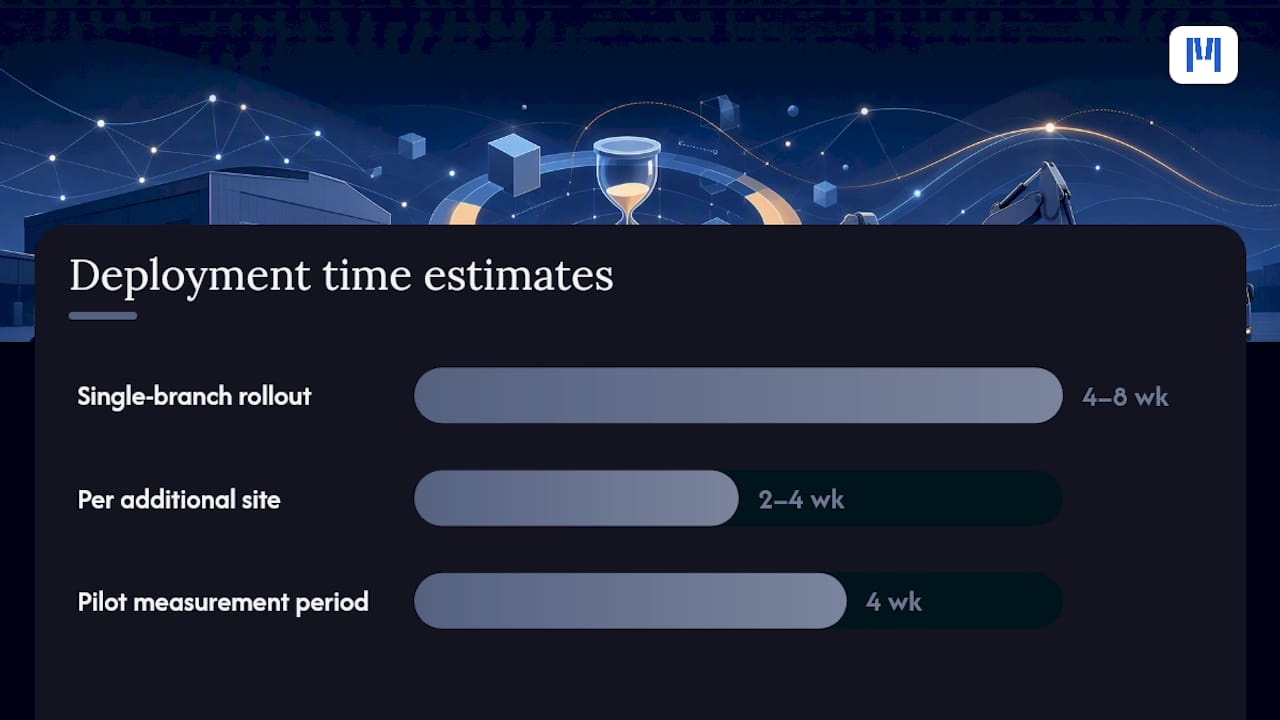
A realistic rollout runs four to eight weeks from contract to full deployment for a single-branch dealership. Multi-branch rollouts typically add two to four weeks per additional site.
Quick-setup benchmark: Moderndms is designed for setup under an hour for core configuration — a meaningful contrast to legacy DMS platforms that require months of professional services before go-live.
Cost buckets to plan for:
- Subscription fee — monthly, based on modules and team size; no long-term lock-in with MDMS
- Data migration — historical ROs, asset records, and customer data; complexity drives cost here
- Staff training — service coordinators, technicians, and managers each need role-specific sessions
- Integration setup — Xero/MYOB connection, payments gateway, and any telematics feeds
- Change management — process documentation, daily management rituals, and a go-live support window
Run a pilot with one branch or one service team first. Measure admin hours and call volume for four weeks before expanding. That baseline makes the ROI case internally and surfaces any workflow gaps before they affect your whole operation.
Pro Tip: Ask your vendor for a phased rollout option — activate scheduling and RO creation first, then layer in online payments and customer portal access. Trying to go live on every module simultaneously is the most common cause of slow adoption.
What should you ask vendors during demos and RFP evaluations?
The single must-ask question: “Can you demo a live booking flowing through to an RO in our test environment, using one of our own asset records?” If the vendor cannot do that in the demo, the integration is not as deep as the brochure suggests.
Full demo checklist:
- Live booking into a test DMS instance, end-to-end to RO creation
- Parts reservation flow — does stock reduce in real time at booking?
- Promise-date handling — how does the system respond when capacity is full?
- Field app offline behavior — what happens when a technician loses signal mid-job?
- Audit trail — can you trace every change from booking to invoice close?
- Support SLA — what is the response time for a P1 outage during business hours in Australia?
Red flags to walk away from:
- Manual re-keying still required between the portal and the DMS
- Proprietary data format with no export option
- “Custom build” required for Xero or MYOB integration
- No Australian GST support in the base product
- Support team operating only in US or European time zones
Pro Tip: Ask for two customer references from equipment dealers (not car dealers) who have been live for at least six months. The questions that matter: how long did migration take, and what did the vendor get wrong the first time?
Why Moderndms is a practical choice for Australian equipment dealers
Moderndms meets the critical requirements for a DMS-integrated service booking portal built for Australian equipment dealerships. The MDMS feature set maps directly to the checklist above: shop and field schedule sync, offline-capable mobile app, parts and inventory linkage, native Xero integration with Australian GST compliance, a customer self-service portal, and a setup benchmark under an hour.
Key proof points:
- Client-reported time savings of up to 10 hours per week in admin tasks
- Customer portal that reduces inbound call volumes and captures parts sales
- Modular rollout — activate only the modules your team is ready for, then expand
- No data lock-in — your asset records, RO history, and customer data remain yours
Pro Tip: Request a sandbox demo using your own machine serial numbers and a real service scenario from last month. That single test will tell you more about integration depth than any feature checklist.
End-to-end deployment timeline: selection to full go-live
| Phase | Duration | Key activities |
|---|---|---|
| Vendor selection and contract | Weeks 1–2 | Demo, RFP, reference checks, data-export clause negotiation |
| Data migration and configuration | Weeks 3–4 | Asset records, customer data, RO history, Xero connection |
| Staff training | Weeks 4–5 | Role-specific sessions: coordinators, technicians, managers |
| Pilot go-live (one branch) | Weeks 5–6 | Activate scheduling and RO creation; measure baseline KPIs |
| Customer portal activation | Weeks 6–8 | Enable self-service booking and notifications for customers |
| Full deployment and review | Weeks 7–8 | Expand to all branches; review admin hours and call volume |
Multi-branch dealers should add a two-to-four-week buffer per additional site and assign a dedicated internal project owner for each location.
The part most dealers underestimate
Most evaluation checklists focus on features. The harder problem is change management. A portal that your service coordinators distrust or work around delivers none of the throughput gains described above.
The dealers who see the fastest ROI share one habit: they measure admin hours and call volume weekly for the first 90 days and share the numbers with the team. When coordinators see their own time returned to them, adoption follows. When managers see call volume drop, they stop second-guessing the investment.
Prioritize three things when you return to the office: activate scheduling sync first (it has the widest impact), configure parts reservation at booking second (it directly affects first-time fix rate), and set a weekly 15-minute review of the KPIs you defined before go-live. That cadence is what separates a successful deployment from a system that gets used for six months and then quietly abandoned.
Moderndms: an integrated portal built for Australian equipment dealers
Moderndms gives Australian equipment dealerships a purpose-built DMS with a fully integrated service booking portal — not a bolt-on. Clients report recovering up to 10 hours per week in admin tasks, reduced inbound call volumes, and improved parts capture from the first month of use. Setup runs under an hour for core configuration, Xero and MYOB connect natively with Australian GST compliance, and your data stays yours with no lock-in.

The modular structure means you can start with scheduling and RO creation, then activate the customer portal and online payments when your team is ready. No forced big-bang rollout, no US-based support team, no custom build required for Australian accounting.
Request a sandbox demo at Moderndms and test the booking-to-RO flow using one of your own asset records.
Sources
- A better equipment repair experience with full-service workflows | Equipment World
- 5 Reasons you should integrate your Web site with your Car Dealer Management System (it adds profit)
- Case Study: Service Optimization Program Drives 21 Basis Points in Profitability
FAQ
What is a DMS-integrated service booking portal?
It is an online and staff-facing portal built inside your dealer management system that accepts service requests, auto-creates repair orders, schedules technicians, and confirms appointments to customers without manual re-keying.
How long does it take to deploy a service booking portal?
A single-branch dealership typically goes from contract to full deployment in four to eight weeks, with data migration and staff training accounting for most of that time.
Which integrations are non-negotiable for Australian equipment dealers?
Native Xero or MYOB integration with Australian GST compliance, real-time parts and inventory linkage, and a mobile field app are the three integrations that most directly affect daily operations and compliance.
How does Moderndms reduce admin time for service teams?
Moderndms automates booking intake, RO creation, and scheduling, with clients reporting up to 10 hours per week recovered in administrative tasks after go-live.

What is the biggest red flag when evaluating portal vendors?
Manual re-keying still required between the portal and the DMS core. If a booking does not automatically create an RO and reserve parts, the integration is superficial and the admin savings will not materialize.