Go Live in 6–16 Weeks: DMS Implementation Time for Equipment Dealers
By MDMS Team · 4 September 2026

Go Live in 6–16 Weeks: DMS Implementation Time for Equipment Dealers
Expect a first working module in a few months and a full multi-module rollout over several months, depending on scope and data quality. That first phase gets your team live on one workflow. Full operational maturity, where sales, service, parts, rental, and finance all run through the system, takes longer. Adoption keeps evolving for months after go-live, and the first 60 to 90 days determine whether your team actually embraces the new dealer management system or quietly reverts to spreadsheets.
TL;DR:
- Data cleanup should be prioritized early with a technical spike to identify integration risks and avoid delays during configuration.
- Assigning dedicated champions in each department and establishing a signed milestone plan significantly accelerates the project timeline.
- Launching one core workflow first, such as service work orders, provides quick value and helps build momentum for the full system adoption.
- Support should transition gradually from intensive post-launch help to ongoing relationship management beyond 90 days to ensure continuous success.
- Phased module rollouts typically align better with dealership complexity and deliver quicker operational benefits than big-bang implementations.
Table of Contents
- What Does a DMS Implementation Timeline Actually Look Like?
- What Factors Speed Up or Slow Down Your Rollout?
- How Do You Handle Data Migration Without Blowing the Schedule?
- How Long Does It Take Your Team to Actually Adopt the System?
- What’s the Fastest Path to a Working DMS?
- What Support Should You Expect After Go-Live?
- How Do Implementation Timelines Compare Across DMS Vendors?
- Should You Go Phased or All at Once?
- Why Timeline Planning Is an Operational Decision, Not Just a Technical One
- Get Your First Module Running This Week, Not Next Quarter
- Sources
- FAQ
What Does a DMS Implementation Timeline Actually Look Like?
A dealer management system rollout breaks into four phases, and each one has its own risk profile. Understanding the sequence helps you spot delays before they cascade into the next stage.
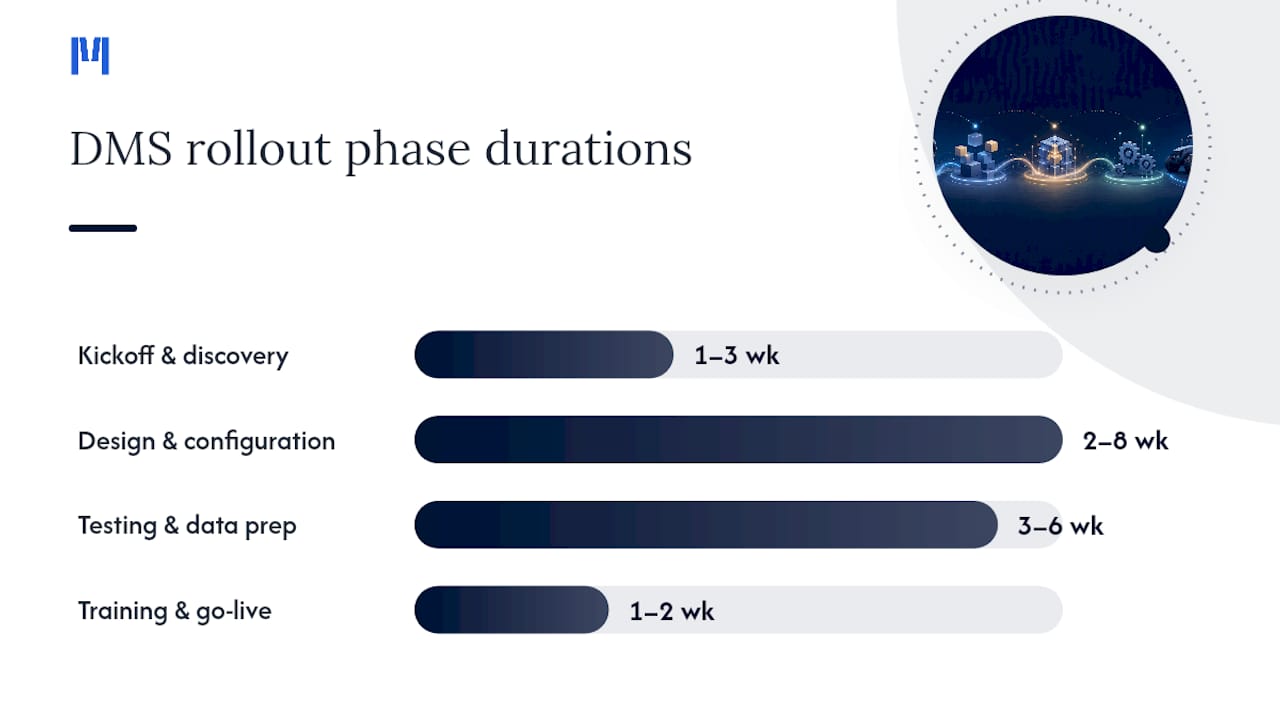
Kickoff and discovery typically runs one to three weeks. Your team and the vendor map current workflows, agree on scope, and set a baseline for what “done” means. Skipping this step is the single fastest way to blow your schedule, because scope disagreements surface later, when they’re expensive to fix.
Design and configuration takes anywhere from two to eight weeks. The spread is wide because it depends almost entirely on customization. A dealership adopting out-of-the-box workflows for one department moves fast. A dealership customizing quoting rules, warranty logic, and rental contracts across five modules moves much slower.
Testing and data preparation usually needs three to six weeks, sometimes longer if your legacy data is messy. This phase includes user acceptance testing (UAT), data conversion, and formal acceptance gates where your team signs off before go-live.
Training and go-live is typically compressed into one to two weeks of execution, backed by written milestones that specify data-access windows and conversion-scope locks. Tekion frames the full kickoff-to-go-live window at roughly 120 days for a modern DMS project, which lines up closely with the phase totals above.
- Kickoff and discovery: 1 to 3 weeks
- Design and configuration: 2 to 8 weeks
- Testing and data prep: 3 to 6 weeks
- Training and go-live: 1 to 2 weeks
What Factors Speed Up or Slow Down Your Rollout?
Four variables explain almost every schedule overrun in equipment-dealership DMS projects, and three of them are within your control.
Legacy data quality is the biggest wildcard. If your parts catalog has duplicate SKUs, your customer records have inconsistent naming, or your service history lives in three disconnected spreadsheets, cleanup eats weeks before configuration even starts.
Integration complexity matters just as much. A simple API pull from your accounting platform is a different animal than a two-way writeback into a legacy database with no modern interface. Writeback testing, confirming that data flows both directions correctly, is where projects quietly stall.
Scope decides most of the rest. Out-of-the-box workflows deploy fast. Heavy customization across sales, service, parts, rental, and finance simultaneously multiplies your testing surface and your risk of scope creep.
Internal resourcing closes the loop. Projects with a named internal champion and a fast decision cadence move noticeably quicker than projects waiting on committee approval for every configuration choice.
- Data cleanup effort (duplicate records, inconsistent formats)
- Integration type (API vs. direct database pulls)
- Number of modules and depth of customization
- Internal champion availability and decision speed
Pro Tip: Assign one internal champion per department before the project starts, not after. A parts manager who already knows the current workflow catches configuration mistakes a project manager alone would miss.
How Do You Handle Data Migration Without Blowing the Schedule?
Data migration is where most equipment-dealership DMS timelines go sideways, and it’s almost always avoidable with the right early testing.
- Run a two-week technical spike first. Extract a sample of real records, then attempt a writeback test into the new system. This single step reveals most integration scope risk before you’ve committed budget to full design work.
- Lock your conversion scope early. Decide exactly which historical records migrate (how many years of service history, which closed deals, which inactive customers) and freeze that decision. Plan for iterative cleanses rather than one giant data dump.
- Build UAT around real scenarios. Test with actual sample records across each role: a service advisor creating a work order, a parts clerk adjusting inventory, a rental coordinator closing a contract. Define acceptance criteria before testing starts, not during.
- Plan contingency time for middleware and offline modes. Field-service teams working offline need writeback logic tested separately, since latency and sync conflicts often surface only once real technicians use the app in the field.
Writeback failures, not upfront design flaws, cause the majority of post-launch rollbacks. Testing actual writes (appointments, repair orders, inventory adjustments) in week one, rather than week ten, catches validation-rule conflicts while they’re still cheap to fix.
How Long Does It Take Your Team to Actually Adopt the System?
Going live and going operational are two different milestones, and confusing them is how dealerships end up disappointed with a system that’s actually performing fine.
The first 60 to 90 days after launch cover onboarding: your team learns core workflows, and usage climbs from “logging in when reminded” to “using it by default.” Days 91 through 180 mark the adoption phase, where you compare actual usage against benchmarks, lean on your internal champions, and make mid-course corrections to workflows that aren’t sticking. Day 181 onward is growth: optimizing configurations, reviewing return on investment, and planning which module comes next.
Track these numbers, not just gut feel:
- User adoption rate (percentage of staff logging in daily versus assigned)
- Time saved on administrative tasks per week
- Repair orders captured digitally versus on paper
- Parts attach rate on service jobs
If those numbers plateau below target by day 90, that’s your signal to intervene, not wait it out.
What’s the Fastest Path to a Working DMS?
Four moves consistently separate dealerships that hit their timeline from dealerships that miss it by months.
- Run your technical spike in week one. Don’t wait until design is finished to test your integrations. Extract data and attempt a writeback before you sign off on scope.
- Assign a project manager and a champion per department. Someone needs to own the schedule, and someone in sales, service, parts, and finance needs to own their department’s configuration decisions.
- Ship one revenue-generating workflow first. A tight version one, say, service work orders or rental contracts, funds and informs the rest of the rollout instead of trying to launch everything simultaneously.
- Require a signed milestone plan. Get deliverable dates and acceptance criteria in writing before the project starts, not as an afterthought.
Pro Tip: Pick the workflow that’s currently costing you the most manual hours, usually service scheduling or parts lookups, as your version-one release. It proves value fastest and buys goodwill for the modules that follow.
What Support Should You Expect After Go-Live?
Support doesn’t end at go-live. It shifts shape.
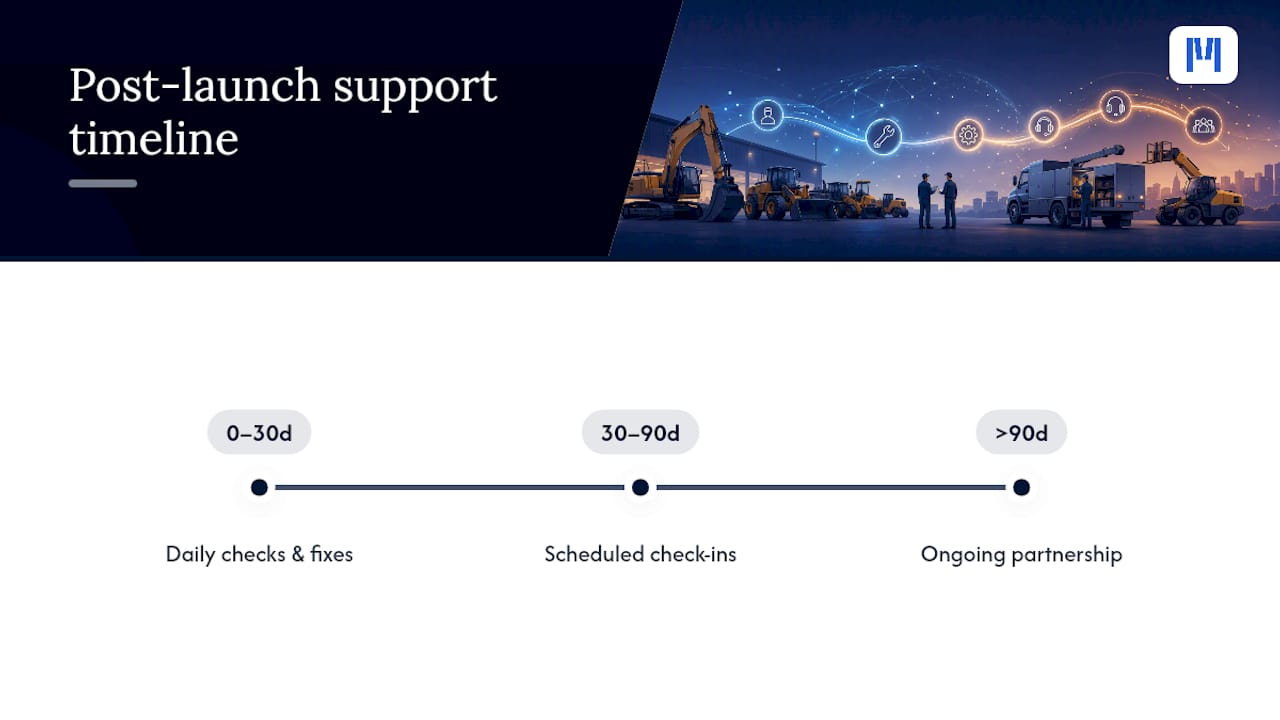
In the first 30 days post-launch, expect intensive support: daily or near-daily check-ins, rapid bug fixes, and a vendor team actively watching for the writeback failures and workflow gaps that only show up under real use. This is when your written milestone plan earns its keep. If your vendor promised specific deliverables, this is where you verify they showed up.
From day 30 to 90, support typically tapers to scheduled check-ins rather than constant monitoring. Your internal champions start fielding first-line questions, and vendor support handles escalations, configuration tweaks, and training gaps that surface as new staff or new workflows come online.
Beyond 90 days, support should look more like a standing relationship than a project. Expect periodic reviews of usage data, help scoping the next module you add, and access to updates as the platform evolves. A dealership adding a rental module in month eight shouldn’t need to relitigate the entire onboarding process, just a scoped mini-rollout for that one addition.
The mistake dealerships make here is assuming support ends when the invoice for implementation does. Ask any vendor, before signing, exactly what post-launch support looks like at 30, 60, and 90 days, and get it in writing alongside the milestone plan itself.
How Do Implementation Timelines Compare Across DMS Vendors?
Timelines vary less by brand name than by scope and delivery model, but there are real patterns worth knowing before you commit.
Enterprise-focused platforms built for large, multi-location dealer groups often quote longer implementation windows, sometimes six months or more, because they’re configuring for complex organizational hierarchies and heavier customization from day one. That’s not necessarily a flaw. It reflects the scope those platforms are built to handle.
Lighter, modular platforms built specifically for equipment dealerships tend to quote shorter first-release windows, often in that 6 to 16 week band, because they’re designed to launch one workflow cleanly before adding the next. The tradeoff isn’t quality. It’s how much you’re customizing versus adopting standard workflows out of the box.
The honest comparison point isn’t “which vendor is fastest” in the abstract. It’s which vendor’s delivery model matches your dealership’s actual complexity. A single-location dealership running sales and service doesn’t need the same rollout timeline as a five-location group running sales, service, parts, rental, and finance simultaneously. Ask any vendor for a written timeline of milestones before signing, and compare that document, not marketing claims, against your own scope.
Should You Go Phased or All at Once?
Big-bang implementations, switching every department to the new system on the same day, sound efficient on paper. In practice, they concentrate risk. If your parts module and your finance integration both go live simultaneously and something breaks, you’re troubleshooting two fires with one team.
Phased rollouts spread that risk across a longer calendar but reduce the chance of a full operational stoppage. You launch service first, stabilize it over a few weeks, then bring parts online, then rental, then finance. Each phase benefits from lessons learned in the previous one. Staff aren’t trying to learn five new workflows in the same week, which directly improves your adoption rate during that critical first 90 days.
The tradeoff is calendar time. A phased approach across five departments will typically run longer end to end, often the full 3 to 12 month band, than a theoretical big-bang launch. But “theoretical” is the key word. Big-bang rollouts that look fast on a project plan frequently lose that time back in post-launch firefighting, rollback fixes, and staff frustration that big-bang projects generate at a higher rate than phased module rollouts with staged data cleanses. For most equipment dealerships, phased wins on total time-to-value even when it loses on paper calendar length.
Why Timeline Planning Is an Operational Decision, Not Just a Technical One
The conventional advice treats DMS implementation as a technical migration: move the data, configure the modules, done. That framing misses the real driver of both cost and schedule, which is operational adoption, not software configuration. A perfectly configured system that your service advisors don’t trust yet delivers zero value on day 91.
Spending an extra week on governance, naming champions, locking scope, writing milestone criteria, feels slow in the moment. It’s the cheapest insurance against a six-month adoption stall. MDMS builds around that reality: setup under an hour for a first module and modular rollout so departments launch on their own timeline.
— ModernDMS
Get Your First Module Running This Week, Not Next Quarter
Most equipment-dealership DMS projects lose weeks before configuration even starts, stuck in vendor onboarding queues or waiting on a discovery phase that drags for a month. MDMS is built around the opposite approach: initial setup under an hour, with modular rollout that lets you launch one department (service, parts, sales, rental, or finance) without waiting on the rest of the platform to be ready.

You keep full ownership of your data with no lock-in, and native Xero integration removes one of the biggest migration headaches: reconciling accounting records twice. If you’re running rental fleets alongside sales and service, the rental and hire fleet module rolls in on the same modular basis. Start a trial or request a walkthrough on the equipment dealer management platform page to see which module fits your first release.
Sources
- Timeline to Success: What Dealerships Should Expect When Moving to a Modern DMS
- Why dealers getting more from your heavy-equipment DMS matters more than ever
- Equipment Dealer Software Problems That Lose Repairs
FAQ
How Long Does a Basic DMS Implementation Take?
A focused first module, such as service or parts, typically launches in 6 to 16 weeks with clean data and limited customization.
How Long Until a Full DMS Rollout Is Complete?
Full multi-module rollouts across sales, service, parts, rental, and finance typically take 3 to 12 months, depending on customization and data complexity.
What Causes the Most DMS Implementation Delays?
Poor legacy data quality and untested integrations cause most delays; a two-week technical spike early in the project catches these risks before they cost weeks later.
Is a Phased or Big-Bang DMS Rollout Faster?
Big-bang rollouts look faster on paper, but phased rollouts usually deliver value sooner because they reduce post-launch firefighting and improve staff adoption.
How Fast Can MDMS Get a Dealership Live?
MDMS supports initial setup under an hour for a first module, with additional departments added on a modular basis as your team is ready.