Inventory Management System for Xero: Equipment Dealer Guide
By MDMS Team · 26 July 2026

Inventory Management System for Xero: Equipment Dealer Guide
For Australian equipment dealerships, the right inventory management system for Xero isn’t just a software upgrade. It’s the difference between your operational data and your financial records finally telling the same story. A purpose-built dealer management system (DMS) connects your parts stock, work orders, serial numbers, and rental contracts directly to Xero, so invoices, payments, and supplier bills flow automatically without anyone rekeying a single figure.
Generic inventory apps weren’t designed for the complexity your team deals with daily. GST margin scheme treatments, multi-location stock across branches, warranty claim workflows, and equipment lifecycle tracking all require a system built for this industry. Xero handles accounting brilliantly. What it needs alongside it is a dedicated DMS that manages the operational layer.
Core benefits your dealership gains from a properly integrated system:
- Financial accuracy: Invoices and payments sync to Xero automatically, eliminating manual reconciliation
- GST compliance: Correct tax treatment for trade-ins, margin schemes, and BAS reporting
- Real-time stock visibility: Parts and equipment tracked across every location simultaneously
- Operational efficiency: Users report Moderndms saves up to 10 hours per week in administrative work
- Data ownership: Your records stay yours, with no vendor lock-in
Table of Contents
- What features should your Xero inventory solution actually cover?
- How to implement your Xero integration without disrupting operations
- Moderndms is built for exactly this
- FAQ
- Key Takeaways
What features should your Xero inventory solution actually cover?
A dedicated dealer management system extends well beyond what Xero or generic inventory apps handle natively. When evaluating your options, prioritize these capabilities:
- Two-way Xero integration covering invoices, payments, GST tax codes, and supplier bills without manual exports
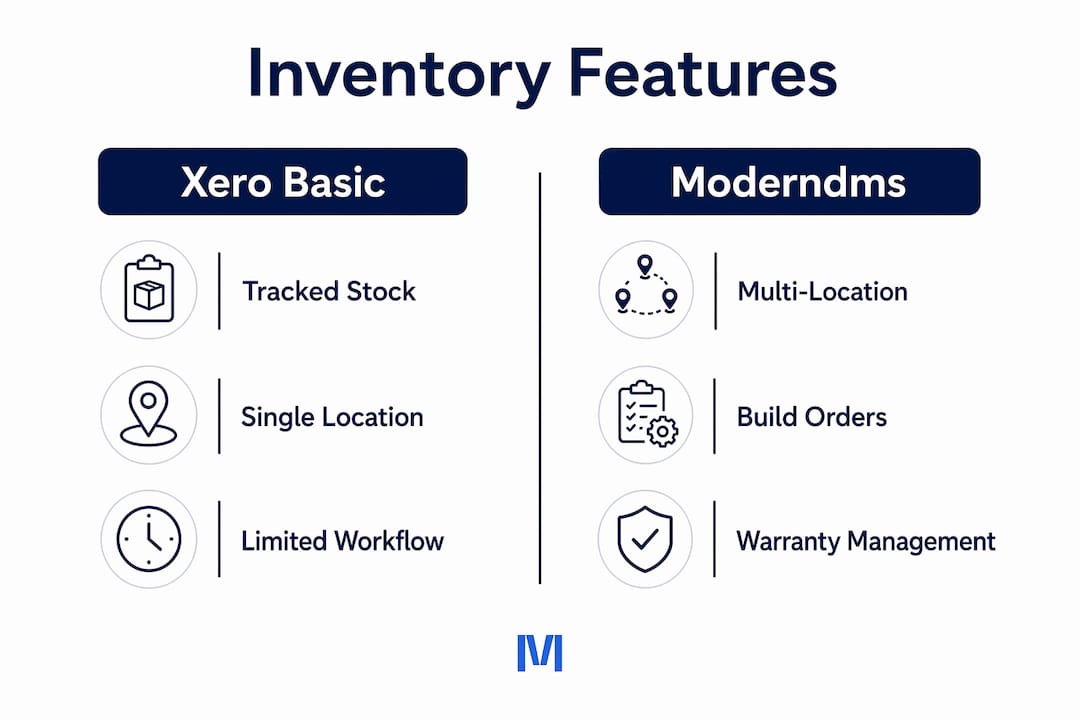
- Multi-location inventory sync so your branches see the same stock levels in real time
- Build orders and commissioning workflows tied directly to parts consumption and cost
- Field service and workshop job cards that link labor, parts usage, and customer billing accurately
- Warranty claim processing with full service history per asset
- Rental contract management tracking fleet availability, contract terms, and billing cycles
- Offline-capable mobile access for technicians working on-site or in the field
- Modular deployment so your team adopts features at a pace that fits your operation
Pro Tip: Before signing any contract, confirm the vendor handles Australian GST margin scheme treatments natively. Incorrect GST setup is one of the most common audit risks for equipment dealers, and it’s rarely fixable after the fact without significant rework.
Prioritizing a system’s appearance over its integration depth is a trap. Financial mismatches and workflow gaps tend to surface at month-end, not during a demo.
How to implement your Xero integration without disrupting operations
A structured rollout prevents the most common pitfalls, including incomplete GST configuration and missing multi-location sync.
- Consult your accountant first. Confirm your Xero organization settings, chart of accounts, sales account codes, GST tax types, and payment account mappings before connecting any system.
- Audit your existing data. Clean your parts catalog, customer records, and asset register before migration. Dirty data migrated into a new system creates reconciliation problems immediately.
- Run a parallel test period. Process a week of real transactions in both systems simultaneously and compare outputs before going fully live.
- Validate GST flows. Confirm every transaction type, including trade-ins and warranty credits, carries the correct tax treatment through to Xero.
- Train operational staff and your bookkeeper together. Vendor-provided training resources and ongoing support are key to reducing errors and accelerating adoption.
- Schedule monthly integration audits. Check sync logs, reconcile Xero balances against your DMS, and apply vendor updates promptly to maintain compliance.
Moderndms is built for exactly this

Australian equipment dealerships running disconnected spreadsheets and legacy software lose hours every week to manual data entry and reconciliation. Moderndms replaces that entire stack with a single cloud-native platform covering parts and inventory, service, rental, warranty, and finance, all syncing directly to Xero. Setup takes under an hour, contracts are monthly with no lock-in, and your data stays yours. Whether you’re managing forklifts, construction equipment, or agricultural machinery, Moderndms is built in Australia for the way Australian dealers actually operate. See the platform and start a free trial today.

FAQ
What does a Xero inventory management system do for equipment dealers?
It connects your operational records, including parts stock, work orders, and rental contracts, to Xero so invoices and payments sync automatically without manual entry.
Does Xero handle equipment dealership inventory on its own?
Xero includes basic tracked inventory but has no support for multi-location stock, build orders, warranty workflows, or rental fleet management. A dedicated DMS fills that gap.
How long does Xero integration setup take with Moderndms?
Moderndms is designed for quick setup, with Xero account mapping, GST configuration, and data sync ready to test promptly.
What are the biggest GST risks in a Xero inventory integration?
Incorrect margin scheme treatment and missing tax codes on trade-ins or warranty credits are the most common issues, both of which create BAS errors and audit exposure.
Key Takeaways
An integrated DMS is the only reliable way for Australian equipment dealerships to keep Xero accurate without manual reconciliation.
| Point | Details |
|---|---|
| Two-way integration is non-negotiable | Invoices, payments, and supplier bills must flow automatically to keep Xero aligned with operational data. |
| GST setup requires expert configuration | Margin scheme treatments and trade-in tax codes must be mapped correctly before go-live to avoid BAS errors. |
| Data migration needs a clean foundation | Audit and cleanse your parts catalog and asset records before migrating to prevent reconciliation problems. |
| Training drives adoption | Running operational staff and bookkeepers through vendor training together reduces errors and accelerates benefits. |
| Moderndms covers the full stack | Moderndms connects parts, service, rental, and warranty workflows to Xero in one cloud-native platform built for Australian equipment dealers. |