Recover Rental Damage Costs Faster With the Right Process
By MDMS Team · 23 August 2026

Recover Rental Damage Costs Faster With the Right Process
The moment a damaged unit rolls back onto the yard, inspect it immediately, attach timestamped before-and-after photos to that booking, price the damage from a real repair estimate, and capture the charge against the deposit or card while your authorization window is still open. That sequence, done in order, is what separates a clean rental damage recovery from a written-off repair bill. Miss one link and the whole chain weakens.
Before you do anything else, confirm you can put your hands on these items:
- Signed rental agreement authorizing post-rental charges
- Timestamped pre-rental photos
- Timestamped post-rental photos tied to the same booking
- Unit ID and hour/meter reading at checkout and return
- Itemized repair invoice or shop estimate
- A record showing you notified the renter before charging
If the damage affects safe operation, pull the unit from availability now. If the renter is still on-site, get their signature on the return record and take the photos together. A checkout baseline built from timestamped photos and a signed condition record is the single factor that most reliably prevents a rental damage dispute from turning into a lost chargeback.
Key Takeaways
Rental damage recovery succeeds when the evidence, pricing, notification, and charge all trace back to a single booking record within the right time windows.
| Point | Details |
|---|---|
| Document the baseline | Take timestamped, scaled photos at checkout and return, and get a signature on both. |
| Price from real invoices | Use a written shop estimate or repair invoice, never a round-number damage fee. |
| Notify before you charge | Send photos and the invoice in writing and give a 24 to 48 hour response window. |
| Act inside the deadline | Capture the deposit and remaining balance within your pre-auth and dispute windows. |
| Automate the evidence thread | ModernDMS ties photos, signatures, and invoices to the booking so claim files build automatically. |
Table of Contents
- Rental Damage Recovery: The Step-by-Step Process
- How a DMS Should Automate the Evidence Thread
- What Wins a Chargeback When a Renter Disputes the Charge
- The Yard-Side Checklist Your Team Can Actually Follow
- Run Rental Damage Recovery Through One System, Not Five
- Sources
- FAQ
Rental Damage Recovery: The Step-by-Step Process
Recovering rental damage costs isn’t one action, it’s a chain of six steps, each with its own deadline. Skip the order and you weaken your position at every step downstream.
- Checkout baseline. Record the unit ID, hour reading, and a full walkaround, wide shots for context and tight shots with a tape measure or hand for scale. Get a signature on the booking acknowledging the recorded condition.
- Return inspection. Run the identical sequence at drop-off and compare the two sets panel by panel. Quarantine anything with a safety flag and open a maintenance work order immediately.
- Pricing. Get a written repair estimate or shop invoice before you charge anyone. Round numbers invite disputes; itemized parts, labor, and downtime figures survive them.
- Notification. Send the renter the photos and invoice by email or text, in writing, and give them a 24 to 48 hour response window before you capture funds.
- Charge capture. Apply the deposit first. If the repair cost exceeds it, capture the remainder against the authorized card, and do it inside your pre-authorization and dispute windows.
- Close the loop. Update the asset’s status, track repair completion, and reconcile the charge in your accounting export.
The pricing step trips up more rental managers than any other. Pro Tip: Attach the actual shop quote or parts invoice to the booking before you charge a cent. A lump-sum “damage fee” with no backup is the easiest line item for a cardholder to dispute successfully, and the hardest for you to defend.
Timing matters as much as documentation. Pre-authorization holds and card network dispute windows are time-limited, so inspecting and pricing quickly preserves your ability to capture funds at all. Wait a week to get a shop quote and you may find the hold has already released.
How a DMS Should Automate the Evidence Thread
Every step above is procedural until you’re running it manually across spreadsheets, email threads, and a separate accounting system at 4 p.m. on a Friday. That’s where a dealer management system earns its keep, not by replacing judgment, but by making sure the evidence trail assembles itself.
A rental module worth using should do the following without extra data entry:
- Attach condition photos, signatures, hour readings, and license capture directly to the booking record, so the claim file exists automatically the moment return inspection is complete.
- Flag safety-affecting damage, block the unit from future availability, and generate a maintenance work order in the same action.
- Store the shop’s repair estimate or invoice on the booking and generate an itemized customer invoice that ties line-by-line to that repair record.
- Send the damage notification to the renter automatically, with photos and invoice attached, and log the timestamp of that outbound message inside the booking.
- Sync the reconciled charge to your accounting platform, closing the loop between the rental desk and the general ledger.
This is the core of what ModernDMS’s rental and fleet features are built to do: tie photos, signature, hour reading, and invoice to one booking record instead of scattering them across four systems. When that record lives in one place and syncs to Xero automatically, reconciliation stops being a monthly scramble.
Pro Tip: Ask any DMS vendor, ModernDMS included, to show you the exact click path from “damage flagged at return” to “invoice sent to renter.” If it takes more than three screens, that’s admin time you’re paying for every single claim.
Dealerships running this kind of automated evidence thread report meaningful reductions in weekly admin hours, since the manual work of assembling a claim file disappears into the booking workflow instead of living in someone’s inbox.
What Wins a Chargeback When a Renter Disputes the Charge
Card networks don’t rule on who’s telling the truth. They rule on whose paperwork is more complete, and a thin file loses even when your version of events is accurate.
The winning chargeback file has four components, and all four need to trace back to the same booking:
- A signed rental agreement that explicitly authorizes post-rental damage charges
- Timestamped pre- and post-rental photos tied to that specific booking, not a generic file folder
- An itemized repair invoice showing parts, labor, and downtime, not a flat fee
- Written notification sent to the renter before you captured the charge
Pairing signed agreements with timestamped photos and a repair invoice is consistently what separates a successful dispute response from a refunded charge. When you submit your response, lead with the documents, not an explanation. Keep the cover note factual and brief: what happened, what it cost, what’s attached. Analysts reviewing chargebacks are working through a queue, not reading a narrative.
If you miss the dispute deadline or the pre-authorization window closes before you’ve priced the damage, your options narrow fast, which is exactly why steps two and three in the process above need to happen within days, not weeks, of the return.
When the card charge doesn’t go through or the renter fights it successfully, you have three realistic paths forward, in order of increasing cost and decreasing frequency:
- Retry the card after a few days, holds and declines are sometimes temporary.
- Send a formal demand letter referencing the signed agreement, photos, and invoice.
- Evaluate small claims court, weighing the repair cost against the time and filing cost of pursuing it.
Escalation should follow that same cost-versus-recovery logic: a $180 scratch repair rarely justifies a court filing, but a $4,000 undercarriage repair usually does.
The Yard-Side Checklist Your Team Can Actually Follow
Print this or pin it inside your DMS return workflow. Consistency, not cleverness, is what makes damage recovery routine instead of a fire drill.
At pickup:
- Full walkaround photos, wide and tight, with the unit ID visible
- Hour or meter reading logged
- Signed condition acknowledgment attached to the booking
At return:
- Repeat the same walkaround sequence, same order, same angles
- Get scale in every close-up shot
- Get a signature on the return record
- Quarantine immediately if there’s a safety concern
If damage is found:
- Get a written repair estimate before pricing anything
- Notify the renter in writing with photos and the quote attached
- Apply the deposit, then capture the remainder within your pre-auth window
- Attach the final invoice to the booking record
After the claim closes: reconcile the repair cost in your accounting system, and don’t reopen the unit for booking until the repair is complete and the asset record reflects it.
Process protects the relationship, not just the margin
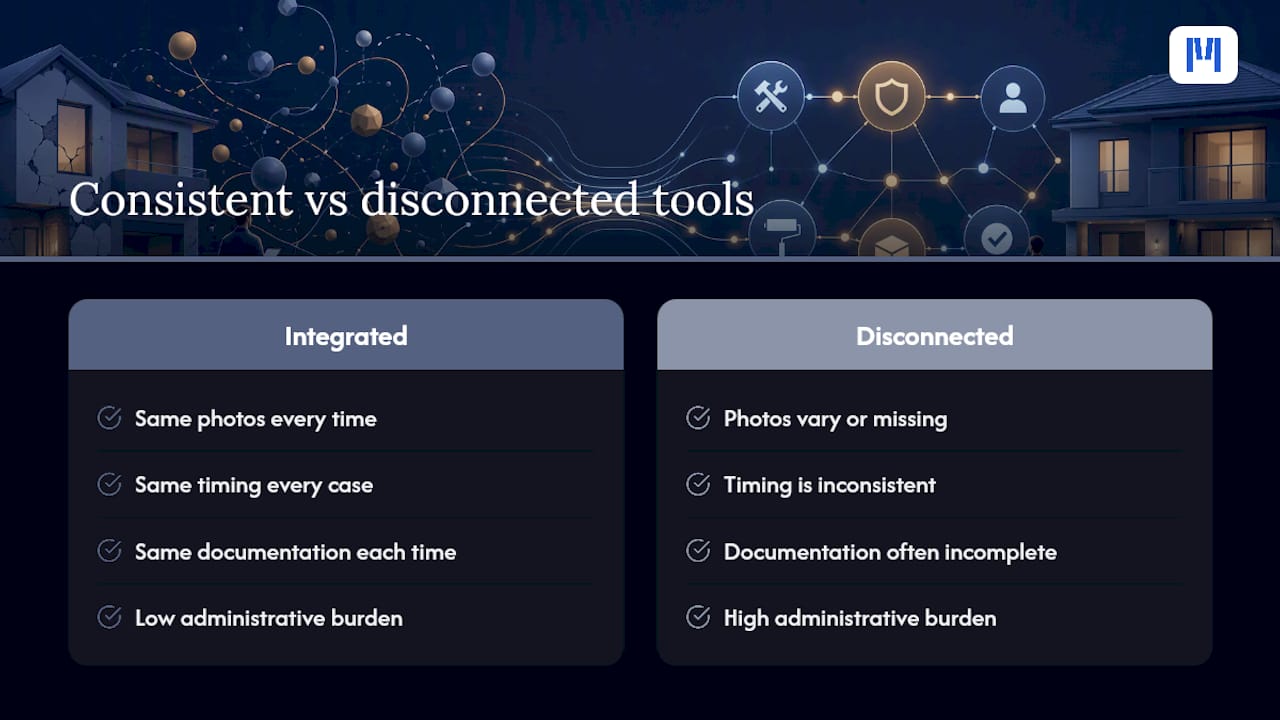
A consistent damage recovery process isn’t about extracting every dollar from every renter. It’s about communicating fairness through consistency, the same photos, same timing, same documentation, every time, for every customer. That consistency is what keeps a legitimate damage charge from feeling like a punitive surprise.
The administrative burden is the real reason most dealerships skip steps, not indifference. Good tooling removes that excuse. When photo capture, notification, and invoicing happen inside one workflow instead of across three disconnected tools, the team follows the process because it’s the path of least resistance, not because someone’s enforcing a checklist.
Run Rental Damage Recovery Through One System, Not Five
Most dealerships piece this process together across a phone camera, a shared drive, an email inbox, and a separate accounting system, and something falls through every few months. ModernDMS closes that gap by attaching photos, signatures, hour readings, and repair invoices to the booking itself, so the claim file builds while your team works, not after the fact.

That means automatic availability blocking when damage flags come in, a maintenance work order generated in the same motion, and an itemized invoice that ties directly to the shop’s repair record. With Xero integration built in, the reconciliation step that used to eat an afternoon happens as part of normal invoicing. Dealerships using this kind of connected workflow report saving up to 10 hours a week in administrative tasks, time that used to go into chasing photos and re-entering repair costs across systems.
If your current setup still relies on separate tools for booking, photos, and invoicing, take a look at ModernDMS’s rental and fleet management features and see the claim-file workflow in a live demo. Setup takes under an hour, and you keep full ownership of your data from day one.
Sources
- How to assess damage on returned equipment — EquipFlow
FAQ
What is the first step in rental damage recovery?
Inspect the unit immediately on return, take timestamped photos comparing it to the pre-rental condition, and attach both sets to the booking record before doing anything else.
How long do I have to charge a renter for damage?
It depends on your payment processor’s pre-authorization and dispute windows, so price the damage and notify the renter within a day or two of return to stay inside those limits.
Should I bill a flat damage fee or an itemized invoice?
Always use an itemized invoice backed by a shop estimate or repair quote. Round, unexplained fees are far more likely to be successfully disputed.
What documents win a rental damage chargeback?
A signed rental agreement authorizing post-rental charges, timestamped pre- and post-rental photos tied to the booking, an itemized repair invoice, and proof of written notification before the charge.
Can software automate rental damage recovery?
Yes. A DMS like ModernDMS can attach photos, signatures, and repair invoices directly to the booking, automatically flag safety issues, and sync the reconciled charge to your accounting system.
What if the renter disputes the charge and wins?
Retry the card after a few days, follow up with a formal demand letter referencing your documentation, and weigh small claims court against the repair cost before pursuing it further.