90 Day Fix for Dealers: Criticality Led Parts Inventory Control
By MDMS Team · 15 September 2026

90 Day Fix for Dealers: Criticality Led Parts Inventory Control
The fastest way to cut stockouts and stop tying up cash in parts nobody needs is to run a criticality-first inventory policy backed by disciplined cycle counting. Start this week: rank your top 20% of parts by downtime risk. Then begin counting that Tier 1 group daily or weekly instead of waiting for an annual stocktake. Teams that make this switch typically see fewer emergency buys, lower carrying cost, and better parts availability within one quarter.
TL;DR:
- Prioritize criticality-first segmentation of parts to focus inventory control efforts on Tier 1 items that directly impact safety, safety, or production stoppages.
- Implement continuous ABC-weighted cycle counting for Tier 1 and 2 parts, with daily or weekly counts, to improve accuracy and reduce reliance on annual stocktakes.
- Ensure catalog data is clean, with one unique part number per item, standardized units, and linked to the equipment to enable accurate criticality scoring and replenishment planning.
- Set reorder points using actual usage, lead time, and safety stock, and track KPIs such as stockout rate, inventory accuracy, and emergency buy rate to identify improvement areas.
- Use modular parts management software that supports BOM linkage, multi-site visibility, automated reorder calculations, and supplier lead-time tracking to sustain disciplined inventory practices.
Table of Contents
- What Is Parts Inventory Control and Why Does Criticality Matter Most?
- How Do You Set Reorder Points, Min/Max Levels, and Track the Right KPIs?
- What Should You Look For in Parts Inventory Software?
- What Does a 90-Day Rollout Plan Look Like?
- How ModernDMS Applies These Controls in Practice
- How Do You Manage Obsolescence and Excess Parts Risk?
- How Do You Get Staff to Actually Follow the New Process?
- A Practitioner’s Take on Fixing Parts Control
- Ready to Put These Controls Into a Real System?
- Sources
- FAQ
What Is Parts Inventory Control and Why Does Criticality Matter Most?
Parts inventory control is the discipline of deciding what to stock, how much, and where, based on the operational risk each part carries if it’s not on the shelf when a technician needs it. Most teams get this backwards. They rank parts by dollar value first and criticality second, which means a low-cost seal that stops a critical production line gets the same attention as a similar low-cost bracket that nobody has ordered in three years.
Segmenting parts by criticality fixes that. A workable tiering model looks like this:
- Tier 1, safety and downtime critical. Parts where a stockout stops a line, creates a safety hazard, or triggers a contractual penalty. These get the highest service level, often very close to 100%, and live in more than one location.
- Tier 2, operationally important but substitutable. Downtime happens, but a workaround exists, or lead time is short enough to absorb a short delay. Target service levels here usually run above 90%.
- Tier 3, low risk, low consequence. Consumables, fasteners, and generic items with multiple suppliers and short lead times. A lower service level is usually fine, and some of these can move to vendor-managed stock entirely.
ELF Automation’s research puts a number on why this matters: Australian manufacturers lose significant sums per hour during unplanned downtime, with a considerable portion traced back to missing or delayed spare parts. That statistic alone justifies spending more time on Tier 1 segmentation than on any other single task in your parts program.
Building a Cycle Counting Program That Actually Sticks
Annual stocktakes are a poor substitute for ongoing accuracy checks, and most reliability engineers know it. Fabrico’s cycle counting guidance recommends replacing the once-a-year count with continuous, ABC-weighted counting: Tier 1 (A) parts counted frequently (e.g., monthly or weekly), Tier 2 (B) parts less often (e.g., quarterly), and Tier 3 © parts annually. Four rules keep the program honest:
- Counts should be blind, meaning the counter doesn’t see the system quantity before counting, which prevents anchoring bias.
- Investigate every variance the same day it’s found, not at month end when the trail has gone cold.
- Rotate counting duties among storeroom staff and at least one technician per cycle, so counting isn’t seen as “someone else’s job.”
- Set a recount rule: any variance over a defined threshold (often 2% of on-hand quantity) triggers an immediate second count before adjusting the system.
Short counts beat long ones. Fifteen-minute daily counts on a handful of Tier 1 bins are more sustainable than a marathon quarterly count that burns a full shift and still misses items. This approach also changes behavior on the floor: when technicians trust that the system quantity is accurate, they stop hoarding personal stashes of critical parts, a habit that quietly inflates working capital and hides real usage data.
Cleaning Up the Catalog Before You Touch Software
None of this works if your part master data is a mess. Trace consultants’ MRO research makes a point worth repeating to any manager eager to buy new software: clean catalog data is a prerequisite for effective technology, not an afterthought you fix later. Catalog governance means:
- One unique part number per physical item, with duplicate descriptions merged rather than left to coexist.
- Standardized units of measure so “each,” “box of 10,” and “case” don’t get confused during a stock count or a purchase order.
- Bill of materials (BOM) linkage so every part ties back to the equipment or asset it serves, which is what makes criticality scoring possible in the first place.
- Controlled item creation, meaning only a small group of trained people can add new part numbers, with a required check against existing records first.
Setting Replenishment Rules and Stores Discipline
Once tiers and catalog data are solid, replenishment policy follows naturally. Reorder point (ROP) logic, min/max thresholds, and safety stock levels should all be driven by lead time and the service level you assigned in your tiering exercise, not by gut feel or “what we’ve always ordered.”
Stores discipline closes the loop. Every issue should tie to a work order, every return should go through a formal put-back process with a condition check, and every receipt should be scanned and verified against the purchase order before it hits the shelf. Skip this step and your counts will drift out of accuracy within weeks, no matter how good your cycle-counting schedule looks on paper.
Designing the Stores Network
Where you stock parts matters as much as how many you stock. A central store handles constrained, high-value Tier 1 items that don’t move fast enough to justify duplicating everywhere. Regional depots or satellite stores hold moderate-velocity parts closer to the equipment they serve. Field vans or mobile units carry a tight, standardized par list of the fastest-moving consumables and common failure parts, a model MDMS documents in a 50-SKU van inventory example.
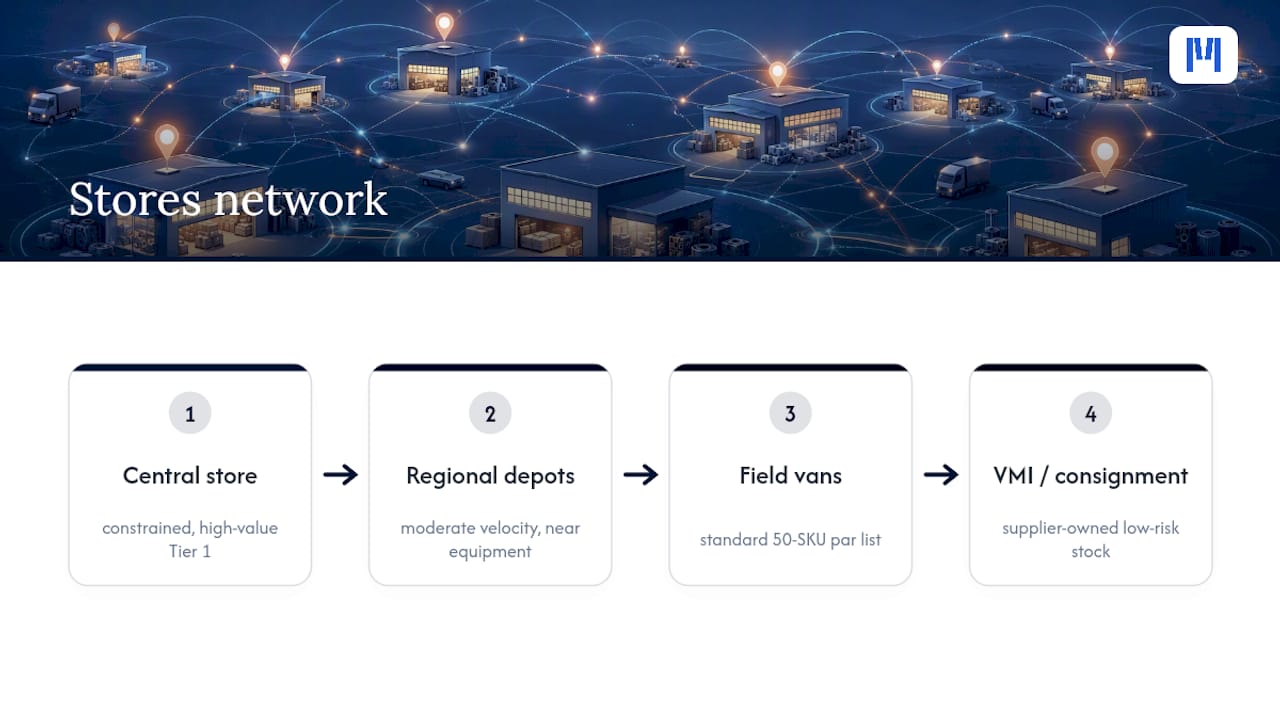
For genuinely low-risk consumables, vendor-managed inventory (VMI) or consignment stock shifts ownership burden to the supplier, freeing up capital for the parts that actually deserve it.
Pro Tip: Review your stores network annually, not just your stock levels. A part that moved fast last year in one region might now be obsolete there and in high demand somewhere else. The network drifts even when the numbers look stable.
Governance rhythms are what keep all of this from decaying back into the chaos you started with. A weekly variance review, a monthly catalog audit for duplicate or dead part numbers, and a quarterly tier reassessment are the minimum cadence for a program that stays accurate longer than six months.
How Do You Set Reorder Points, Min/Max Levels, and Track the Right KPIs?
The standard reorder point formula is straightforward: Reorder Point = (Average Daily Usage × Lead Time in Days) + Safety Stock. A worked example makes it concrete. Say a Tier 1 hydraulic seal has average daily usage of 0.5 units, a supplier lead time of 14 days, and you’ve set safety stock at 3 units to cover demand variability and the occasional late shipment. Your reorder point is (0.5 × 14) + 3, or 10 units. When on-hand inventory hits 10, the system should trigger a purchase order automatically, not wait for a storeroom clerk to notice the shelf looks light.
Oxmaint’s min-max documentation frames min-max as a ceiling-and-floor control: the minimum is your reorder point, and the maximum limits how much you’ll hold even when a bulk discount looks tempting. That ceiling matters more than most managers assume, because overstock ties up capital just as surely as a stockout causes downtime, only more quietly.
New to a formal policy? Start conservative. Set min/max levels using six to twelve months of consumption history if you have it, or supplier-recommended starting quantities if you don’t. Then tighten the numbers every quarter as real usage and actual lead-time performance replace your initial estimates. Guessing high on safety stock for the first two quarters costs less than guessing low and eating a Tier 1 stockout.
A few numbers worth tracking on a weekly dashboard:
- Stockout rate for Tier 1 parts — the percentage of Tier 1 demand that couldn’t be filled from stock. This is the single most important number in the program; anything above 2% to 3% deserves an immediate review.
- Inventory accuracy — the percentage of cycle counts that match system records within tolerance. Most well-run programs aim for inventory accuracy above 95%.
- Emergency buy rate — the share of purchase orders flagged as rush or expedited. A rising trend here signals that your reorder points are set too low or your lead-time data is stale.
- Aged and obsolete inventory percentage — the dollar value of stock with no movement in 12 to 24 months, expressed as a share of total inventory value.
- Fill rate by store or stocking location — useful for spotting whether one regional depot or van route is chronically underserved compared to the rest of the network.
Review stockout rate and emergency buys weekly. Review accuracy and aged inventory monthly. Review the full KPI set with tier reassessment quarterly, ideally in the same meeting where you’re deciding whether any part needs to move up or down a tier.
What Should You Look For in Parts Inventory Software?
Before evaluating any system, get clear on what “good” actually looks like functionally, not what a sales deck promises. A parts inventory platform earns its keep only if it supports the discipline you’re trying to build, not the other way around.
- BOM linkage. The system must connect parts to the specific equipment or asset they serve, so criticality scoring and usage forecasting have something real to draw on.
- Part-to-work-order consumption. Every issue should tie to a work order automatically, closing the loop between what left the shelf and why.
- Cycle-count workflows. Look for built-in support for blind counts, ABC-based scheduling, and variance flagging, ideally with mobile scanning so counts happen on the floor, not on a clipboard that gets transcribed later.
- Multi-site inventory visibility. If you run a central store plus regional depots or vans, you need a single view across all locations, not a separate spreadsheet per site.
- Automated reorder intelligence. The platform should calculate reorder points from actual consumption and lead-time data, and flag when either shifts enough to warrant a policy change.
- Vendor lead-time tracking. Static lead times baked into a spreadsheet go stale fast; the system should track actual delivery performance per supplier and per part.
On the integration side, confirm the platform connects cleanly to your accounting system (Xero and MYOB are common in Australian dealership and maintenance environments), your procurement workflow, and any broader ERP you run. Offline mobile capability matters more than most buyers realize, particularly for field technicians or van-based teams working in areas with unreliable connectivity.
Before go-live, budget real time for data hygiene. Duplicate part numbers, inconsistent units of measure, and orphaned BOM records will follow you into any new system unless you clean them first. Trace consultants warn that technology without clean data doesn’t fix chaos, it automates it.
Pro Tip: During any vendor trial, load a sample of your actual messy data, not the vendor’s clean demo set. Ask the system to flag duplicate part numbers and suggest BOM matches. If it can’t handle your real-world mess, it won’t handle it in production either.
What Does a 90-Day Rollout Plan Look Like?
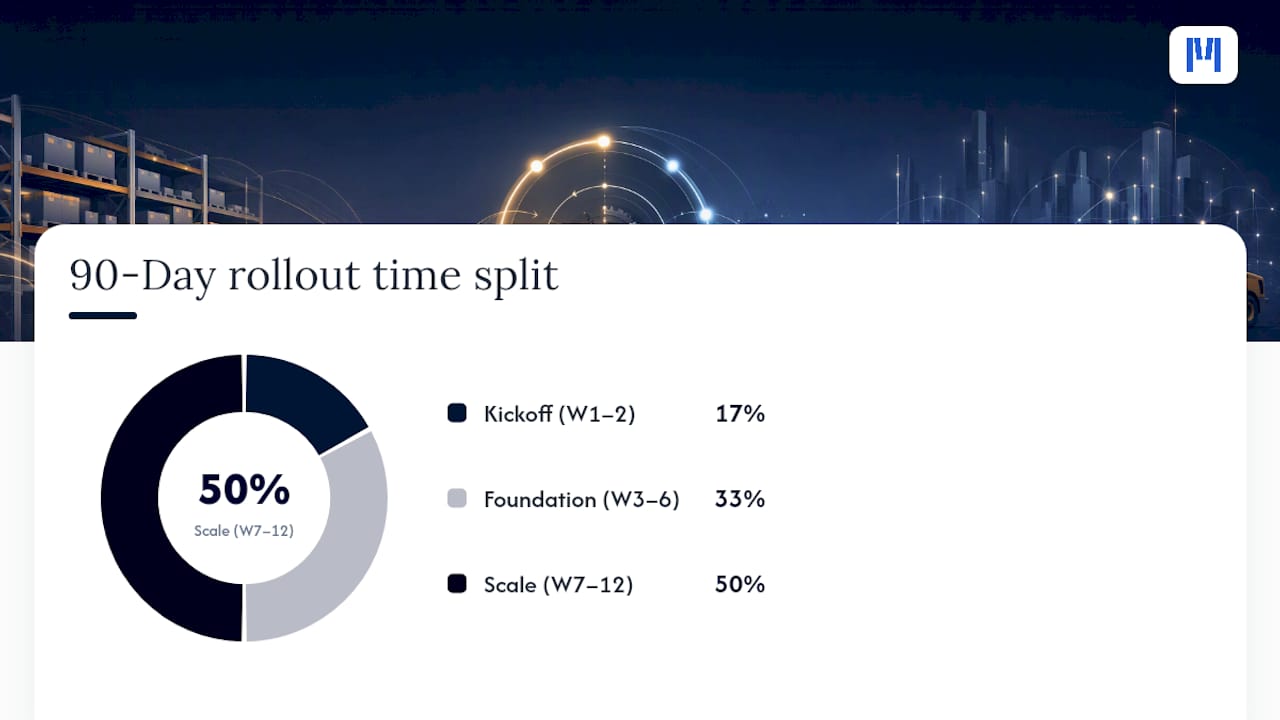
Making parts control changes stick requires a sequence, not a single big-bang switch. Here’s a workable timeline.
Weeks 1 to 2, kickoff:
- Align stakeholders across maintenance, procurement, and finance on the goals and the tiering criteria.
- Extract a baseline: current stock levels, usage history, and existing stockout incidents.
- Select a pilot group, ideally one storeroom or one equipment category rather than the entire operation.
Weeks 3 to 6, foundation:
- Run criticality segmentation on the pilot group and assign Tier 1, 2, and 3 labels.
- Set baseline min/max levels using available history.
- Prioritize catalog cleanup for the pilot’s highest-usage parts.
- Configure the cycle-counting schedule by tier.
Weeks 7 to 12, discipline and scale:
- Run pilot cycle counts and track variance trends week over week.
- Enforce transaction discipline: no issue without a work order, no exceptions during the pilot.
- Open supplier conversations about VMI or consignment stock for Tier 3 categories.
A few SOP rules worth writing down and posting in the storeroom:
- Every count is blind; the counter never sees system quantity first.
- No part leaves the shelf without a linked work order number.
- Every receipt gets checked against the purchase order and inspected for damage before it’s shelved.
- Returns go through a condition check before they’re put back into available stock.
Ongoing governance needs assigned owners: a weekly variance review owned by the storeroom lead, a monthly catalog audit owned by whoever controls item creation, and a quarterly tier reassessment owned jointly by maintenance and procurement.
How ModernDMS Applies These Controls in Practice
The Parts module described here builds on fundamental governance principles: clean catalog data, tiered criticality, and disciplined transaction control, rather than treating inventory as a bolt-on to sales or service software.
The platform’s modular structure means a dealership or maintenance operation can set up parts and warehouse tracking in under an hour, according to the company, without waiting on a full ERP rollout. Modules sharing the same underlying data allow a part issued against a work order to update inventory in real time. Full data ownership with no vendor lock-in enables teams migrating from spreadsheets or aging legacy systems to keep control of their historical records rather than starting from zero.
A 50-SKU van inventory par list illustrates the field-replenishment model this article recommends for Tier 2 and Tier 3 consumables: a tightly defined, standardized stock list per vehicle, cutting down the emergency parts runs that eat into billable technician hours.
Clean part data, linked to the equipment it serves, is what makes criticality scoring and automated reorder points possible in the first place. Everything downstream, cycle counting, replenishment policy, KPI tracking, depends on getting that foundation right first.
For teams building their own counting rhythm, Moderndms’s cycle-counting SOP guidance and catalog cleanup resources offer practical starting templates rather than abstract theory.
How Do You Manage Obsolescence and Excess Parts Risk?
Obsolete and excess inventory is the quiet tax on every parts program that skips regular review. A part becomes a risk the moment the equipment it serves is retired, redesigned, or replaced with an updated component, and most teams don’t notice until an audit surfaces a shelf full of dead stock.
The fix starts with the BOM linkage discussed earlier. If every part ties back to a specific asset, retiring that asset should trigger an automatic flag on every linked part, prompting a decision: return to supplier, sell, scrap, or reallocate to a sister site still running the older equipment.
Aged inventory percentage, tracked as one of your core KPIs, is your early warning system. Set a threshold, commonly 12 to 24 months with no movement, and review anything crossing that line quarterly alongside your tier reassessment. For Tier 3 consumables, negotiating a return-to-supplier clause upfront avoids the sunk-cost problem entirely.
Excess inventory often traces back to defensive overordering after a bad stockout. That’s a policy failure, not a purchasing failure, and the real fix is tightening safety stock calculations rather than letting fear drive the next order.
How Do You Get Staff to Actually Follow the New Process?
Even a well-designed inventory policy fails if the people running the storeroom quietly go back to old habits within a month. Change management here isn’t a training slide deck. It’s showing technicians and storeroom staff, in their own workflow, why the new discipline benefits them directly.
Start with the people who touch parts daily, not just supervisors. A technician who understands that blind cycle counts protect the accuracy they rely on to find a part quickly is far more likely to comply than one who’s simply told counting is now mandatory.
Frame transaction discipline, the no-issue-without-work-order rule especially, around the fact that it’s what makes automated reorder points possible. Skipping the scan doesn’t just break a rule; it breaks the math the whole replenishment system depends on.
Assign clear ownership for each governance rhythm so accountability doesn’t dissolve into “someone should probably check that.” A weekly ten-minute huddle reviewing variance flags, run by the storeroom lead, keeps the habit visible without turning into a burdensome meeting. Recognize early wins publicly, a reduced emergency-buy count in month two is worth mentioning out loud, because it gives staff proof the extra discipline is paying off, not just adding work.
A Practitioner’s Take on Fixing Parts Control
The conventional advice on inventory control leans too hard on dollar-value ABC analysis, ranking parts by what they cost rather than what breaks when they’re missing. That approach optimizes for the wrong risk. A cheap seal that stops a critical line deserves more attention than an expensive part that fails once a decade, and most legacy inventory programs still get this backwards.
The other overrated fix is buying software before fixing data. A new system layered on top of duplicate part numbers and inconsistent units of measure just automates the same mess faster. Criticality segmentation and clean catalog governance have to come first; everything else, cycle counting frequency, reorder automation, KPI dashboards, only works once that foundation is solid.
If you take one thing from this playbook, prioritize the tiering exercise over the software search. A modular system like Moderndms’s parts and inventory tools can support disciplined counting and replenishment well, but no platform substitutes for the judgment call of deciding which parts actually matter most.
— ModernDMS
Ready to Put These Controls Into a Real System?
This system provides an alternative to running parts control across spreadsheets, whiteboards, and legacy systems: a modular DMS built for parts, warehouse, and replenishment workflows described here, not a generic inventory app retrofitted for dealerships.

The Parts module handles BOM linkage, work-order consumption, and stocking locations across a central store, regional depots, or field vans, including the 50-SKU van par list model. Replenishment logic connects directly to reorder point and min/max calculations, and integration with accounting systems helps avoid manual reconciliation.
If your catalog needs cleanup before go-live, Moderndms offers a data upload service to handle the migration work. Start by reviewing the Parts plan on the pricing page, currently listed at 59 AUD per month, or explore the full parts and inventory solution to see how the module fits your current stocking model before you commit.
Sources
The strategies in this article draw on operational research and industry guidance specific to MRO and spare-parts environments:
- MRO supply chains in Australia — why getting the fundamentals right matters | Trace consultants
- Why efficient spare parts management is crucial for manufacturers | ELF Automation
FAQ
How do you manage parts inventory effectively?
Segment parts by criticality first, not dollar value, then apply disciplined cycle counting with ABC-based frequencies and enforce strict transaction rules like no issue without a work order.
What are the four main types of inventory control?
Common frameworks include periodic review, continuous (perpetual) review, min/max systems, and just-in-time replenishment, with most mature MRO programs blending continuous review and min/max for critical parts.
Is there free software available for parts inventory management?
Basic spreadsheet templates can track simple stock counts at no cost, but they lack cycle-count workflows, BOM linkage, and automated reorder logic. Paid platforms like Moderndms’s Parts module start at 59 AUD per month, with current pricing details on the pricing page.
What is the 80/20 rule in inventory management?
The 80/20 rule, or Pareto principle, suggests roughly 20% of your parts typically account for 80% of usage value or demand volume, which is the classic basis for ABC classification, though a criticality-first approach layers risk on top of that value ranking rather than relying on it alone.