Payroll Ready Field Technician Timesheets for Australian Dealers
By MDMS Team · 17 September 2026

Payroll Ready Field Technician Timesheets for Australian Dealers
The fastest way to stop payroll leakage and produce audit-ready records is an integrated, mobile-first timesheet workflow that ties clock-ins to job records and exports directly into payroll. This approach cuts payroll disputes, keeps job costing accurate, and removes the manual reconciliation that eats hours every pay cycle. The rest of this guide walks through capture methods, compliance requirements, payroll workflows, and a checklist for choosing and rolling out the right system.
TL;DR:
- Using mobile apps with GPS and offline sync reduces disputed hours and accelerates payroll processing for field technicians working across multiple sites.
- Timesheet systems must record work, travel, and allowances separately and retain detailed audit trails to meet Fair Work compliance and prevent errors.
- Automated payroll export that maps hours to job and pay categories minimizes reconciliation errors and eliminates manual rekeying.
- Pilot programs involving complex crews ensure the system can handle overtime, travel claims, and multi-site operations before full deployment.
- Integration with dealer management or field service platforms links hours directly to work orders and profitability, streamlining administrative workflows.
Table of Contents
- What Does a Reliable Field Technician Timesheets System Look Like?
- How Should You Capture Technician Time in the Field?
- What Are the Compliance Requirements for Field Technician Timesheets?
- How Do You Get Field Technician Timesheets Into Payroll Without Rekeying?
- How Do You Choose and Roll Out a Timesheet Solution?
- Why an Integrated Dealer Management System Fits Field Technician Timesheets
- What Training and Support Do You Need to Deploy a New System?
- How Reliable Is Offline Timesheet Capture in the Field?
- An Operations Manager’s Perspective on Getting This Right
- A Direct Path to Payroll-Ready Timesheets for Dealership Field Teams
- Where to Verify Compliance Requirements
- Sources
- FAQ
What Does a Reliable Field Technician Timesheets System Look Like?
A production-ready system starts with mobile-first capture linked directly to job codes and ticket numbers, not a standalone clock. When a technician clocks in against a specific job, that hour is already allocated for costing purposes before payroll ever sees it.
From there, you need location verification through GPS or geofencing, kiosk options for depot-based crews, and offline sync for technicians working in poor coverage areas. Approvals matter just as much as capture: a system without exception flags for overtime, missed breaks, or unusual travel time is a system that lets errors slide straight into a pay run. Every entry needs an audit trail showing who submitted it, who approved it, and when it changed.
The output has to be payroll-ready, meaning hours arrive pre-mapped to pay categories and job or cost-center codes, not as a raw list of times a bookkeeper has to interpret. Core components to expect:
- Mobile clock-in/out tied to job or ticket numbers
- GPS or geofence verification, with kiosk fallback for site-based teams
- Offline capture with automatic sync once connectivity returns
- Manager approval workflow with exception flags and a visible audit trail
- Payroll export mapped to pay categories and cost centers, not raw timestamps
Pro Tip: If your current timesheets require a supervisor to manually match hours to job numbers after the fact, you’re already paying for two systems: the timesheet and the person who reconciles it.
How Should You Capture Technician Time in the Field?
The right capture method depends on how mobile your technicians actually are, and getting this wrong is the single most common reason timesheet rollouts fail. Here’s how the main options stack up:
- Paper timesheets and spreadsheets. Cheap to start, expensive to maintain. Handwriting errors, memory-based rounding at the end of the week, and no audit trail make these a liability the moment Fair Work or a payroll dispute requires proof of hours worked.
- Depot kiosks and time clocks. A solid fit for teams that start and end shifts at a fixed yard or workshop, such as vehicle fleets or warehouse-based service crews. They fall short the moment a technician works multiple sites in a day, because the clock has no way to attribute hours to the right job.
- Mobile apps with GPS or geofencing. The best option for technicians moving between customer sites, since each clock-in carries a timestamp and location that doubles as evidence if a job or a pay entry is ever questioned.
- Offline-capable mobile apps. Non-negotiable for remote sites, mining operations, and construction projects where cell coverage drops out entirely. Entries queue locally and sync once the device reconnects, so nobody loses a day’s hours to a dead zone.
- Crew or bulk time entry. Useful for genuinely uniform crew shifts, but risky for job costing, because it tends to spread hours evenly across a job rather than reflecting who actually did the work.
Practitioner reporting on field teams switching to mobile timesheet apps with GPS and offline sync points to fewer disputed hours and materially faster payroll turnaround once award rules are built into the app itself.
What Are the Compliance Requirements for Field Technician Timesheets?
Fair Work sets clear expectations for what a compliant timesheet has to capture, and most compliance failures trace back to a system that was never configured to meet them. Pay slips must show the employee’s details, gross and net pay, and hours worked, and they need to reach the employee within one working day of payment, according to Fair Work Ombudsman guidance for small business.
The Fair Work Regulations go further, specifying that records must include the rate of remuneration, gross and net amounts, deductions, hours worked for casual and irregular staff, and documentation for allowances and penalty rates. A timesheet that only logs a start time and an end time doesn’t meet that bar on its own.
Your system needs to handle these essentials:
- Retain time and wage records for several years, with access controls that prevent unauthorized edits, per Fair Work’s record-keeping rules
- Capture travel time, overtime, and penalty rate periods as distinct entries, not folded into a single daily total
- Record allowances (tools, vehicle, site) against the specific day they applied
- Flag missing breaks or unusual overtime for manager review before approval, not after payroll runs
Practitioner data suggests switching from paper to a mobile timesheet app cuts timesheet errors by 60 to 80 percent, which is the gap between a clean audit and a Fair Work inquiry that drags on for months. The most common failure mode isn’t fraud. It’s a technician rounding “about 45 minutes” of travel time to an hour, week after week, because nobody built travel capture into the workflow.
How Do You Get Field Technician Timesheets Into Payroll Without Rekeying?
Getting timesheets payroll-ready is a sequence, not a single step. Skip a stage and you end up with the same manual reconciliation you were trying to eliminate.
- Capture. Technician clocks in against a job code, with GPS or geofence data attached automatically.
- Review and approve. A supervisor checks flagged exceptions (overtime, missed breaks, unusual travel) and approves or corrects before the entry locks.
- Payroll export. Approved hours map to pay categories, cost centers, and job numbers, then flow into payroll or accounting software.
- Reconciliation. Payroll confirms the export matches approved hours before the pay run finalizes.
Integration usually happens one of three ways: a CSV export mapped to your payroll system’s import fields, a direct API connection that pushes data automatically, or a scheduled export that runs on a set cycle, such as nightly or before each pay run. Field service platforms that connect scheduling, time capture, and payroll into one flow remove the manual handoffs that cause most reconciliation errors, because the timesheet becomes a byproduct of the job record instead of a separate task.
Before trusting any new export to a live pay run, validate it. Run a parallel payroll cycle where the old and new systems process the same week side by side, and compare totals line by line.
- Confirm award and pay category logic is applied before export, not corrected manually afterward
- Check that job or cost-center codes survive the export intact
- Reconcile gross pay totals between the new system and your existing payroll for at least one full cycle
Pro Tip: Award interpretation is where most underpayment risk hides. Context like travel-start time versus shift-start time, or on-call versus call-out rates, needs to be built into the rule engine itself, not left to whoever processes payroll that week.
How Do You Choose and Roll Out a Timesheet Solution?
Selection comes down to five criteria, ranked by how much they affect daily operations: offline capability for mobile crews, payroll export that doesn’t require rekeying, built-in award or pay-rule logic, direct job or ticket linking, and support that responds quickly when something breaks mid pay cycle.
During a demo, don’t let a vendor talk in generalities. Ask them to show you:
- What happens to a clock-in when the technician’s phone loses signal mid job
- How a corrected timesheet entry is logged, and whether the original entry is still visible in an audit trail
- What a payroll export file actually looks like, field by field
- How award or penalty rate logic gets configured for your specific job categories
- Whether your historical timesheet data can be exported if you ever switch providers
Certain answers should end the conversation. No audit trail on corrections, no offline mode, or a payroll export format that only works with one provider are all signs the system will cost you more in workarounds than it saves in admin time.
Rollout works best as a staged process rather than a flip of the switch:
- Run a pilot with one crew or one depot for two to four weeks
- Map your award and pay rules into the system before touching live payroll
- Run a parallel payroll cycle to confirm exports match your current process
- Train supervisors on approval and exception handling before technicians go live
- Set your seven-year retention policy and access controls at launch, not after an audit request
Pro Tip: Pilot with your most complicated crew, not your easiest one. If the system handles a multi-site team with mixed overtime and travel claims cleanly, it will handle everything simpler without surprises.
Why an Integrated Dealer Management System Fits Field Technician Timesheets
Dealerships running field service teams face a specific version of this problem: technician hours need to link to work orders, parts used, and customer job records, not just a payroll line. Moderndms approaches this by building timesheets into the field service workflow itself rather than bolting a separate app on top.
Relevant capabilities include:
- An offline-capable mobile app that captures technician time and job data even without signal, syncing once connectivity returns
- Payroll export that maps approved hours to pay categories without manual rekeying
- Labour costing that rolls technician hours directly into job profitability reporting
- Setup for core modules can be completed quickly, with potential time savings on administrative work
Because time entries tie to the same work order a technician is already using in the field, the timesheet becomes a natural output of the job, not an extra form to fill out.
What Training and Support Do You Need to Deploy a New System?
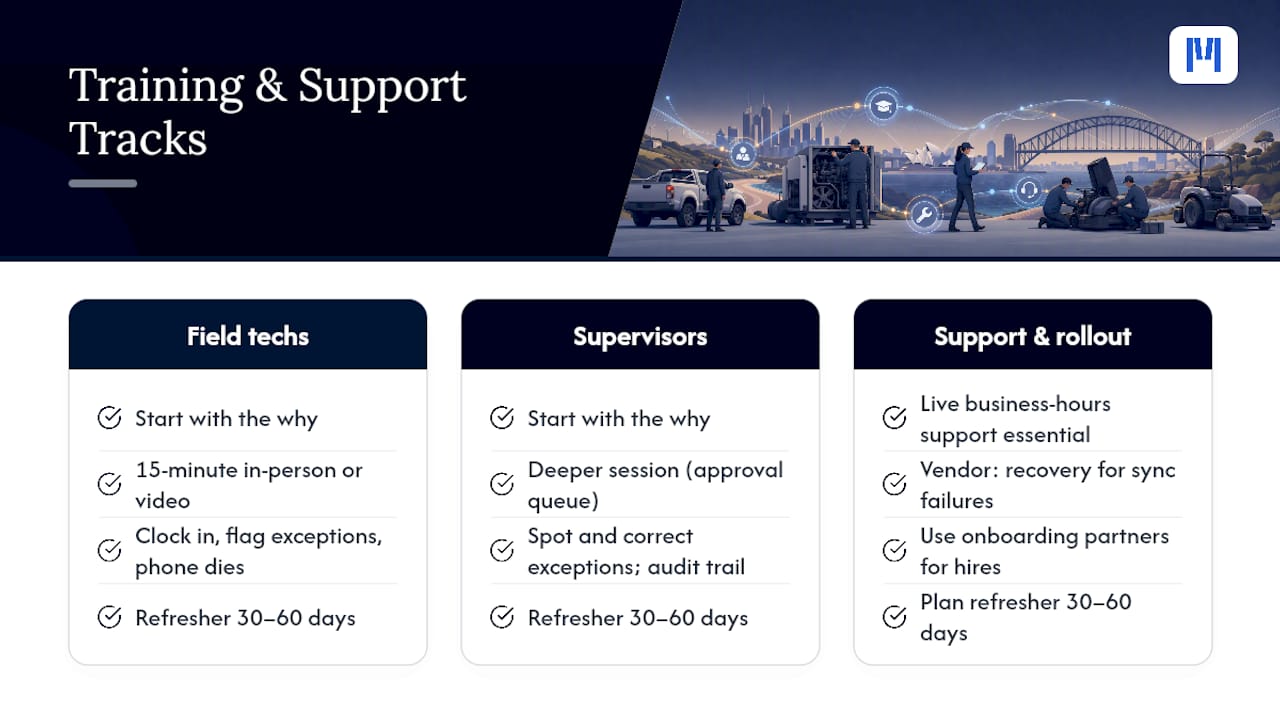
Technicians rarely resist a new timesheet app because it’s complicated. They resist it because nobody explained why it exists or what happens if they get it wrong on day one. Training should start with the “why” (fewer payroll corrections, faster reimbursement for travel and allowances) before it covers the “how.”
Plan for two distinct training tracks. Field technicians need a short, practical walkthrough: how to clock in against a job, how to flag an exception like a missed break, and what happens if their phone dies mid shift. This works best as a fifteen-minute in-person or video session, not a written manual nobody reads. Supervisors need a deeper session covering the approval queue, how to spot and correct exceptions, and how corrections show up in the audit trail.
Support quality matters more after go-live than during the demo. Ask any vendor what happens when a technician can’t sync their timesheet the night before a pay run closes, and how fast a real person responds. A system with strong documentation but no live support during business hours will leave your supervisors stuck exactly when it matters most.
Staffing timelines also affect rollout speed. If your team is growing or turning over, recruiting and onboarding partners can help you build training into the hiring process itself, so new technicians learn the timesheet system alongside their trade responsibilities instead of as an afterthought weeks later.
Budget for at least one refresher session thirty to sixty days after launch. That’s typically when habits either solidify correctly or drift back toward old shortcuts, like rounding travel time from memory instead of logging it live.
How Reliable Is Offline Timesheet Capture in the Field?
Offline reliability is not a nice-to-have feature buried in a spec sheet. It’s the difference between a technician on a remote mine site logging accurate hours and that same technician trying to reconstruct a full day from memory once they’re back in range. Field practitioners note that offline sync and geofencing are essential for many trades, not optional extras, because coverage gaps are routine in construction, mining, and rural service territory.
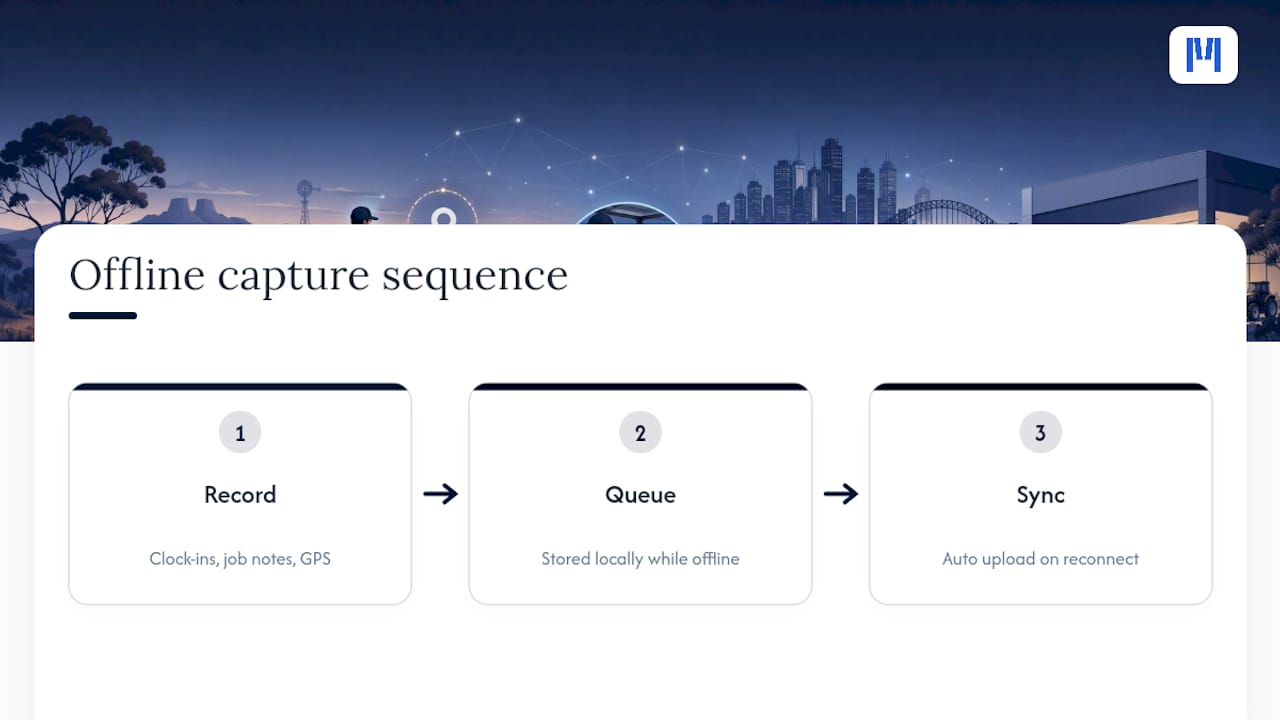
The mechanics matter here. A genuinely offline-capable app stores clock-ins, job notes, and GPS coordinates locally on the device, then queues that data for automatic sync the moment the device reconnects, whether that’s minutes or hours later. Anything less, such as an app that simply fails or freezes without signal, forces technicians back toward paper notes or memory, which is exactly the failure mode a digital system is supposed to eliminate.
Mobile device management deserves attention too, particularly for dealerships or service operations issuing company phones or tablets to field crews. You need policies covering what happens if a device is lost or damaged mid shift, how quickly a replacement gets provisioned with the timesheet app installed and configured, and whether data syncs automatically to a new device or requires manual recovery. Teams using personal devices (bring-your-own-device policies) need clear expectations about app permissions, battery management for GPS tracking, and what data the employer can and can’t access.
Test offline reliability before you commit to any platform. Put a phone in airplane mode, log a full shift including a job change and a break, then confirm every entry syncs correctly once you reconnect. If anything gets lost in that test, it will get lost in the field too.
An Operations Manager’s Perspective on Getting This Right
Get the sequence right and the rest follows: lock down secure capture first, build real approval workflows second, connect payroll third, then pilot before you scale. Most of the ROI here isn’t dramatic. It’s fewer payroll corrections and fewer hours spent chasing down last week’s hours. Before you buy anything, run a one-week timing audit on a single crew. You’ll likely find the leakage before you find the fix.
— ModernDMS
A Direct Path to Payroll-Ready Timesheets for Dealership Field Teams
If you run field service for an equipment dealership, generic timesheet apps only solve half your problem. They track hours, but they don’t connect those hours to the work order, the parts used, or the job’s profitability the way your business actually operates. Moderndms is built specifically for equipment dealers, which means field technician time links directly to the job record from the moment a technician clocks in, not as a separate step someone reconciles later.

Setup for core modules takes under an hour, and dealerships keep full ownership of their data with no lock-in if priorities change down the road. The Field Service plan runs 59 AUD per month and includes the offline-capable mobile app, job-linked time capture, and payroll export built to eliminate rekeying. If your rollout needs a hand, white-glove implementation and per-module training packages are available to get your team live without disrupting an active pay cycle. Check current pricing across modules or explore the field service solution page to see how it fits your dealership’s structure, then book a demo to walk through your specific award rules and job-costing setup before you commit.
Where to Verify Compliance Requirements
For the current rules on record content and retention, go directly to the Fair Work Ombudsman’s record-keeping guidance and the Fair Work Regulations 2009 for the specific clauses on pay, hours, and entitlements. Cross-check any timesheet-to-payroll mapping against your own payroll provider’s export documentation before your first live run.
Sources
- Record-keeping — Fair Work Ombudsman
- Fair Work Regulations 2009 (consolidated) — Australian Government
- 17 Benefits of Field Service Management Software | NetSuite
FAQ
How Do I Keep Track of Hours Worked as a Field Technician?
Use a mobile timesheet app that clocks in against the specific job or ticket number, ideally with GPS verification and offline sync for low-coverage sites. This creates a timestamped, location-tagged record that stands up if hours are ever disputed, rather than relying on end-of-week memory.
What Should a Compliant Timesheet Include?
At minimum, a compliant timesheet needs to capture hours worked, overtime, travel time, and any allowances or penalty rates as distinct entries, per Fair Work Regulations. Records must be retained for seven years with controlled access to prevent unauthorized changes.
Is Field Service Work a Stressful Job?
Field service roles carry real pressure from tight scheduling windows, travel demands, and unpredictable job scope, and payroll disputes over unrecorded hours or travel time add unnecessary friction on top of that. Accurate, transparent timesheets remove one common source of tension between technicians and management, since disputed hours become far less common when every entry is timestamped and location verified.
How Do Timesheets Get Approved Before Payroll?
A supervisor reviews submitted hours, checks any flagged exceptions such as unapproved overtime or missing breaks, then approves the entry so it locks and flows into the payroll export. This approval step, backed by a visible audit trail, is what turns a raw timesheet into a payroll-ready record that a payroll team can trust without manually rechecking every line.