Stop Rekeying: Paperless Job Cards for Field Teams in 4–8 Weeks
By MDMS Team · 11 September 2026

Stop Rekeying: Paperless Job Cards for Field Teams in 4–8 Weeks
Paperless job cards are worth adopting for nearly every field service team still filling out paper sheets by hand. The main payoff is speed: technicians capture job details, photos, and signatures the moment work happens, so nothing gets lost between the truck and the office and invoices go out the same day, not a week later. The rest of this guide walks through the features to demand, a rollout checklist, and the mistakes that slow teams down.
TL;DR:
- Nearly all field service teams will benefit from adopting paperless job cards to speed up data capture, invoicing, and reduce errors.
- An effective system must offer offline sync, attach photos and signatures directly to jobs, and integrate seamlessly with accounting platforms like Xero or MYOB.
- Implement a small pilot with one or two technicians over two to three weeks to identify offline, usability, and data quality issues before full rollout.
- Most teams can transition within four to eight weeks, with staged expansion and short training sessions to maximize adoption and minimize mistakes.
- Choose providers that clearly specify offline capabilities, account integration, and data ownership to avoid delays or vendor lock-in during deployment.
Table of Contents
- What Are Paperless Job Cards and How Do They Replace Paper Job Sheets?
- Key Features to Require From a Paperless Job Card System
- How Digital Job Cards Improve Workflows and Deliver ROI
- Step-by-Step Implementation Checklist to Go Paperless With Job Cards
- Common Mistakes and Troubleshooting During a Paperless Rollout
- Typical Timeline for Implementing Paperless Job Cards in a Field Service Team
- Criteria and Questions to Evaluate and Choose a Paperless Job Card Software Provider
- Comparison of Leading Paperless Job Card Solutions Including Pros and Cons
- ModernDMS Perspective: How We Approach Paperless Job Cards for Equipment Dealers
- See How Moderndms Handles Job Cards in Your Workshop
- Sources
- FAQ
What Are Paperless Job Cards and How Do They Replace Paper Job Sheets?
A paperless job card is a structured digital record tied to a specific customer, site, or piece of equipment, capturing the same details a paper job sheet would, but in real time instead of after the fact. Where a paper form sits in a technician’s clipboard until it reaches the office, a digital job card updates live: office staff see job status the moment a technician marks a task complete, and every photo, note, or signature attaches with a timestamp.
That shift matters more than it sounds. Digital job cards create a single, reliable record of each job with time-stamped entries, photos, and signatures, which closes the gap paper leaves open between “the work happened” and “someone entered it into the system.” Paper still tends to survive in a few places:
- Handwritten parts lists that get re-keyed into inventory software later
- Customer signatures collected on carbon-copy forms
- Site notes scribbled in margins that never make it into the job history
A digital job card replaces every one of those steps directly on the technician’s phone or tablet, with the data flowing straight into invoicing and reporting.
Key Features to Require From a Paperless Job Card System
Not every job card app is built the same way, and the difference shows up the first week a technician tries to use one in a shed with no signal. Before you commit to a provider, run the following checklist.
- Offline sync that actually works. The app needs to save data locally and push it once a connection returns, because a lot of field work happens with no signal at all.
- Photo and video capture attached directly to the job record, not emailed separately afterward.
- Digital signature capture for both the technician and the customer, timestamped on completion.
- Time tracking that starts and stops with the job, not a guess entered at the end of the day.
- Parts logging that deducts from inventory automatically rather than waiting for a warehouse clerk to transcribe a paper list.
- Required-field validation so a job card cannot close with missing information.
Beyond those non-negotiables, look for accounting integration with platforms like Xero or MYOB, since that connection is what turns a closed job card into an invoice without anyone re-typing line items. Usability features like mobile job card templates, voice-to-text notes, and barcode scanning for parts cut down the seconds-per-field that add up to minutes per job.
Pro Tip: Test the offline mode before you buy, not after. Ask the vendor exactly which fields stay editable with no signal, and what happens if two technicians touch the same job card before either one syncs.
How Digital Job Cards Improve Workflows and Deliver ROI
Real-time updates shorten the loop between “job finished” and “invoice sent.” When a technician closes a job card in the field, the office sees it instantly instead of waiting for a paper form to physically arrive, which means invoicing can happen the same day rather than at the end of the week.
Automating scheduling, replacing re-keyed job cards, and cutting manual invoicing work can recover meaningful admin and drive time across a team, and those minutes compound fast once you multiply them across ten technicians and five days a week.
The audit trail is the part teams underestimate until they need it. A searchable digital record with timestamped photos and signatures makes dispute resolution far simpler than digging through a filing cabinet for a signed paper copy from six weeks ago. Moderndms customers report saving significant weekly hours in administrative work after moving job recording off paper, largely because the same data that closes a job card also feeds directly into invoicing without a second data-entry step. Combined with an offline-capable mobile app and native Xero integration, that time saving is less about a single feature and more about removing the re-keying step entirely.
Step-by-Step Implementation Checklist to Go Paperless With Job Cards
Rolling out digital job cards works best as a short, deliberate pilot rather than a company-wide switch on day one. A focused pilot with one or two technicians and a handful of common job types tends to surface most integration, usability, and offline issues before you commit the whole team.
- Pick your pilot group. One or two technicians, a narrow set of job types, two to three weeks.
- Map your paper forms into templates first. Structured templates help capture the right fields consistently, and freezing them for the pilot avoids confusing technicians with mid-rollout changes.
- Test offline mode deliberately. Check which fields stay editable with no signal, how photo attachments queue for later upload, and how the system resolves two technicians editing the same job card.
- Connect your accounting platform. Link Xero or MYOB and confirm GST is applied correctly on invoices generated from closed job cards.
- Train in short bursts. A 30 minute walkthrough plus a one-page cheat sheet beats a half-day workshop nobody remembers by Friday.
- Track adoption, not just usage. Watch for:
- Average time to close a job card
- Percentage of jobs invoiced within 24 hours
- Number of job cards returned for missing fields
Once the pilot clears those checks, expand template by template rather than department by department.
Common Mistakes and Troubleshooting During a Paperless Rollout
Most failed rollouts trace back to the same handful of problems, and nearly all of them are avoidable if you catch them early.
- Clunky mobile UX. If the app is slower than pen and paper, technicians will quietly go back to writing things down, and no amount of training fixes that.
- Offline gaps nobody tested. Confirm attachments queue properly and required fields still enforce validation with no connection, not just when the office Wi-Fi is working.
- Loose data-quality rules. Skip required fields at setup and you will spend months chasing incomplete job cards instead of trusting the record.
- Weak change management. Technicians adopt new tools faster when the first win is visible fast, like an invoice going out the same day instead of three days later.
Pro Tip: Give your pilot technicians a say in which fields are mandatory. They know which details actually matter on site, and involving them early cuts resistance later.
Typical Timeline for Implementing Paperless Job Cards in a Field Service Team
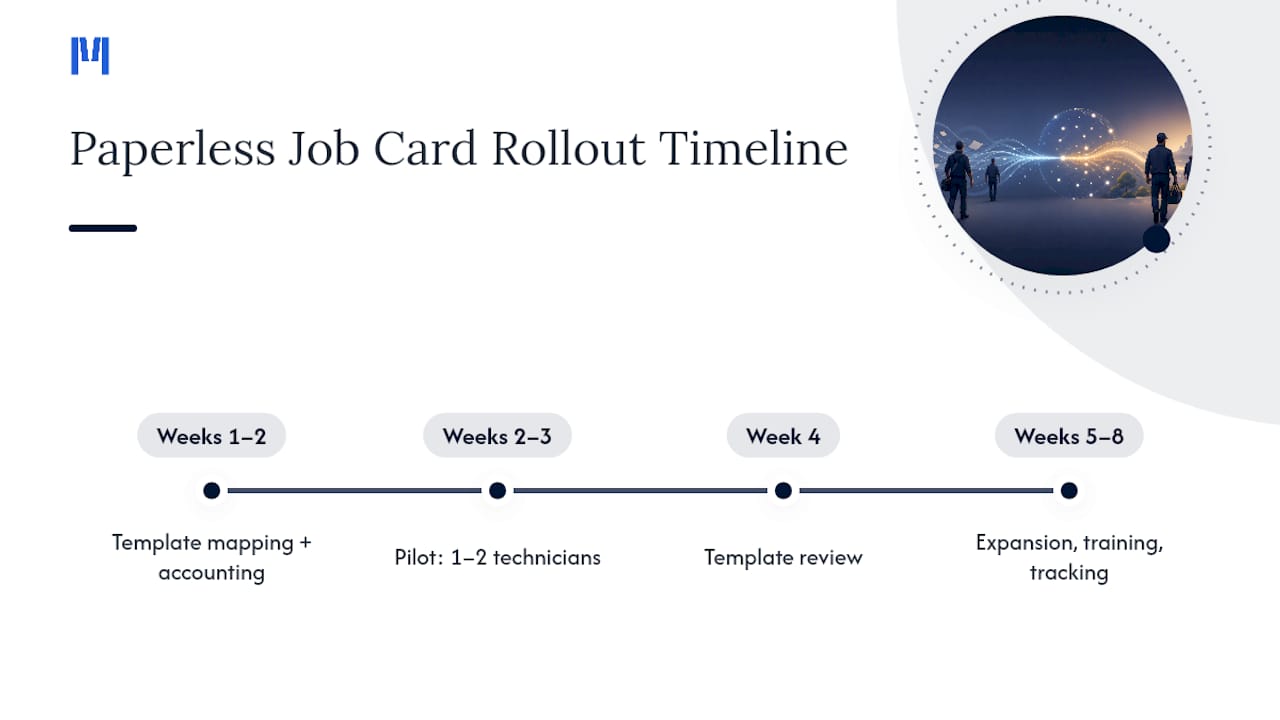
Most field service teams can move from paper to a working digital job card system in four to eight weeks, assuming they follow a pilot first approach rather than switching everyone at once.
The first one to two weeks go toward template mapping: translating existing paper forms into digital fields, deciding which fields are required, and configuring accounting integration with Xero or MYOB. Weeks two and three are the pilot itself, typically one or two technicians running a narrow set of job types while the team tests offline sync, photo capture, and signature collection under real conditions, not a demo environment.
By week four, most teams have enough data to decide whether templates need adjusting before wider rollout. Weeks five through eight cover the expansion: adding technicians in waves rather than all at once, running short refresher training sessions, and watching adoption metrics like average time to close a job card and percentage of jobs invoiced within 24 hours.
Teams that skip the pilot and try to roll out to twenty technicians simultaneously tend to take longer overall, not less, because configuration mistakes get repeated across the whole fleet before anyone notices. A staged rollout costs a few extra weeks up front but usually saves months of cleanup. Seasonal timing matters too: starting a rollout during your busiest season adds friction that a quieter month avoids, so plan the pilot window around your actual workload, not the calendar quarter.
Criteria and Questions to Evaluate and Choose a Paperless Job Card Software Provider
Choosing between providers gets easier once you have a short list of pointed questions rather than a feature checklist to compare line by line.
Start with offline behavior, since that is where most field apps fail first. Ask exactly which fields remain editable with no signal, how large attachments like photos and videos queue for upload, and what happens when two technicians edit the same job card before either syncs. A vendor who cannot answer these specifically, or who deflects to “it just works,” has not tested the scenario you are asking about.
Next, ask about accounting integration in concrete terms. Does the platform sync natively with Xero or MYOB, or does it require a third-party connector that adds another point of failure? Confirm GST is calculated correctly on invoices generated from closed job cards, since that is a common gap in platforms built for other markets first.
Ask about setup time and data ownership. A platform that takes weeks to configure before your team sees any value is a hard sell against one you can pilot the same week. Ask directly whether you can export your own data if you ever leave, since some providers lock job history inside proprietary formats.
Finally, ask how the provider handles modular rollout. Teams rarely need every module on day one, and a provider that forces an all-or-nothing purchase adds cost and complexity you may not need for months.
Comparison of Leading Paperless Job Card Solutions Including Pros and Cons
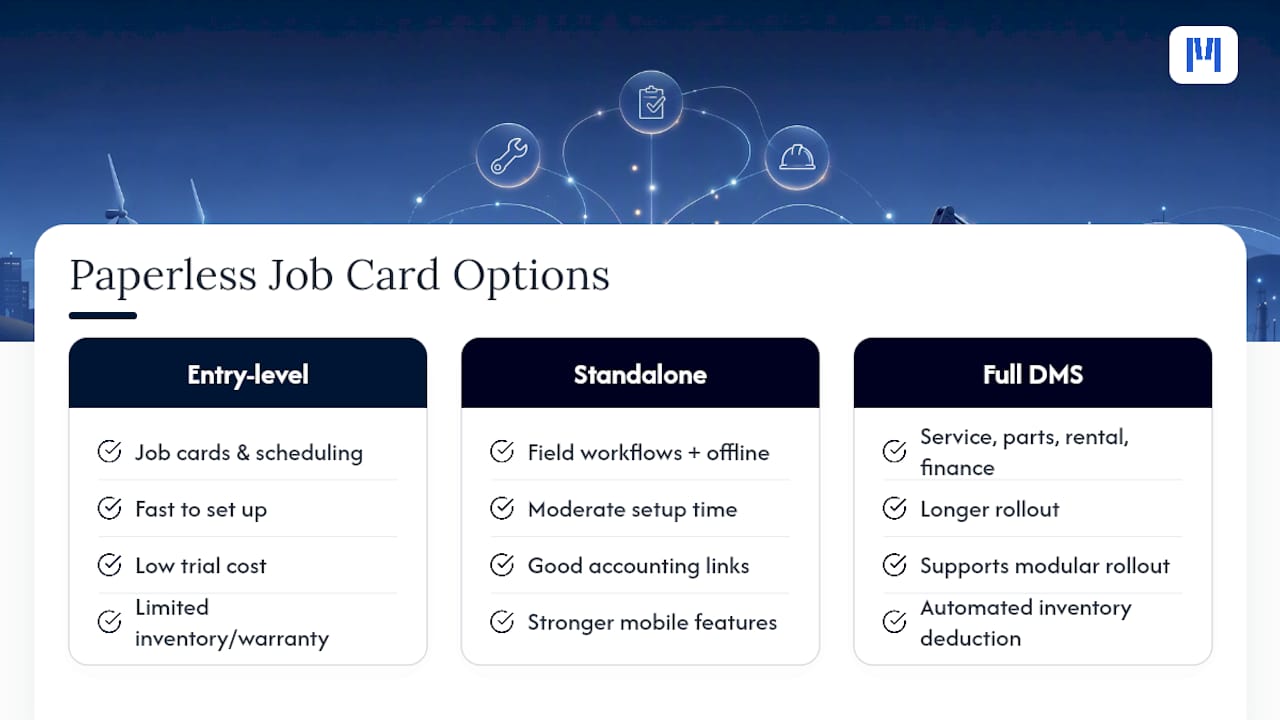
Paperless job card tools generally fall into three categories, and the right one depends on how much of your operation you want the software to touch.
Entry-level field apps focus narrowly on job cards and scheduling. They are fast to set up and cheap to trial, which suits a small team just moving off paper. The tradeoff is limited depth: parts logging, warranty tracking, and accounting integration are often shallow or missing, so you outgrow them once your service operation gets more complex.
Standalone field service platforms add stronger mobile workflows, offline sync, and accounting connections like Xero, matching what most field service teams actually need day to day. The limitation is that they typically stop at the field service boundary. Parts inventory, warranty claims, and dealer-specific workflows like build orders or rental contracts usually need a separate system, which reintroduces the re-keying problem you were trying to eliminate.
Full dealer management platforms, including Moderndms, fold job cards into a wider system covering parts, service, rental, and finance, so a closed job card can trigger inventory deduction and an invoice without a second data-entry step anywhere in the chain. The tradeoff is that a full platform asks you to think about more modules at once, though modular rollout means you can start with just service and field work and add parts or rental later.
Weigh the comparison against how much of your operation still runs on disconnected tools versus one connected record.
ModernDMS Perspective: How We Approach Paperless Job Cards for Equipment Dealers
The industry tends to sell job cards as a standalone fix, and that framing undersells the actual problem. A job card that closes cleanly but still needs its parts list re-keyed into inventory, or its total re-typed into an invoice, has only moved the paperwork from a clipboard to a screen. That is not paperless. That is just digital paper.
Moderndms treats the job card as one step inside a longer chain: parts, service, and invoicing all reading from the same record. Setup can be quick. The mobile app works offline in sheds and regional sites with no signal, and closed job cards can sync into accounting software without a second entry. Modular rollout means you can start with field service alone and add parts or rental when you are ready.
— ModernDMS
See How Moderndms Handles Job Cards in Your Workshop
Most job card apps stop at the technician’s phone. Moderndms carries that same job card straight into parts deduction, invoicing, and your Xero ledger, so closing a job on site is the last manual step in the whole process, not the first of several.

Setup can be quick, the mobile field app works fully offline for technicians in sheds or regional sites with no signal, and users maintain ownership of their data without lock-in. Teams typically report saving significant weekly hours in administrative work once job cards, parts, and invoicing stop being three separate steps.
If your team is still re-keying job cards into a separate invoicing system, book a look at Moderndms’s service management platform and see how a closed job card turns into a paid invoice without anyone touching a spreadsheet in between.
Sources
The feature checklist and rollout guidance in this article draw on a handful of practical resources worth reading in full if you want deeper procurement detail:
- Field Service Software Buyer’s Guide: Features That Actually Matter
- Job Card Best Practices to Optimise Field Services | BigChange
- Job cards: what they are and how to go digital
FAQ
How Do I Create a Job Card?
Start by mapping your existing paper form into a digital template with required fields for customer, site, parts, labor time, and signature, then freeze that template during a short pilot before rolling it out further.
Can You Provide Examples of What Goes on a Job Card?
A typical job card includes customer and site details, a description of the work requested, parts used, labor hours, before-and-after photos, and a digital signature from both the technician and the customer.
What Is a Job Card?
A job card is a record of work performed on a specific job, site, or piece of equipment, traditionally kept on paper and now increasingly captured digitally in real time as the work happens.
How Do I Get a Job Card System Set Up for My Team?
Choose a provider with offline mobile support and accounting integration, run a short pilot with one or two technicians, then expand once the templates and offline behavior are confirmed. Moderndms, for example, can be set up in under an hour with an offline-capable field app built in.