Equipment Price Book and Quoting Software
Import supplier price books and quote machines, options and trade-ins on one itemised screen, with a margin floor and manager approval.
Included with your module subscription at no extra charge. An administrator switches each pack on for your business in Admin > Features.
What price books and itemised quoting is
A machine quote is rarely one line. There is the base unit, the options that fit it, the ones that cannot go with it, the attachments, the pre-delivery work, a trade-in and perhaps a manufacturer rebate. Price books and itemised quoting builds that quote from a supplier's own price file instead of from memory.
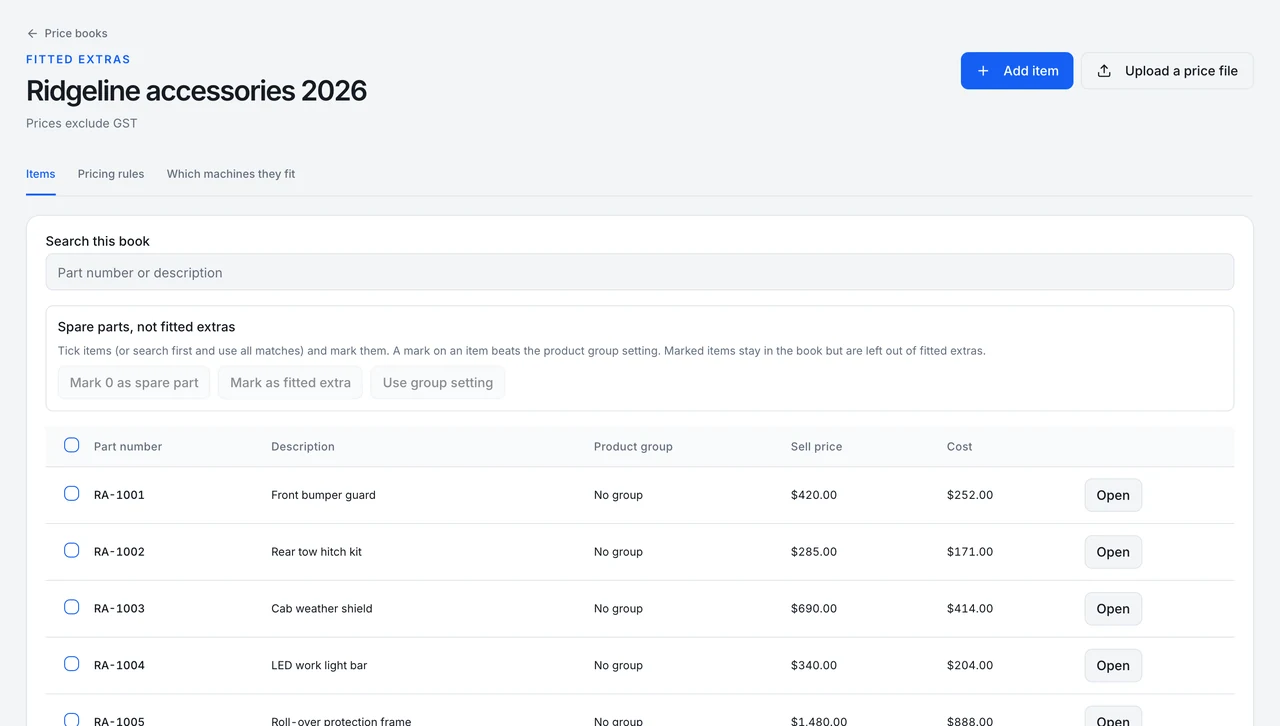
Start with the price book. Import the supplier's spreadsheet, check the preview, and commit it; if it is wrong, reverse it. Set pricing rules per product group, and per machine set the required and excluded options and the compatibility rules. The itemised quote screen then works from those rules and shows live margin and stale-price checks as the salesperson builds.
For bigger deals, one quote can carry several machines. Each machine group has a quantity from one to twenty-five, expanded to a row per unit, with spec choices (pick one, with a standard), fitted extras, workshop jobs, sublet lines and stock parts. Trade-in and rebate programs attach to the deal. Customer documents show one line per machine with spec bullets, or a single price.
Margin is guarded. A quote below the margin floor waits for a manager to approve it before it can convert, and the margin itself is visible to people who can read cost. On conversion each unit gets its own build order and work order, sublet lines create a draft purchase order for the supplier, and rebate claims are tracked per unit. Machines already in stock can be sold from the From stock tab, with a guard against double-selling a unit.
Part of these modules
What price books and itemised quoting covers
- Imports a supplier price book from a spreadsheet with a preview before commit, and can reverse an import
- Applies pricing rules per product group and per-machine required or excluded options and compatibility rules
- Quotes several machines on one quote, each with a quantity expanded to one row per unit, spec choices, fitted extras, workshop jobs, sublet lines, stock parts, and trade-in and rebate programs with claims tracked per unit
- Holds a quote below the margin floor for manager approval before it can convert
- Creates a build order and a work order per unit on conversion, and a draft purchase order for sublet lines
- Sells machines already in stock from a From stock tab, with a guard against selling the same unit twice
Where price books and itemised quoting stops
Stated as it behaves today, so you can judge the fit before you switch it on.
- Does not lodge claims with the manufacturer
- Does not post rebates to the general ledger
- Old quotes keep the old configurator, and itemised quotes cannot be edited in the old line editor
- Shows margin to cost readers only
Price books and itemised quoting in a working day
A farm contractor asks for three tractors, two with front loaders, one old tractor on trade, and a delivery by the end of the month. The salesperson builds one quote with two machine groups, picks the loader option on one group, adds the trade-in, and sees the margin dip under the floor. The sales manager approves it in the app with a reason, the customer gets a clean itemised copy, and conversion creates a build order and work order for each tractor.
Switching on price books and itemised quoting
Included with your module subscription at no extra charge. An administrator switches each pack on for your business in Admin > Features.
More feature packs
Commission matrix
Pay commission per invoice line by product group, at a flat rate or by margin band, with amounts frozen when paid.
Hide cost and margin
Hides margin badges, margin bars and the profitability card on quotes and sales orders from roles outside management and finance.
Back-order allocation
Holds stock that arrives for the oldest waiting work orders and sales orders at the same branch, with every hold on a ledger.
Frequently asked questions
- Will my existing quotes change?
- No. Existing quotes keep the old configurator. Itemised quotes are created on the new screen and cannot be edited in the old line editor.
- Does it post rebates or lodge claims?
- No. It tracks rebate claims per unit, but it does not lodge them with the manufacturer or post them to the ledger.
- How do I get price books on my account?
- New accounts start with price books switched on. For an existing account, ask MDMS support to switch it on; it is not an administrator toggle.
Where this work shows up
Ready to try price books and itemised quoting?
Start a 14-day free trial — no credit card, no implementation fee, no sales call required. Or book a personalised demo with our team to see your workflow in MDMS.