Non-Job Labour Codes for Technicians
Let technicians clock on to yard, travel or workshop admin codes with no work order, then have a manager move the time onto a job.
Included with your module subscription at no extra charge. An administrator switches each pack on for your business in Admin > Features.
What generic labour codes is
A workshop pays for hours that never touch a job card: sweeping the yard, fetching a part, waiting for the next machine. When the only way to clock on is against a work order, that time is either hidden inside whatever job was open or left off the sheet, and the labour numbers lie in both directions. Generic labour codes gives those hours a place to go.
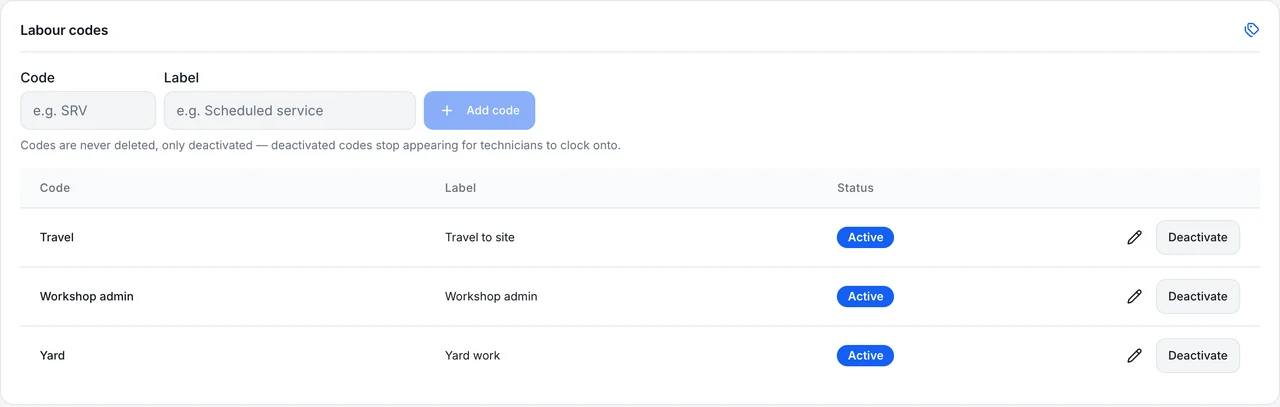
Management defines the codes in Operations > Labour. A technician or service staff member picks one from My Day and clocks on with no work order attached. When they stop, the entry waits on the Timesheet page for the week. If it belongs to a job after all, a manager moves it onto the right work order; if it does not, it stays as honest overhead.
The rules are enforced by database functions and a guard trigger rather than by the screen. Only managers can move time, only after it has been stopped, and the code on an entry cannot be edited after the fact. That keeps the record straight when someone is tidying up a week at five on a Friday.
The week is where it all comes together. The Timesheet page lists stopped code time for the week, so a manager sees overhead hours next to job hours and can judge what the workshop really spends on non-chargeable time. Codes are set up once for the whole business, not per branch, and a code is simply switched off when it is no longer needed.
Part of these modules
What generic labour codes covers
- Lets management create business-defined codes such as Yard, Travel or Workshop admin under Operations > Labour
- Lets a technician or service staff member clock on to a code from My Day with no work order
- Lists stopped code time for the week on the Timesheet page
- Lets a manager move stopped code time onto a work order
Where generic labour codes stops
Stated as it behaves today, so you can judge the fit before you switch it on.
- Code time does not appear on any job, invoice or job hours until a manager moves it
- Time must be moved before the technician's timesheet is approved; approval stamps it and it can no longer be moved
- Does not capture GPS or distance, and does not push timesheets to Xero
- Codes are tenant wide, not per branch
Generic labour codes in a working day
Two technicians spend Monday morning reorganising the shed after a delivery. Under the old habit, one books it to a long-running job and the other leaves it off. With labour codes, both clock on to Workshop admin from their phones. On Friday the service manager reviews the Timesheet page, moves the half hour that belonged to a customer job onto it, and leaves the rest as overhead before approving the week.
Switching on generic labour codes
Included with your module subscription at no extra charge. An administrator switches each pack on for your business in Admin > Features.
Ask MDMS AI about generic labour codes
Try asking Read
“How many hours of code time are waiting to be moved onto a job?”
Service roles; technicians see only their own time. Reads only. MDMS AI is an optional add-on with its own price and an AI seat, and what it can answer depends on your modules and role.
About MDMS AIMore feature packs
Job travel timer
Start and stop a travel timer on a job; the time is booked as labour on that job under an automatic Travel code.
Work order job segments
Organise a work order by fault, each with its own Bill to, technician, parts, labour, checklist and photos.
Segmented work order invoicing
Invoice a long chargeable work order in stages, billing chosen labour, parts and travel once, with the remainder billed at completion.
Frequently asked questions
- Does code time show up on invoices?
- Not until a manager moves it onto a work order. Until then it is visible on the Timesheet page and nowhere else.
- What happens if the timesheet is already approved?
- Approval stamps the time and it can no longer be moved. Move it before you approve.
- Does it track where the technician went?
- No. There is no GPS and no distance capture. For travel as a timed activity on a job, the job travel timer builds on this pack.
Where this work shows up
Ready to try generic labour codes?
Start a 14-day free trial — no credit card, no implementation fee, no sales call required. Or book a personalised demo with our team to see your workflow in MDMS.