Progress Invoicing for Work Orders
Invoice a long chargeable work order in stages, billing chosen labour, parts and travel once, with the remainder billed at completion.
Included with your module subscription at no extra charge. An administrator switches each pack on for your business in Admin > Features.
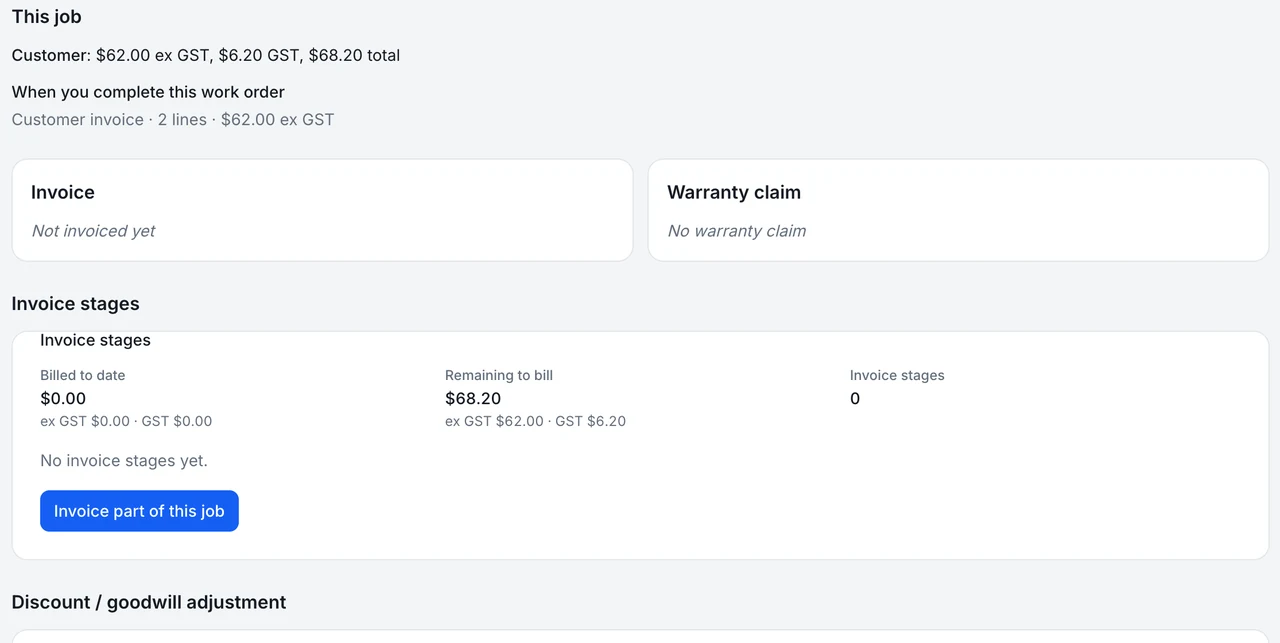
What segmented work order invoicing is
Some jobs run for weeks. A header rebuild or a full chassis repair can hold a customer's machine for a month, and invoicing it all on the last day means the dealership carries the cost of labour and parts while it waits to be paid. Segmented work order invoicing, which the product calls invoice stages, lets you bill as the job progresses.
At any point a service manager or service advisor opens the job, chooses the recorded labour, the issued parts and the billable travel they want to bill, and creates a stage. Each stage becomes a draft service invoice. Every source row can be billed once, so nothing is charged twice and nothing is left behind: when the job is completed, whatever has not been billed becomes the final stage automatically.
The job screen keeps a running position: billed to date and remaining, with GST calculated on the server rather than by the browser. If a stage was wrong, voiding it returns its rows to unbilled so they can go into another stage. Voiding the final stage reopens the job.
Because every stage is a draft service invoice, the office can read it before it goes out. The service manager or advisor who creates the stage sees the same billed and remaining figures that finance sees later, so a phone call from the customer about what has been charged so far has a ready answer. Staging also suits the cash side of a long repair: the workshop is paid for the work already done instead of financing it until the machine leaves the yard.
Part of these modules
What segmented work order invoicing covers
- Lets a service manager or advisor pick recorded labour, issued parts and billable travel for a stage
- Creates each stage as a draft service invoice and bills each source row once
- Bills whatever is left as the final stage when the job is completed
- Shows billed to date and remaining on the job screen, with GST worked out on the server
- Voiding a stage returns its rows to unbilled; voiding the final stage reopens the job
Where segmented work order invoicing stops
Stated as it behaves today, so you can judge the fit before you switch it on.
- Works on work orders only; sales orders cannot be invoiced in stages
- Does not apply a deposit against a stage invoice
- Does not include hand-keyed extra lines on a stage invoice in the staged totals
Segmented work order invoicing in a working day
A customer drops off a loader for a transmission overhaul that will take most of a month. At the end of week two the service advisor bills the labour logged so far and the parts already fitted as stage one. The customer pays that while the workshop waits on a bearing kit. When the job completes, the last of the labour and the new parts land on the final invoice, and the totals reconcile to the work order.
Switching on segmented work order invoicing
Included with your module subscription at no extra charge. An administrator switches each pack on for your business in Admin > Features.
Ask MDMS AI about segmented work order invoicing
Try asking Read
“What's billed so far on WO-000123 and what's left?”
Service manager, service advisor, branch manager, dealer principal and admin. Reads only. MDMS AI is an optional add-on with its own price and an AI seat, and what it can answer depends on your modules and role.
About MDMS AIMore feature packs
Work order job segments
Organise a work order by fault, each with its own Bill to, technician, parts, labour, checklist and photos.
Job travel timer
Start and stop a travel timer on a job; the time is booked as labour on that job under an automatic Travel code.
Mixed job types on one work order
Put chargeable, warranty and internal lines on one work order; completing it splits the job into one linked job per type.
Frequently asked questions
- Can I collect a deposit against a stage?
- No. A deposit cannot be applied to a stage invoice. Take deposits on the sales side or settle the stage invoice in the normal way.
- What stops the same labour being billed twice?
- Each source row, whether a labour entry, an issued part or a travel line, can be billed once. A row belongs to a stage until that stage is voided.
- Can I use it on sales orders?
- No. It is built for chargeable work orders only.
Where this work shows up
Ready to try segmented work order invoicing?
Start a 14-day free trial — no credit card, no implementation fee, no sales call required. Or book a personalised demo with our team to see your workflow in MDMS.