Work Order Job Segments for Workshops
Organise a work order by fault, each with its own Bill to, technician, parts, labour, checklist and photos.
Included with your module subscription at no extra charge. An administrator switches each pack on for your business in Admin > Features.
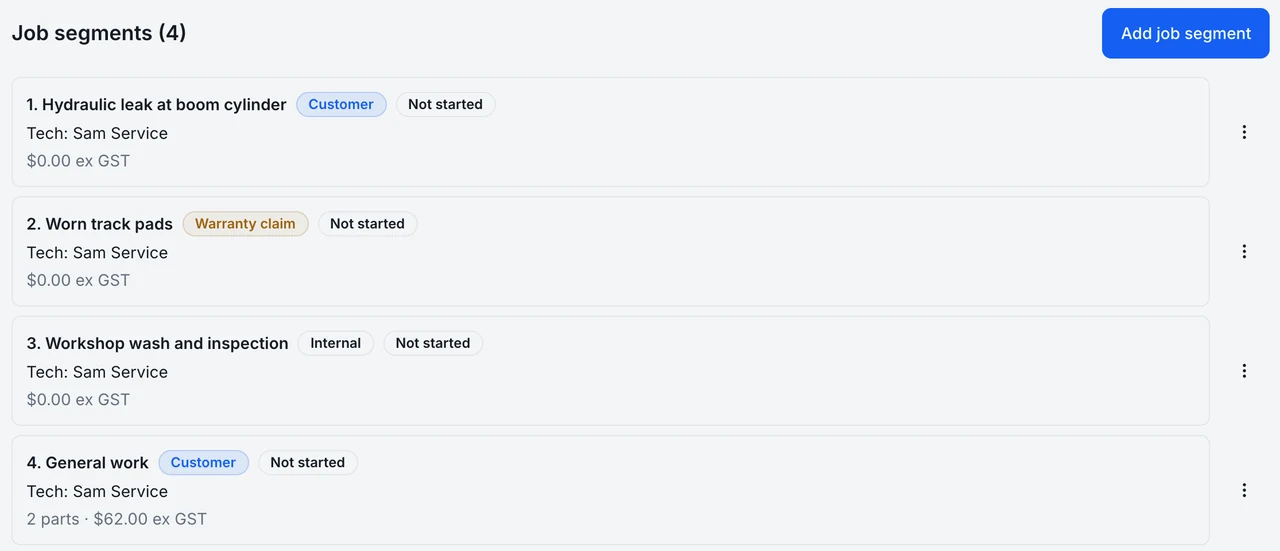
What work order job segments is
Real workshop jobs are rarely one thing. A machine arrives with three complaints, one of them a warranty claim, and a single list of parts and hours makes it hard to see which fault cost what, who is paying, and which technician is on it. Job segments turns the work order into a set of faults.
Every segment has its own Bill to: the customer, a warranty claim or an internal account. It also has its own technician, status, parts, labour, billable misc charges, quality checklist and photos. A General work segment is created the first time an editable job is opened, so existing habits keep working. For managers, a Billing tab shows what completing will create, the invoice stages, discount and linked work orders.
Changing who pays is a deliberate act. When someone changes a segment's Bill to, MDMS shows in words what that will reprice before it saves and asks for a reason. Single lines can be billed differently or moved between segments. Completing the job shows what will be created, and when Bill to values differ it splits the job into linked work orders through the normal completion code.
Technicians get a stripped back view: only their own segments, no prices, a timer, manual time entry and a photo bar built for a phone, plus a Job segments list in My Jobs.
Part of these modules
What work order job segments covers
- Turns the Details tab into Job segments: one fault per segment
- Gives each segment its own Bill to (Customer, Warranty claim or Internal), technician, status, parts, labour, checklist and photos
- Previews in words what repricing a Bill to change will do and asks for a reason before it saves
- Adds All parts, All labour, All QC and All photos tabs with a Job segment column
- Shows technicians only their own segments, with no prices, and a timer and photo bar on a phone
Where work order job segments stops
Stated as it behaves today, so you can judge the fit before you switch it on.
- Does not change the customer status link, the invoice PDF or customer notifications
- Does not support GST-free misc charges
- Cannot change Bill to on a part already issued from stock; return it and add it again
- Lists only labour, parts and travel in the invoice stage picker; misc is billed with the rest at completion
Work order job segments in a working day
A baler comes in with a jammed knotter, a leaking hydraulic fitting under manufacturer warranty, and a routine service. The advisor opens three segments. The apprentice works the knotter, the senior technician takes the warranty fitting and photographs the failed part, and the service is quoted to the customer. At the end, the manager checks the Billing tab, sees one customer invoice and one warranty claim about to be created, and completes the job once.
Switching on work order job segments
Included with your module subscription at no extra charge. An administrator switches each pack on for your business in Admin > Features.
Switch these on first:
More feature packs
Segmented work order invoicing
Invoice a long chargeable work order in stages, billing chosen labour, parts and travel once, with the remainder billed at completion.
Mixed job types on one work order
Put chargeable, warranty and internal lines on one work order; completing it splits the job into one linked job per type.
Job travel timer
Start and stop a travel timer on a job; the time is booked as labour on that job under an automatic Travel code.
Frequently asked questions
- What do I need switched on first?
- Invoice stages and Mixed job types. The screen names whichever one is missing, so you are not left guessing.
- Can a technician see prices?
- No. Technicians see only their own segments, without prices.
- Can I change who pays after parts have been issued?
- Not for the issued part itself. Return it and add it again under the right segment. For a consumed part, raise a support ticket.
Where this work shows up
Ready to try work order job segments?
Start a 14-day free trial — no credit card, no implementation fee, no sales call required. Or book a personalised demo with our team to see your workflow in MDMS.